sketchucation logo sketchucation
    • Login
    Oops, your profile's looking a bit empty! To help us tailor your experience, please fill in key details like your SketchUp version, skill level, operating system, and more. Update and save your info on your profile page today!
    ⚠️ Update | Sketchucation Tools 5.0.8 released with licensing improvements and bugfixes Download

    [Plugin] Selection Toys

    Scheduled Pinned Locked Moved Plugins
    594 Posts 121 Posters 552.7k Views 121 Watching
    Loading More Posts
    • Oldest to Newest
    • Newest to Oldest
    • Most Votes
    Reply
    • Reply as topic
    Log in to reply
    This topic has been deleted. Only users with topic management privileges can see it.
    • C
      caronte01
      last edited by

      Hi ThomThom.

      Test 1: Moved TT_Lib and selection toys to the native plugin folder, left everything else untouched. Got this error:
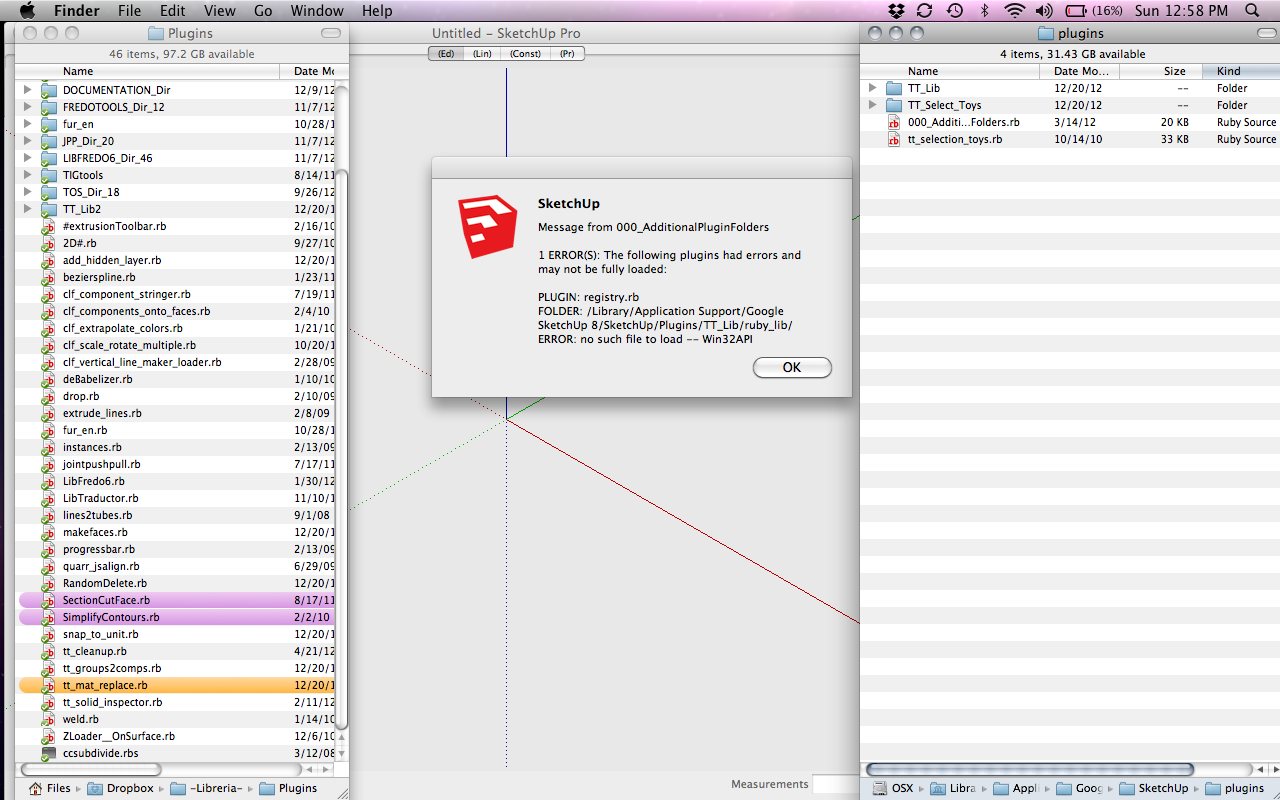
      Test 1

      Test 2: Moved TT_Lib and selection toys to the native plugin folder, removed 000_AdditionalPluginFolders. Selection toys loaded correctly.
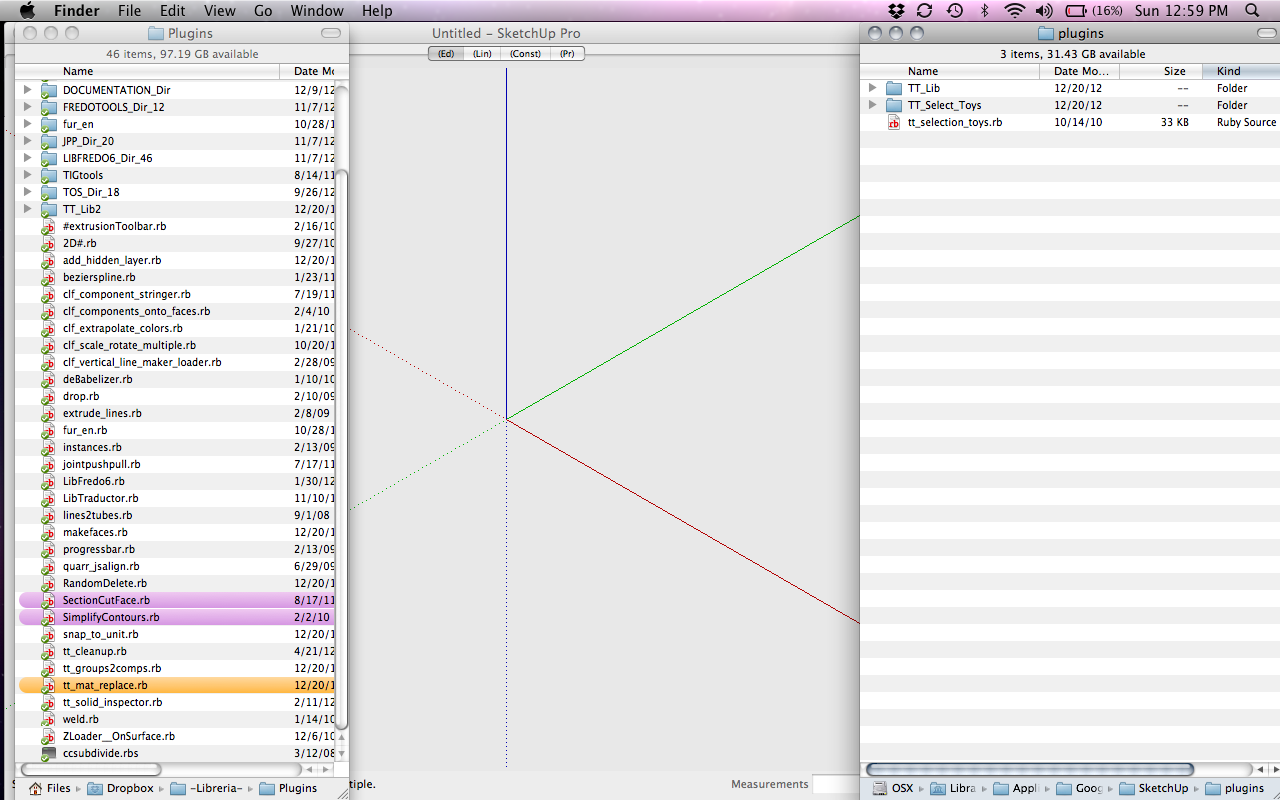
      Test 2

      Test 3: TT_lib, selection toys and 000_AdditionalPluginFolders in the native plugins folder, dropbox folder left empty. Got this error:
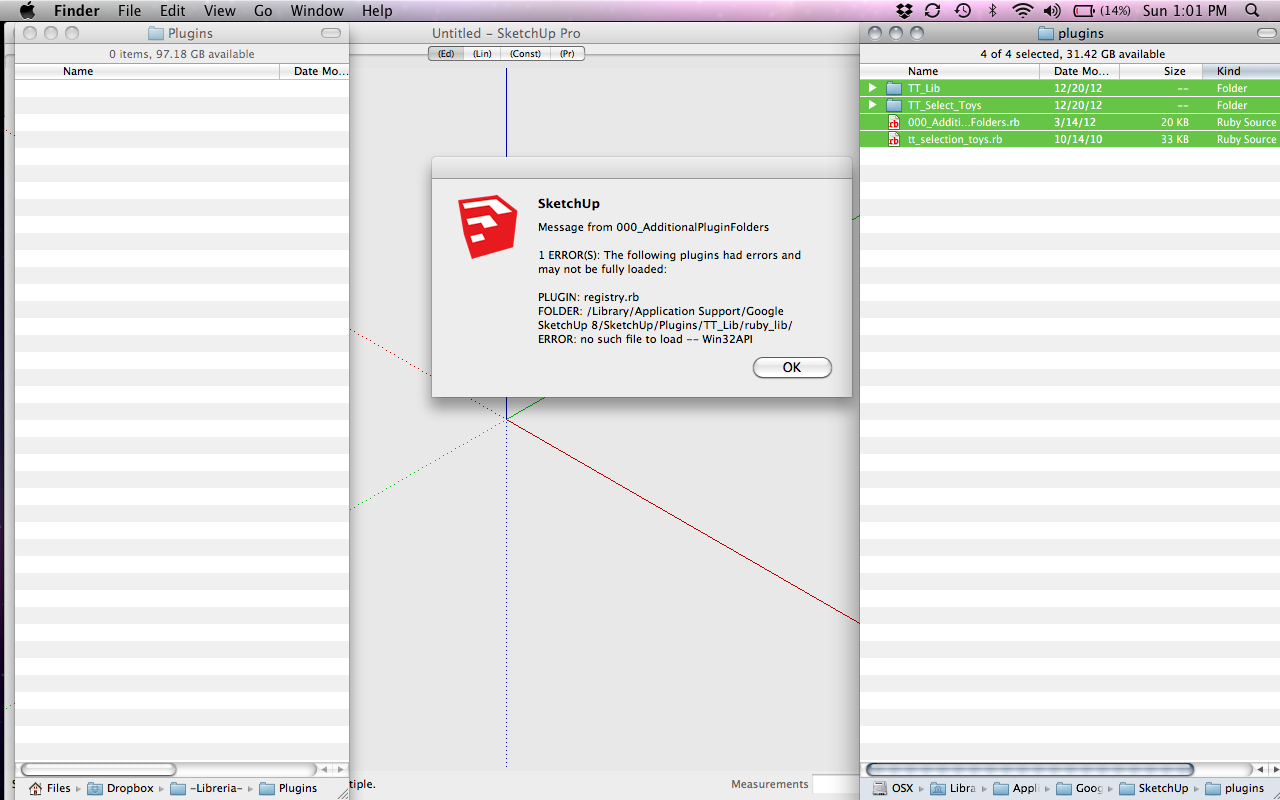
      Test 3

      Test 4: Just in case, 000_AdditionalPluginFolders in the native directory, TTlib and selection toys in my dropbox plugin folder Error:
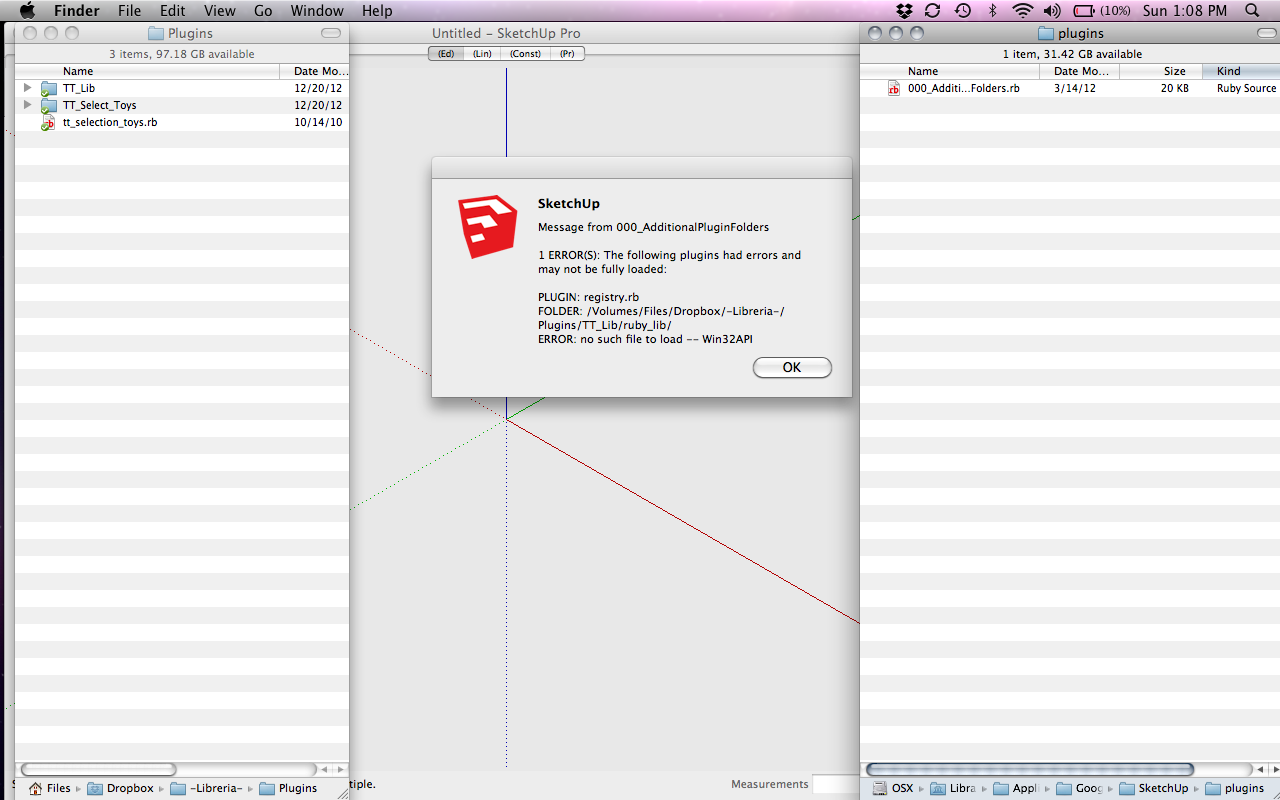
      Test 4

      So it is some kind of incompatibility with this two plugins?

      1 Reply Last reply
      Reply Quote 0
      • thomthomT
        thomthom
        last edited by

        Hmm... need to check with Fredo on this.

        Thomas Thomassen — SketchUp Monkey & Coding addict
        List of my plugins and link to the CookieWare fund

        1 Reply Last reply
        Reply Quote 0
        • Dave RD
          Dave R
          last edited by

          In a case like that, you might be better off deleting all of the layers and putting everything back on Layer 0. Then start over with making layer associations.

          Etaoin Shrdlu

          %

          (THERE'S NO PLACE LIKE)

          G28 X0.0 Y0.0 Z0.0

          M30

          %

          1 Reply Last reply
          Reply Quote 0
          • gonashviliG
            gonashvili
            last edited by

            Is there a way to select everything within a particular layer?

            I've got big mess, components within components with each of them on various layers and I'd like to clean up, reduce the number of layers. It would help to 'see' whats on a particular layer....

            I mean when I try to remove a layer thinking its empty, the dialog appears [wants to move the contents] and often times I have no idea where to look for them as unclicking the 'Visible' box in the Layers dialog might make it seem like its empty/there's no change, visually...

            Cheers

            1 Reply Last reply
            Reply Quote 0
            • gonashviliG
              gonashvili
              last edited by

              Guess you're right, such a feature would rule though, I think

              1 Reply Last reply
              Reply Quote 0
              • thomthomT
                thomthom
                last edited by

                @gonashvili said:

                Is there a way to select everything within a particular layer?

                "Select all on Selected Layer" - That means the layer the selected entity is on.

                Thomas Thomassen — SketchUp Monkey & Coding addict
                List of my plugins and link to the CookieWare fund

                1 Reply Last reply
                Reply Quote 0
                • thomthomT
                  thomthom
                  last edited by

                  Version 2.2.2

                  • Added Select Active with Materials
                  • Removed dependency from TT_Lib
                  • Repackaged as RBZ

                  Thomas Thomassen — SketchUp Monkey & Coding addict
                  List of my plugins and link to the CookieWare fund

                  1 Reply Last reply
                  Reply Quote 0
                  • cottyC
                    cotty
                    last edited by

                    Thank you for the update.
                    (I will not ask how to install it 😉 )

                    my SketchUp gallery

                    1 Reply Last reply
                    Reply Quote 0
                    • C
                      caronte01
                      last edited by

                      Hi Thomas,

                      Installed the new version. It now works, no conflicts or errors!

                      Thanks a lot!

                      Santiago

                      1 Reply Last reply
                      Reply Quote 0
                      • M
                        Mra
                        last edited by

                        Thanks for the amazing plugin. I was wondering if for future that some extra things could be implemented although I ponder if this is impossible with SketchUp.

                        Basically Maya has some sweet tools in this regard;

                        Select an edge ring
                        Select a path of edges between two edges

                        Invalid URL

                        favicon

                        (download.autodesk.com)

                        Just an idea.

                        1 Reply Last reply
                        Reply Quote 0
                        • D
                          driven
                          last edited by

                          like TT other plugin?

                          [web 100%,600:uxxl934f]http://www.thomthom.net/software/vertex_tools/[/web:uxxl934f]

                          john

                          learn from the mistakes of others, you may not live long enough to make them all yourself...

                          1 Reply Last reply
                          Reply Quote 0
                          • thomthomT
                            thomthom
                            last edited by

                            @unknownuser said:

                            Thanks for the amazing plugin. I was wondering if for future that some extra things could be implemented although I ponder if this is impossible with SketchUp.

                            Basically Maya has some sweet tools in this regard;

                            Select an edge ring
                            Select a path of edges between two edges

                            Invalid URL

                            favicon

                            (download.autodesk.com)

                            Just an idea.

                            Check out QuadFace Tools: http://extensions.sketchup.com/en/content/quadface-tools

                            It doesn't have Select path between two edges yes, but it's on the todo list.

                            Thomas Thomassen — SketchUp Monkey & Coding addict
                            List of my plugins and link to the CookieWare fund

                            1 Reply Last reply
                            Reply Quote 0
                            • C
                              clubber2k
                              last edited by

                              Is there, or will there be, a select all "seemingly" connected segments (lines)?

                              when you have a few lines on a complex component and you want to select all of the connected ones you touch but not all the lines and not the faces.

                              double clicking a line when theres no face selects all the lines but double clicking a line when on face selects the face as well and all lines around. I'd like to be able to select all the connected lines and nothing else..

                              thanks!

                              1 Reply Last reply
                              Reply Quote 0
                              • cottyC
                                cotty
                                last edited by

                                What about double click and deselect the unwanted face(s)?

                                my SketchUp gallery

                                1 Reply Last reply
                                Reply Quote 0
                                • C
                                  clubber2k
                                  last edited by

                                  @cotty said:

                                  What about double click and deselect the unwanted face(s)?

                                  too tedious if you have like 100 faces and you only want the lines..

                                  1 Reply Last reply
                                  Reply Quote 0
                                  • Dave RD
                                    Dave R
                                    last edited by

                                    Switch to wire view and select only the edges.

                                    Etaoin Shrdlu

                                    %

                                    (THERE'S NO PLACE LIKE)

                                    G28 X0.0 Y0.0 Z0.0

                                    M30

                                    %

                                    1 Reply Last reply
                                    Reply Quote 0
                                    • cottyC
                                      cotty
                                      last edited by

                                      @clubber2k said:

                                      @cotty said:

                                      What about double click and deselect the unwanted face(s)?

                                      too tedious if you have like 100 faces and you only want the lines..

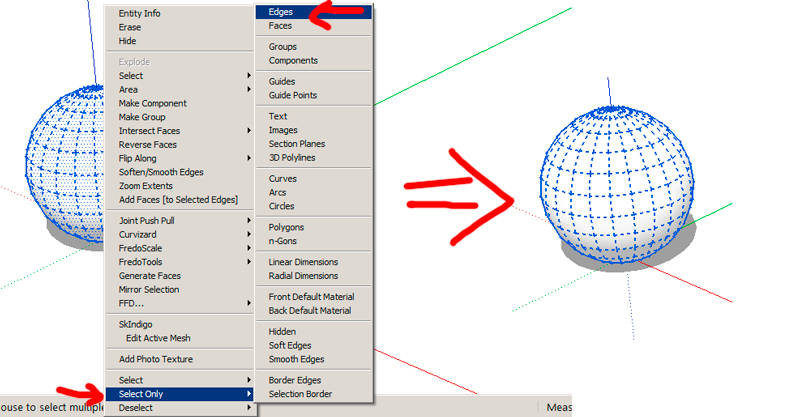
                                      You can use the selection toys (this topic 😉 ) for this...


                                      onlyedges.jpg

                                      my SketchUp gallery

                                      1 Reply Last reply
                                      Reply Quote 0
                                      • tt_suT
                                        tt_su
                                        last edited by

                                        What about Select Curve? http://sketchucation.com/forums/viewtopic.php?p=273423#p273423

                                        1 Reply Last reply
                                        Reply Quote 0
                                        • renderizaR
                                          renderiza
                                          last edited by

                                          There is another plugin installed on my SketchUp that might be conflicting with Selection Toys. It is not letting me add more icons to the toolbar using UI Settings dialog. When I hit save it doesn't close the dialog.

                                          I tested Selection Toys Plugin without other plugins and it works fine... 😕

                                          There is also other plugins affected by this..."Plugin Store"!...When I try to disable a plugin for it doesn't do nothing.

                                          Going through all the plugins to find the one responsible for this will be hard work but will let you know if I find it.

                                          [url=https://www.sketchupcode.com/:z3kqsidd]My Extensions ...[/url:z3kqsidd]

                                          1 Reply Last reply
                                          Reply Quote 0
                                          • renderizaR
                                            renderiza
                                            last edited by

                                            Ok this is weird... I went to my Plugin Folder and moved all of my other plugins except Selection Toys and it still is not working!

                                            The other test I did that made it work was the following...

                                            I copied my SketchUp Folder from Programs Files and pasted a new one to my Desktop. Doing this will make the plugin work.

                                            Any ideas what can this be...This means what is causing this is not another plugin but something else.

                                            IMPORTANT!

                                            I uninstalled & reinstalled SketchUp to see if it will fix it and it didn't so something is wrong with the SketchUp folder being on my Programs Folder!?... Not sure but this is definitely weird. 😕

                                            Maybe I need to restore my machine factory settings to see if it solves it. 😮 😢

                                            [url=https://www.sketchupcode.com/:z3kqsidd]My Extensions ...[/url:z3kqsidd]

                                            1 Reply Last reply
                                            Reply Quote 0

                                            Hello! It looks like you're interested in this conversation, but you don't have an account yet.

                                            Getting fed up of having to scroll through the same posts each visit? When you register for an account, you'll always come back to exactly where you were before, and choose to be notified of new replies (either via email, or push notification). You'll also be able to save bookmarks and upvote posts to show your appreciation to other community members.

                                            With your input, this post could be even better 💗

                                            Register Login
                                            • 1
                                            • 2
                                            • 3
                                            • 4
                                            • 5
                                            • 6
                                            • 7
                                            • 29
                                            • 30
                                            • 5 / 30
                                            • First post
                                              Last post
                                            Buy SketchPlus
                                            Buy SUbD
                                            Buy WrapR
                                            Buy eBook
                                            Buy Modelur
                                            Buy Vertex Tools
                                            Buy SketchCuisine
                                            Buy FormFonts

                                            Advertisement