[Plugin] Selection Toys
-
Version 2.2.1
- Fixed Select DC Instances
-
Sorry - I forgot to include a file. Redownload.
-
It was working in V7, but I can't get Sel Toys working in V8. Feeling stupid for a number of reasons.
My configurtion of Sel Toys:
C:\Program Files (x86)\Google\Google SketchUp 8\Plugins\TT_Lib
C:\Program Files (x86)\Google\Google SketchUp 8\Tools\TT_Select_ToysAfter SU8 re-start:
no context picks for Sel Toys
no pick for Sel Toys in Tools menu drop down -
@brookefox said:
C:\Program Files (x86)\Google\Google SketchUp 8\Plugins\TT_Lib
C:\Program Files (x86)\Google\Google SketchUp 8\Tools\TT_Select_ToysDon't put plugins in the Tools folder.
There should be
C:\Program Files (x86)\Google\Google SketchUp 8\Plugins\TT_Lib\ - (inside, lots of .rb files)
C:\Program Files (x86)\Google\Google SketchUp 8\Plugins\tt_selection_toys.rb
C:\Program Files (x86)\Google\Google SketchUp 8\Plugins\TT_Select_Toys\ -
OK. Thank you. I thought that since it is accessed by the tools menu..., but thinking is not my strong suite.
@unknownuser said:
You must enable it from Tools->Selection Toys->Enable Toolbar before it appears under View->Toolbars->Selection Toys.
While the install didn't seem that clear to me, I didn't notice many install problems in the thread, so likely I am being thick. Perhaps because I assumed it was different than the norm when it is not. (Is the download count related to this, only 141 for such a useful tool? Or is that count only since the last update or somehow not reliable?)
Thanks, again.
-
Since last update - there's been thousands of downloads all together of the previous versions.
With my more recent plugins I've started to add more detailed descriptions of how they should be installed.
-
I will remove and try to re-install as now for me under Tools, there is no 'Selection Toys'; and so not surprisingly, under View->Toolbars there is no 'Selection Toys'. After entity pick, context menu does not show sel toy choices.
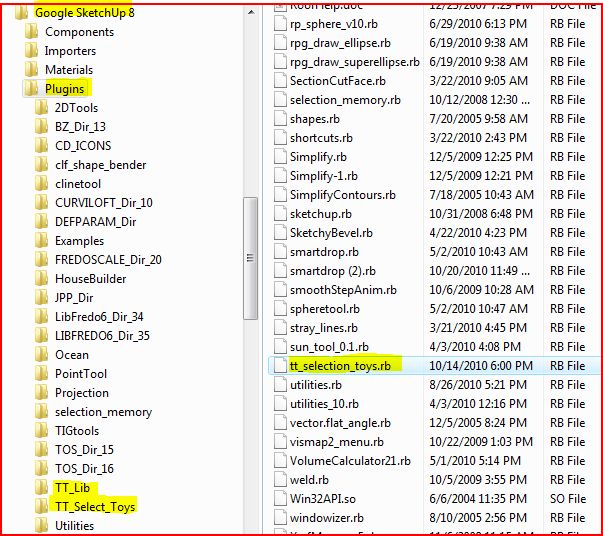
Folders TT_Lib and TT_Select_Toys are both in Plugins, as is file tt_selection_toys.rb.
-
@brookefox said:
and so not surprisingly, under View->Toolbars there is no 'Selection Toys'.
You need to enable the toolbar under Tools -> Selection Toys -> Enable Toolbar
-
Thank you, but under Tools there is no 'Selection Toys.'
-
hmm.... no errors upon startup?
-
Yes, a few. This is not current; I will update it soon.
@unknownuser said:
(eval):6094: compile error
(eval):4921: syntax error, unexpected ',', expecting ')'
if (n1.between? (n2 - interval), (n2 + interval))^Error Loading File cd_power_extension_m.rb(eval):6094: compile error
(eval):4921: syntax error, unexpected ',', expecting ')'
if (n1.between? (n2 - interval), (n2 + interval))^Error Loading File cd_power_m.rb(eval):6094: compile error
(eval):4921: syntax error, unexpected ',', expecting ')'
if (n1.between? (n2 - interval), (n2 + interval))^no such file to load -- Projection/projection.rbError Loading File projection_extension.rbno such file to load -- Projection/projection.rbError Loading File protrude.rb
no such file to load -- protrude/protrude.rbError Loading File vismap2_menu.rb
can't convert nil into String -
They refer to other plugins. You seem to have multiple issues though. You might want to consider starting from scratch..
-
Yes, I thought they referred to other plugins, but you were kind enough to ask. I think I would much rather try to ferret out the problems with a few than mess with the score(s) that seem to be OK. After addressing the apparent issues, the current load error msg. is:
@unknownuser said:
Error Loading File tt_selection_toys.rb
undefined method `require_version' for TT_Lib:Module -
hm... and you have the latest TT_Lib (version 1.x) ?
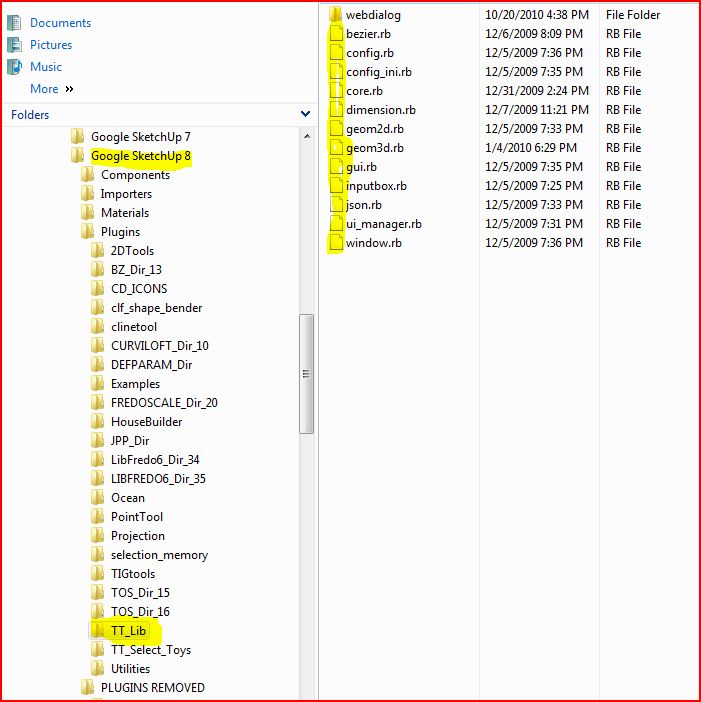
Can you post a screen of the content of your TT_Lib folder? -
Well, certainly, but I feel I have taken enough of your time and will try to re-DL and re-install in the likely event that I boobied somehow along the way...
Either way I will be back.
Thank you.
-
It looks like you have an old version of TT_Lib installed. The dates of the files, and the lack of many of the files from the latest version would suggest this. You can confirm by typing
TT_Lib::Versioninto the Ruby Console and see what it returns.If you recently did download TT_Lib but did not get 1.2.0 then maybe you're getting a cached version.
-
@thomthom said:
TT_Lib::Versioninto the Ruby Console returns.Results:
@unknownuser said:
TT_Lib::Version
Error: #<NameError: (eval):2537: uninitialized constant TT_Lib::Version>
(eval):2537Perhaps a cached version: that may let me off the stick a little for screwing things up.
I re-DLd and installed and will advise if fix fails.
Many thanks.
-
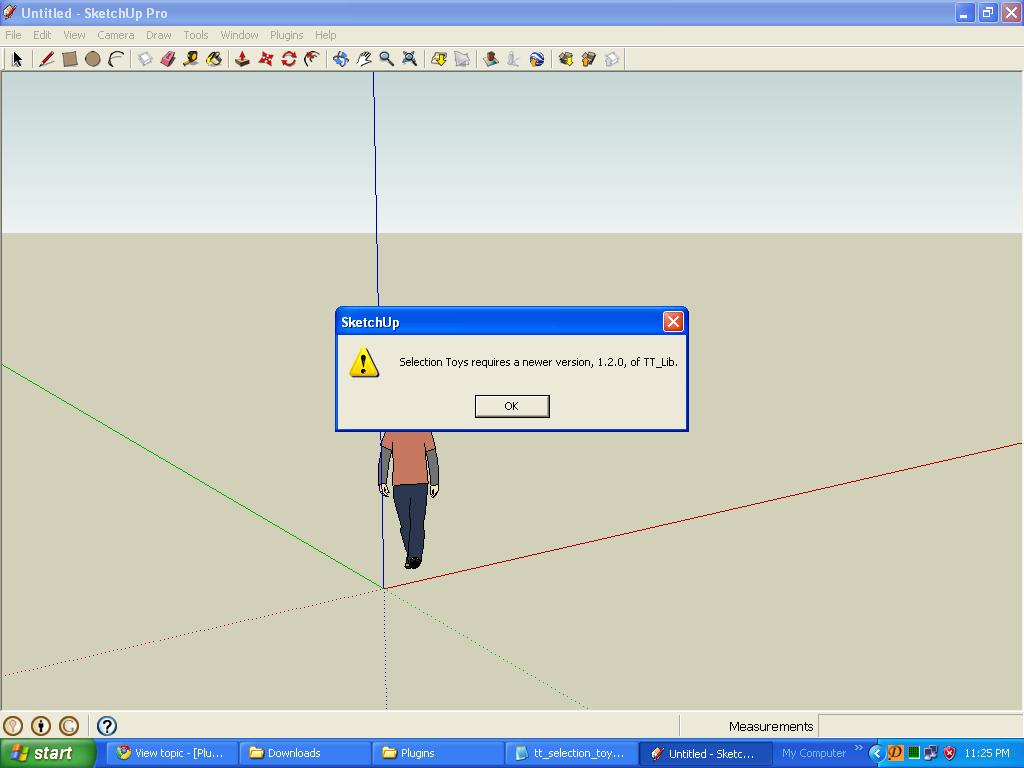
I have sketchup pro 8 ..I've removed my old version of selection toys and downloaded the new one.I already have this 1.2.0 version of TT_lib. But everytime i start sketchup i get a dialog box saying ...Selection Toys requires a new version, 1.2.0, of TT_Lib. Sketchup pauses for a moment...then all the toolbars come in place and selection toys plugin works fine...what should i do to get rid of the dialog box??
-
What do you get when you enter
TT_Lib::Versioninto the Ruby Console? -
@thomthom said:
What do you get when you enter
TT_Lib::Versioninto the Ruby Console?I get this...
TT_Lib::Version
Error: #<NameError: (eval):2307: uninitialized constant TT_Lib::Version>
(eval):2307wonder why i'm getting an error when selection toys plugin is working fine...



Hello! It looks like you're interested in this conversation, but you don't have an account yet.
Getting fed up of having to scroll through the same posts each visit? When you register for an account, you'll always come back to exactly where you were before, and choose to be notified of new replies (either via email, or push notification). You'll also be able to save bookmarks and upvote posts to show your appreciation to other community members.
With your input, this post could be even better 💗
Register Login


Advertisement