sketchucation logo sketchucation
    • 登入
    Oops, your profile's looking a bit empty! To help us tailor your experience, please fill in key details like your SketchUp version, skill level, operating system, and more. Update and save your info on your profile page today!
    🔌 Smart Spline | Fluid way to handle splines for furniture design and complex structures. Download

    [Plugin] Selection Toys

    已排程 已置頂 已鎖定 已移動 Plugins
    594 貼文 121 Posters 398.7k 瀏覽 121 Watching
    正在載入更多貼文
    • 從舊到新
    • 從新到舊
    • 最多點贊
    回覆
    • 在新貼文中回覆
    登入後回覆
    此主題已被刪除。只有擁有主題管理權限的使用者可以查看。
    • thomthomT 離線
      thomthom
      最後由 編輯

      Cheers.
      I hope that I get the time at some point to rewrite it so the selections can also work as tools where you add/remove to the current selection. Letting you combine selection filters better. Though I'm not sure yet what the interface would be. I'm quite tempted to draw my own toolbar/menu/icons on the screen - inspired by Fredo's tools.
      But at the same time I want to keep the plugin's current ability that you assign hot-keys to various filters. ...maybe some kind of macro system... Not really sure. It's a thinker.

      Thomas Thomassen — SketchUp Monkey & Coding addict
      List of my plugins and link to the CookieWare fund

      1 條回覆 最後回覆 回覆 引用 0
      • P 離線
        publied
        最後由 編輯

        what i can saying? thanks!

        hire me@ http://www.publied.it !

        1 條回覆 最後回覆 回覆 引用 0
        • K 離線
          kwistenbiebel
          最後由 編輯

          Great work Tom!

          I didn't have time to read through all the 9 pages of this thread ( 😳 )....so I'll bluntly post my question: Does the plugin work in SU6?
          I ask this because 'dynamic components',a typical SU7 feature, is part of the selection toys plugin...

          1 條回覆 最後回覆 回覆 引用 0
          • thomthomT 離線
            thomthom
            最後由 編輯

            It should work, yes. The DC filters simply checks the DC meta data stored in components, and that can be read in SU6.

            Thomas Thomassen — SketchUp Monkey & Coding addict
            List of my plugins and link to the CookieWare fund

            1 條回覆 最後回覆 回覆 引用 0
            • K 離線
              kwistenbiebel
              最後由 編輯

              Thanks Thomas!

              1 條回覆 最後回覆 回覆 引用 0
              • S 離線
                su30
                最後由 編輯

                Yes it works well this version, I used it for a few days, and the grey out problem never happens again!
                Thanks, Thomas

                su30

                1 條回覆 最後回覆 回覆 引用 0
                • A 離線
                  accabrera
                  最後由 編輯

                  cool plugin!
                  Thanks

                  1 條回覆 最後回覆 回覆 引用 0
                  • thomthomT 離線
                    thomthom
                    最後由 編輯

                    New selection tool to select a face's loops.

                    Thomas Thomassen — SketchUp Monkey & Coding addict
                    List of my plugins and link to the CookieWare fund

                    1 條回覆 最後回覆 回覆 引用 0
                    • thomthomT 離線
                      thomthom
                      最後由 編輯

                      Big speed improvement for most selection functions. Noticeable when dealing with large selections.
                      Some functions are yet not optimized. I need some more time to ensure they work as they should. These are mostly functions related to connected geometry.

                      Thomas Thomassen — SketchUp Monkey & Coding addict
                      List of my plugins and link to the CookieWare fund

                      1 條回覆 最後回覆 回覆 引用 0
                      • thomthomT 離線
                        thomthom
                        最後由 編輯

                        Quad-face Loop works as expected. I tried to illustrate it with that gif animation. It selects connected faces and edges in a row.

                        Can you illustrate your expected result?

                        (You're not confusing it with the new Face Loop feature I just added? The new feature is accessed from the Tools menu. See comment over the first illustration.)

                        Thomas Thomassen — SketchUp Monkey & Coding addict
                        List of my plugins and link to the CookieWare fund

                        1 條回覆 最後回覆 回覆 引用 0
                        • N 離線
                          NewOne
                          最後由 編輯

                          @thomthom said:

                          Quad-face Loop works as expected. I tried to illustrate it with that gif animation. It selects connected faces and edges in a row.

                          Can you illustrate your expected result?

                          (You're not confusing it with the new Face Loop feature I just added? The new feature is accessed from the Tools menu. See comment over the first illustration.)

                          Yes I did confused that two features! 😄 sorry. I like that feature. It saves me lots of clicks - and therefore it saves my mouse! 🤣

                          1 條回覆 最後回覆 回覆 引用 0
                          • thomthomT 離線
                            thomthom
                            最後由 編輯

                            Got any suggestions for better names?
                            They do have all too similar names - no wonder it leads to confusion.

                            Maybe the new one should be named Select Edge Loops ?

                            Thomas Thomassen — SketchUp Monkey & Coding addict
                            List of my plugins and link to the CookieWare fund

                            1 條回覆 最後回覆 回覆 引用 0
                            • N 離線
                              NewOne
                              最後由 編輯

                              @thomthom said:

                              Maybe the new one should be named Select Edge Loops ?

                              Yes, it's a better name. This one I think is a function that will be used very often, so why don't you make an icon for it instead of hiding it in Tools menu where is a little hard to find? 😄

                              1 條回覆 最後回覆 回覆 引用 0
                              • thomthomT 離線
                                thomthom
                                最後由 編輯

                                Yea - I might add a toolbar for this now. Good idea.
                                Thinking it might be worth making a UI to choose what items to display in the menus and toolbars. This plugin has gained quite a few commands through it's lifespan.

                                Thomas Thomassen — SketchUp Monkey & Coding addict
                                List of my plugins and link to the CookieWare fund

                                1 條回覆 最後回覆 回覆 引用 0
                                • N 離線
                                  NewOne
                                  最後由 編輯

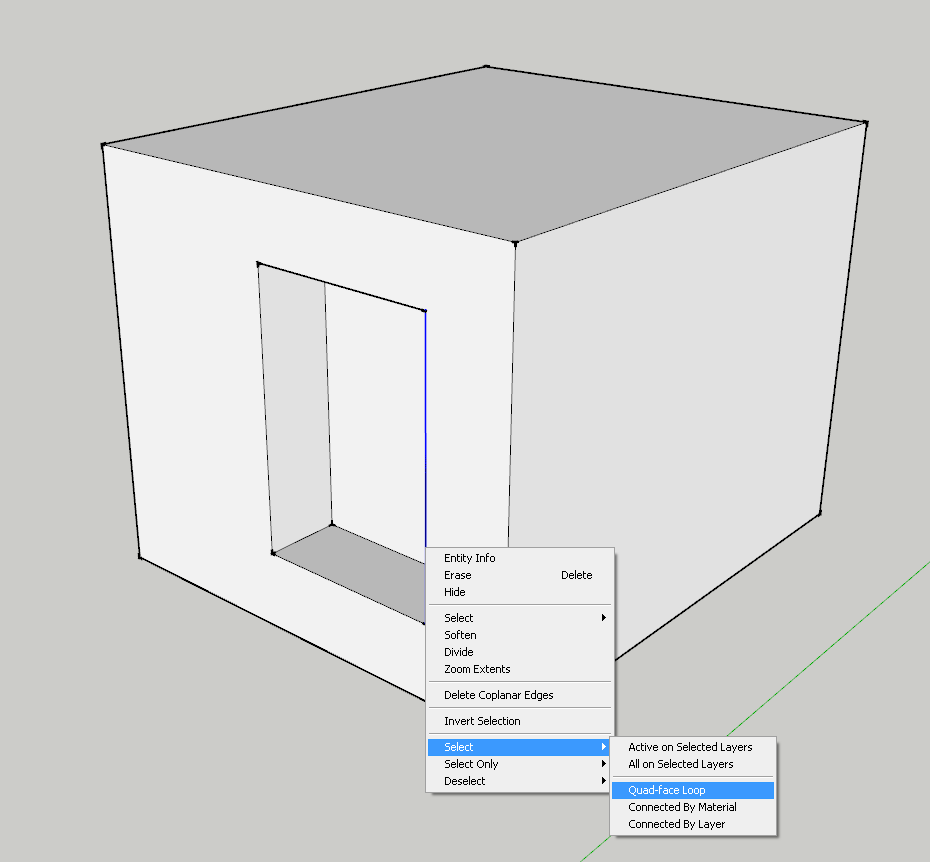
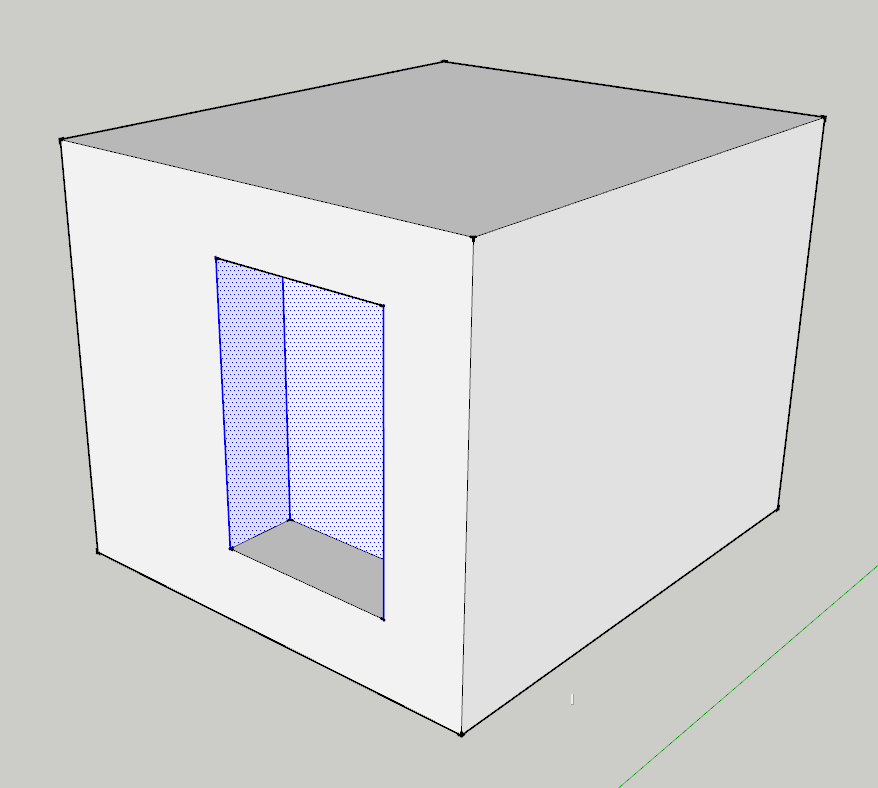
                                  Is this normal? Select Quad-face loop doesn't mean to select closed loop edges that form a quad? Or I misunderstood ?
                                  This is what happened:

                                  BTW: I think you have an error on cursor code; Would you please take a look? ( as I know correct syntax is UI::create_cursor(cursor_path, x, y) )
                                  1.png


                                  2.png

                                  1 條回覆 最後回覆 回覆 引用 0
                                  • H 離線
                                    hamster3
                                    最後由 編輯

                                    Thank you for contributing such a great tool!
                                    Very helpful!

                                    1 條回覆 最後回覆 回覆 引用 0
                                    • R 離線
                                      Ruturaj
                                      最後由 編輯

                                      Thanks....... 💚 😄
                                      you are great man

                                      I find "Boolean Tool" but i can not find full version
                                      please help me

                                      can you send me "boolean tool" please.

                                      Thanks,
                                      RuturaJ

                                      1 條回覆 最後回覆 回覆 引用 0
                                      • F 離線
                                        fossa
                                        最後由 編輯

                                        Great tool. Thank you for sharing with the community.

                                        After reading Daniel Tal's book I was thinking that a tool like this would be very handy.

                                        Have you given any thought to trying to select like Blenders ring/chain command.

                                        1 條回覆 最後回覆 回覆 引用 0
                                        • thomthomT 離線
                                          thomthom
                                          最後由 編輯

                                          I've not used Blender - how does these functions work?

                                          Thomas Thomassen — SketchUp Monkey & Coding addict
                                          List of my plugins and link to the CookieWare fund

                                          1 條回覆 最後回覆 回覆 引用 0
                                          • mitcorbM 離線
                                            mitcorb
                                            最後由 編輯

                                            Please pardon the intrusion.
                                            Fossa is talking about Blender's loop subdivide feature.
                                            One can invoke a loop around the target geometry and, with the scroll wheel, increase or decrease the number of loops. This is usually used on narrow, elongated solids. The command first sets the initial loop at the midpoint of the target region, and then replicates/multiplies that loop as the scroll wheel is advanced or reversed. This is very similar to the Sketchup Divide command, which only works on edges.
                                            After observing by using your Selection Toys and Fredo6's Tools on Surface plugins, I am guessing it's gonna be either you or he who will finally implement this in Sketchup. The clue may be in whatever SU is doing in the Divide command.
                                            I believe there is a Blender video tutorial on loop subdivide at gryllus.net, though I haven't been there in a while.


                                            I take the slow, deliberate approach in my aimless wandering.

                                            1 條回覆 最後回覆 回覆 引用 0
                                            • 1
                                            • 2
                                            • 3
                                            • 4
                                            • 5
                                            • 6
                                            • 7
                                            • 29
                                            • 30
                                            • 5 / 30
                                            • 第一個貼文
                                              最後的貼文
                                            Buy SketchPlus
                                            Buy SUbD
                                            Buy WrapR
                                            Buy eBook
                                            Buy Modelur
                                            Buy Vertex Tools
                                            Buy SketchCuisine
                                            Buy FormFonts

                                            Advertisement