sketchucation logo sketchucation
    • 登入
    Oops, your profile's looking a bit empty! To help us tailor your experience, please fill in key details like your SketchUp version, skill level, operating system, and more. Update and save your info on your profile page today!
    🔌 Easy Offset | Offset selected faces in SketchUp in positive and negative offsets. Download

    What's your beginners tip?

    已排程 已置頂 已鎖定 已移動 Newbie Forum
    sketchup
    305 貼文 169 Posters 351.9k 瀏覽 169 Watching
    正在載入更多貼文
    • 從舊到新
    • 從新到舊
    • 最多點贊
    回覆
    • 在新貼文中回覆
    登入後回覆
    此主題已被刪除。只有擁有主題管理權限的使用者可以查看。
    • GaieusG 離線
      Gaieus
      最後由 編輯

      👍
      Exactly. This is what Jean (Johnny) Lemire also suggests at his 3D BaseCamp session in the "Tips & Tricks" panel (last presenter in this video).

      Gai...

      1 條回覆 最後回覆 回覆 引用 0
      • J 離線
        Jim
        最後由 編輯

        Do NOT assign shortcuts to the numberpad keys, especially if you ever use the Numberpad to enter Measuremensts (VCB) values.

        Hi

        1 條回覆 最後回覆 回覆 引用 0
        • G 離線
          GreenToaster
          最後由 編輯

          @jim said:

          Do NOT assign shortcuts to the numberpad keys, especially if you ever use the Numberpad to enter Measuremensts (VCB) values.

          💭 And . . . don't use X as a shortcut key or you won't be able to create linear or radial patterns.

          If you really want something you won't ever stop pursuing it.

          1 條回覆 最後回覆 回覆 引用 0
          • R 離線
            remus
            最後由 編輯

            Similarly, dont use "/" as a shortcut either as its already used for arrays.

            http://remusrendering.wordpress.com/

            1 條回覆 最後回覆 回覆 引用 0
            • boofredlayB 離線
              boofredlay
              最後由 編輯

              @greentoaster said:

              💭 And . . . don't use X as a shortcut key or you won't be able to create linear or radial patterns.

              Not true. I have used X as my x-ray shortcut for years and have never had a problem.

              http://www.coroflot.com/boofredlay

              1 條回覆 最後回覆 回覆 引用 0
              • G 離線
                GreenToaster
                最後由 編輯

                Do this and it won't work - and I guarantee it:

                Step 1

                Select a group (very important)

                Step 2

                Window -->
                Preferences -->
                Shortcuts -->
                Edit/Item/Flip Along/Group's Green -->
                Add Shortcut (insert X in field) -->
                Press the "+" button -->
                OK

                Step 3

                Copy the group -->
                Now, the "x" function does NOT work

                😮

                If you really want something you won't ever stop pursuing it.

                1 條回覆 最後回覆 回覆 引用 0
                • GaieusG 離線
                  Gaieus
                  最後由 編輯

                  Maybe Eric uses the * symbol for multiplying in arrays 😉

                  Gai...

                  1 條回覆 最後回覆 回覆 引用 0
                  • boofredlayB 離線
                    boofredlay
                    最後由 編輯

                    Brad you are correct. If I do that "X" will not work as a shortcut. I was simply responding to your general statement saying: "Don't use X as a shortcut..." because you can, and I do.

                    http://www.coroflot.com/boofredlay

                    1 條回覆 最後回覆 回覆 引用 0
                    • Chris FullmerC 離線
                      Chris Fullmer
                      最後由 編輯

                      I use X for explode. No problems there either. Even if I move/array a group. It will not explode the group.

                      Chris

                      Lately you've been tan, suspicious for the winter.
                      All my Plugins I've written

                      1 條回覆 最後回覆 回覆 引用 0
                      • JoelM3DMJ 離線
                        JoelM3DM
                        最後由 編輯

                        Another tip ... Some things that are very important for me, and probably helpful to others:

                        -- I have trouble controlling fine movements with my mouse, so I use a WACOM TABLET. It's wonderful for SU work. The stylus is easy to use. It has buttons I can set to whatever I want. I put the tablet on my lap when I am at my desk, and I also have a left mouse that I use sometimes, especially for Rclick.

                        -- And when I go to the local coffeeshop and work, I bring my laptop. I'm obsessive about lightweight. The Wacom Tablet is too heavy and I hate touchpads. I found just the thing: a V-MOUSE. http://www.v-mouse.com/ It is a very lightweight optical mouse that you hold like a pen. I also got a teeny-tiny mouse for my left hand that I use only for its buttons.

                        || Joel Metzger 3D Modeling
                        || story-shorts.net - Animation with SU

                        1 條回覆 最後回覆 回覆 引用 0
                        • R 離線
                          remus
                          最後由 編輯

                          @joelm3dm said:

                          -- I have trouble controlling fine movements with my mouse, so I use a WACOM TABLET. It's wonderful for SU work. The stylus is easy to use. It has buttons I can set to whatever I want. I put the tablet on my lap when I am at my desk, and I also have a left mouse that I use sometimes, especially for Rclick.

                          Id second that, i really like my wacom.

                          http://remusrendering.wordpress.com/

                          1 條回覆 最後回覆 回覆 引用 0
                          • soloS 離線
                            solo
                            最後由 編輯

                            While on the subject of hardware that can help, I would really suggest folks trying the 'Space Explorer' or 'navigator', it's not for everyone and does take getting used to, but once you get going it can increase productivity tremendously. I use it daily and owe my ability to model as fast as I do to it.

                            http://www.cadgraphicswest.com/assets/images/SpaceExplorer_header.JPG

                            http://www.solos-art.com

                            If you see a toilet in your dreams do not use it.

                            1 條回覆 最後回覆 回覆 引用 0
                            • D 離線
                              DocuMike
                              最後由 編輯

                              This is my first post to this group. I've found that using a wireless KB/trackball has been a great help. For PC I use an Adesso WKB 3000UB (http://www.adesso.com/products_detail.asp?productid=336). It's like a 2 handed mouse so you can quickly toggle between orbit (scroll wheel in and trackball) and pan (scroll wheel in and L mouse and trackball) when moving around the model. I see they have many more models now. Some may be better (like programmable function keys) but I find this KB to be ergonomic heaven. Anyone else using it or other input tools like this?

                              1 條回覆 最後回覆 回覆 引用 0
                              • L 離線
                                Luis Esteves
                                最後由 編輯

                                Hi all,

                                Before doing a big change that you are not sure of the result.....first, for security, make a copy of your work (save as). Sometimes, it's difficult to go back (even with CTRL+Z).
                                I think it's a good idea to save multiple releases of the same project, at importants steps.

                                1 條回覆 最後回覆 回覆 引用 0
                                • T 離線
                                  tesmeko
                                  最後由 編輯

                                  Erase all the centerlines that was been used for autocad before importing.

                                  Instead of using multiple curves, try to make points so you wouln't forget drawing the arc itself in sketchup as curves inn autocad almost seem to fail connecting in one of its ends.

                                  For fast modeling try to just use the exterior wall lines, use the windowizer for the doors and windows, its easier and faster when you're in a hurry.

                                  Enjoy every bit of it modeling.

                                  Tesmeko

                                  keep sketching

                                  1 條回覆 最後回覆 回覆 引用 0
                                  • E 離線
                                    Ecuadorian
                                    最後由 編輯

                                    1. When the 'scroll wheel zoom' is not working as you wish... Press Z and zoom the good, old fashioned way.

                                    2. To zoom on the selection, Right click > Zoom extents.

                                    3. Until you get used to the 3-point perspective SketchUp uses, you might want to activate the colored crosshairs (Window > Preferences > Drawing > Display crosshairs).

                                    My 2 cents.

                                    -Miguel Lescano
                                    Subscribe to my house plans YouTube channel! (30K+ subs)

                                    1 條回覆 最後回覆 回覆 引用 0
                                    • T 離線
                                      Twistlok45
                                      最後由 編輯

                                      As a complete newb myself, i would have to say use the instructor function to familiarize yourself with each tool and spend some time with each one.
                                      Think of a simple project to do and see how it turns out.
                                      Use this in conjunction with asking for advice and you will be pleasantly surprised.

                                      I would like to thank Gaieus for helping me out with a simple pvc fitting tut.
                                      With that, i was able to create more complicated fittings on my own, first try!

                                      Thank you Gaieus for the help!

                                      1 條回覆 最後回覆 回覆 引用 0
                                      • cmdC 離線
                                        cmd
                                        最後由 編輯

                                        Work with all aspects of "Inference Locking" so it becomes second nature to you.
                                        http://www.youtube.com/watch?v=fFfmIgJqlIw&feature=channel_page

                                        CMD

                                        • CMD
                                        1 條回覆 最後回覆 回覆 引用 0
                                        • boofredlayB 離線
                                          boofredlay
                                          最後由 編輯

                                          I don't know if this was mentioned yet but:
                                          Use the Tape Measure tool and the SU Axis lines to create Guides (Construction Lines).
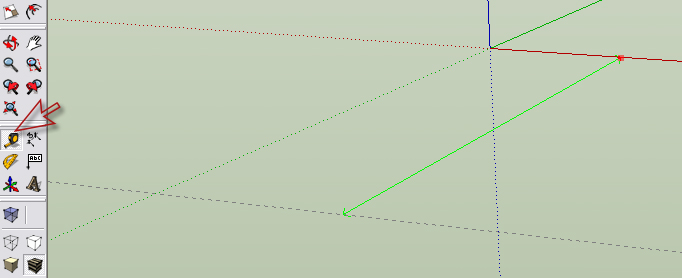

                                          Tape.jpg

                                          http://www.coroflot.com/boofredlay

                                          1 條回覆 最後回覆 回覆 引用 0
                                          • broomstickB 離線
                                            broomstick
                                            最後由 編輯

                                            @edson said:

                                            the three pillars of modelling well (IMHO, of course):

                                            1. work ALWAYS on layer 0;
                                            2. GROUP whatever geometry you are creating (in case there should be more than one copy of it, make it a COMPONENT);
                                            3. place it on another LAYER whose name makes sense (essential for controlling the model's visualization).

                                            This is very true, but it can lead to a lot of problems, when you export your model to another program, to render it. It happened to me, exporting the model to 3D Studio, and I had to open every group and re-assign all the geometry.


                                            1 條回覆 最後回覆 回覆 引用 0
                                            • 1
                                            • 2
                                            • 8
                                            • 9
                                            • 10
                                            • 11
                                            • 12
                                            • 15
                                            • 16
                                            • 10 / 16
                                            • 第一個貼文
                                              最後的貼文
                                            Buy SketchPlus
                                            Buy SUbD
                                            Buy WrapR
                                            Buy eBook
                                            Buy Modelur
                                            Buy Vertex Tools
                                            Buy SketchCuisine
                                            Buy FormFonts

                                            Advertisement