Graphic bug on large extent drawing
-
Hi !
I don't know if that had been signaled before (I hope so !!) :
On large drawings (3km/3km for example), when trying to zoom in on details, graphic bugs... Sorry I can't explain more because of my poor english
Here is an example :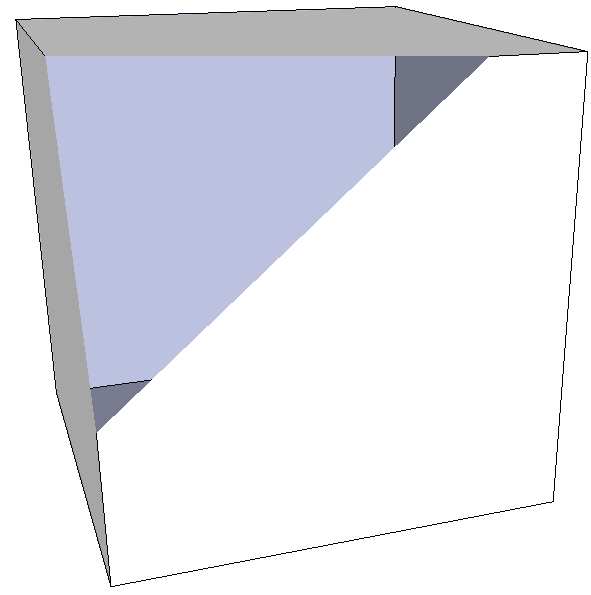
Procedure :
1 - Draw a rectangle (1000m / 1000m)
2 - Draw a box (1m / 1m / 1m) on this rectangle (or elsewhere !!)
3 - Zoom in until you see largely the box (and the bug )
) -
Not sure this is a bug... I'd say it's an OpenGL issue/limitation...
This is also known as the FOV issue and you correct it by changing the FOV distance...BTW - who would need a 3km x 3km box..??

-
This is a pretty well known issue. Its called clipping.
If i remember correctly it usually occurs when you have a very large model, or your model is a long way form the origin. If you do a search for 'clipping' you should get a lot of info on it.
-
Ok thank you !!
-
@remus said:
This is a pretty well known issue. Its called clipping.
Yes, see this:
http://sketchup.google.com/support/bin/answer.py?answer=36261&topic=13710 -
Like I said... Fix it by adjusting the FOV setting...


Hello! It looks like you're interested in this conversation, but you don't have an account yet.
Getting fed up of having to scroll through the same posts each visit? When you register for an account, you'll always come back to exactly where you were before, and choose to be notified of new replies (either via email, or push notification). You'll also be able to save bookmarks and upvote posts to show your appreciation to other community members.
With your input, this post could be even better 💗
Register Login


Advertisement