[Plugin] Memory Copy (xformclone.rb)
-
I support Plot Paris' request. This would indeed be a handy feature.
Don't know though what the easiest way for implementing a sequence of transformations would be. -
dear Adam,
I thank you so much for having a go with this script. I truely believe that this could be one of the most used functions throughout my daily modelling.
what I experienced with a first test:

I rotated a copy of the component arround axis A and moved it up vertically. when selecting the "Play it Again" function, it currently creates three copies.
in the first test it applied the vertical movement correctly. rotation however appeared to be applied arround the component's origin and not arround the actually used axis of rotation.on other attempts it worked perfectly fine for two times, then reversed the copying direction, so that I suddenly had two components on top of each other.
but the general idea seems to be working - I am very excited!
the next step now would be (apart from finding the cause for the random direction of course) to make the "select one instance, then select another to indicate the direction"-process automatic.
what I mean is: you select a component. when you create a copy of it, the original component is automatically remembered as the first one. after you did some modifications to the copy you press the keyboardshortcut (therefore we need an entry in the "Tools- or Plugins- menue") and a copy is created.
repeated pressing of the shortcut key creates more copies...
I think that would be the fastest workflow imaginable.another issue at the moment is, that the plugin doesn't seem to regard the order in which the changes have been applied.
for example, when have a component, 50cm from the origin. I now rotate it arround the origin horizontally (A), then I rotate it vertically arround it's centre (B).
if I now apply the plugin, it applies the rotation about it's centre (A) first, then does the other rotation (B)arround a pivot point that has been affected by the first alteration (A) as well - meaning that the center of rotation (B) has been rotated vertically arround the centre of the component.
thus the resulting overall movement is not as intended.oh, dear. I hope that was understandable.

again, thank you so much for this first plugin. it really is a dream becoming true!
-
Yes, clear as mud...

I should have explained it was just me banging out some code while I finished my after lunch espresso, not some finished thang. More a proof of concept. Mea culpa.
- I'd left in a hardcoded '3' for the number of times to do the clone. It should be 1 (or perhaps read the VCB?)
- The plugin wrongly relies on an ordering of the SketchUp Selection buffer. ie Selection is an unordered group of stuff you've hilighted, but this v0.000001 of the plugin was presuming the first thing in the Selection was the first thing you selected - which as you've discovered is not true - and nor should it be either I hasten to add.
So. I think I'll change it so you highlight an Instance, hover over another instance and right click - (ie an implicit second instance).
But but I've got things to do.. but I'll try to get to it soon.
Adam
-
oh, of course I understood it to be just a fist vague idea of the script. all the more reason to be impressed, that you are able to produce something like this during an after lunch expresso!
and of course, take your time. this plugin is nothing desperately needed (allthough it will be one of the most used ones...
 )
) -
I decided to get it out the way. Here it is.
- Create an instance of component
- Duplicate and position a second instance
- Right click on first instance and choose "Play it again.."
- Now if you hover over any instance that is the same definition as your 'start' instance it will be highlighted.
- Left button to create a new instance.
- Type string of the form "123x" in the VCB to set the number of instances to create per left button click.
- Click away from geometry to exit tool
Enjoy,
Adam
-
WOW MARVELOUS
Thanks
agrazdi
-
Cheers adam,
i have a feeling this is going to become one of those 'how did i ever do that before?' type plugins.
-
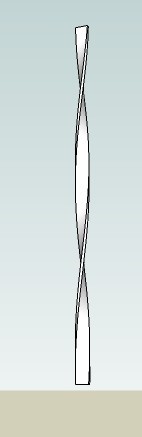
A quick demo for the non believers.
362 segments and about 4 clicks of the mouse
-
this is marvellous! thanks a lot, Adam!
however, I don't get the multiply function to work. tried everything; typing in the number with and without an x, before and after left clicking the second component. didn't get it to work

(I use Windows Vista) -
Glad you like it.
Feel free to slap me here but you did press return after typing the "5x" or whatever, didn't you.
Adam
-
Wow! Adam, this is another great plugin. Thank you.
-
Excellent script !!!! Thank you !
@unknownuser said:
- version_2 has to be applied directly after the copying/transformation process (like the array fuction only works directly after the copying process, because it retrieves it's information from the last action). therefore we need a shortcut for this function (and an entry in one of the menues).
Totally agree. That would be awesome !
- version_2 has to be applied directly after the copying/transformation process (like the array fuction only works directly after the copying process, because it retrieves it's information from the last action). therefore we need a shortcut for this function (and an entry in one of the menues).
-
A little update, for future improvements noticed above !!
Good luck AdamB !!

PS : And sorry for my incompetence... I don't have enough talent to modify your script
-
awsome script, i can think of quite a few things to use this for. but i have a suggestion/request
-
could we also get a version where we can devide the action? so it fills in the instances between a move and rotation?
-
for tree branches this would be awsome if we could taper the size of instances or even have some kind of size randomizer on it.
but i think the first request is more important... thanx for the script
-
-
Thanks Adam,
Wonderful script!
-
Yet another muscle to SU.
-
Dear Adam,
Trying out your script and enjoying the unexpected results.
Thank you for all your efforts.
Kind regards,
Bob
-
Hi, this script is excellent.. trouble is i am having some trouble - when i key in the Nx in the VC box nothing happens - I noticed someone else had this trouble... i am running windows XP - can anyone help?!?!
Thanks
-
I understand that you had to ask.
I did indeed (among every other method imaginable) hit enter after typing in Nx. just tried it here in the office (Windows XP) - works like a charm. may be a vista problem then.some suggestions, observations:
would you mind changing the Nx to N***** to go in line with the native SketchUp input?
and to assimilate the native workflow even more: is it possible to left-click the second component to be copied and then type in N*? because I love the way it works with the array function in SketchUp at the moment (that you can change the number of copies (or divisions for that matter...) repeatedly, simply by retyping 3*, 11*, 15*, 3*...).an observation I made is that the order of modifications does still make no difference (of course not - that would only be possible if you applied the function directly after the copy-and-transform process).
that means that if you have more than one rotation process applied to the component-copy you may get results different from your intentions:
in this example I rotated the component arround axis A, then rotated it vertically around the outer corner. to get the desired result, the script had to repeat these steps in exactly the same order (rotate arround A 2x, 3x, 4x... the initial distance, then rotate 2x, 3x, 4x... arrount the outer corner).
the current version of the script however takes the overall changes in position/rotation which in this example results in the first rotation axis B being distorted - merged with the second rotation so to speaknow that I think about it - the result as we get it at the moment may be quite useful as well at some time.
maybe there is the need for two different versions:-
verion_1 works exactly like the current script (with the minor changes I suggested at the top of this post
). it would make sense to have an entry within the "tools menue" to keep the context menue tidier. you can choose this function at every point of the modelling process, because it is history independent and retrieves every information from the selected geometry -
version_2 has to be applied directly after the copying/transformation process (like the array fuction only works directly after the copying process, because it retrieves it's information from the last action). therefore we need a shortcut for this function (and an entry in one of the menues).
I hope my thoughts are comprehensible.
have to start doing some office work now -
-
I just had the need to use this script, but it got lost on the way to the SU7 installation. so I looked for it again and re-read some posts on the way.
and I still think it would be cool to have a second version of the script that works slightly different, as I stated in this post above:@unknownuser said:
I understand that you had to ask.
I did indeed (among every other method imaginable) hit enter after typing in Nx. just tried it here in the office (Windows XP) - works like a charm. may be a vista problem then.some suggestions, observations:
would you mind changing the Nx to N***** to go in line with the native SketchUp input?
and to assimilate the native workflow even more: is it possible to left-click the second component to be copied and then type in N*? because I love the way it works with the array function in SketchUp at the moment (that you can change the number of copies (or divisions for that matter...) repeatedly, simply by retyping 3*, 11*, 15*, 3*...).an observation I made is that the order of modifications does still make no difference (of course not - that would only be possible if you applied the function directly after the copy-and-transform process).
that means that if you have more than one rotation process applied to the component-copy you may get results different from your intentions:in this example I rotated the component arround axis A, then rotated it vertically around the outer corner. to get the desired result, the script had to repeat these steps in exactly the same order (rotate arround A 2x, 3x, 4x... the initial distance, then rotate 2x, 3x, 4x... arrount the outer corner).
the current version of the script however takes the overall changes in position/rotation which in this example results in the first rotation axis B being distorted - merged with the second rotation so to speaknow that I think about it - the result as we get it at the moment may be quite useful as well at some time.
maybe there is the need for two different versions:-
verion_1 works exactly like the current script (with the minor changes I suggested at the top of this post
). it would make sense to have an entry within the "tools menue" to keep the context menue tidier. you can choose this function at every point of the modelling process, because it is history independent and retrieves every information from the selected geometry -
version_2 has to be applied directly after the copying/transformation process (like the array fuction only works directly after the copying process, because it retrieves it's information from the last action). therefore we need a shortcut for this function (and an entry in one of the menues).
I hope my thoughts are comprehensible.
have to start doing some office work nowwhat do you think? wouldn't that be cool?
-








Advertisement