sketchucation logo sketchucation
    • Anmelden
    Oops, your profile's looking a bit empty! To help us tailor your experience, please fill in key details like your SketchUp version, skill level, operating system, and more. Update and save your info on your profile page today!
    ⚠️ Important | Libfredo 15.6b introduces important bugfixes for Fredo's Extensions Update

    [Plugin] Face Flattener 0.19

    Geplant Angeheftet Gesperrt Verschoben Plugins
    50 Beiträge 29 Kommentatoren 55.0k Aufrufe 29 Watching
    Lade mehr Beiträge
    • Älteste zuerst
    • Neuste zuerst
    • Meiste Stimmen
    Antworten
    • In einem neuen Thema antworten
    Anmelden zum Antworten
    Dieses Thema wurde gelöscht. Nur Nutzer mit entsprechenden Rechten können es sehen.
    • W Offline
      watkins
      zuletzt editiert von

      Dear Gaieus,

      Perhaps some of our script writers could come up with a more reliable clean-up script.

      I note from Zach's example that the line joining the inner and outer loops is bounded by the same area, while the lines forming the inner and outer loops are bounded by different areas. What makes an area/surface unique, and could this be used to decide on the order of line removal? At least deletecoplaredges.rb leaves the centre fold line in an non-coplanar surface alone, and so perhaps this would be the script to start with. A nice icon would not go amiss, say an image of a few random, crossed lines.

      Kind regards,
      Bob

      1 Antwort Letzte Antwort Antworten Zitieren 0
      • GaieusG Offline
        Gaieus
        zuletzt editiert von

        Bob, Zach,

        I have a script that creates a menu item "Remove unused edges" in the Edit menu (for the life I cannot locate the script anywhere to see the file name of it). Using the script it also deletes the top surface (so the order it deletes the lines must be wrong as well).

        I have noticed a couple of times that using it leads me to lose a coupleof faces (especially after complex, curved intersections).

        Gai...

        1 Antwort Letzte Antwort Antworten Zitieren 0
        • W Offline
          watkins
          zuletzt editiert von

          Dear Gaieus,

          It is cleanup_model.rb.

          Regards,
          Bob

          1 Antwort Letzte Antwort Antworten Zitieren 0
          • GaieusG Offline
            Gaieus
            zuletzt editiert von

            Ah, thanks a bunch, Bob! I have always wondered and couldn't figure out (I keep a fairly nice mess in my Plugins folder).

            Gai...

            1 Antwort Letzte Antwort Antworten Zitieren 0
            • RayOchoaR Offline
              RayOchoa
              zuletzt editiert von

              You know what i don in order to get a 2d model is get the scale tool and type in .002 and then do that again by putting a line next to it and resizing again. then i just erase the lines i want after intersecting everything

              CaR DeSiGnS bY mE
              http://ray-ochoa.com

              1 Antwort Letzte Antwort Antworten Zitieren 0
              • R Offline
                rv1974
                zuletzt editiert von

                ❗ Perfect solution: export-import 2D hidd.line mode dwg.
                Not sure it canbe implemented in .rb though

                1 Antwort Letzte Antwort Antworten Zitieren 0
                • F Offline
                  Fletch
                  zuletzt editiert von

                  RE: Face flattener - I'll give it a shot... thanks for sharing!

                  Ray, and others, when wanting to export a flat model from SU to CAD format - don't forget the Automated 2D Output ruby! Then you can just re-import the .dwg file back into SU, and it will be flat.

                  Fletch
                  Twilight Render Cross-platform Plugin for SketchUp on PC or Mac

                  1 Antwort Letzte Antwort Antworten Zitieren 0
                  • Z Offline
                    zhuangsuph
                    zuletzt editiert von

                    1 Antwort Letzte Antwort Antworten Zitieren 0
                    • wzfwzfwzfW Offline
                      wzfwzfwzf
                      zuletzt editiert von

                      hehe,hello.

                      1 Antwort Letzte Antwort Antworten Zitieren 0
                      • fredo6F Offline
                        fredo6
                        zuletzt editiert von

                        @cerevellum said:

                        Hi Ray and Bob,

                        This is something I've noticed while working on my flattening script, and I still haven't figured out why it happens. The simplest way of reproducing this is to draw a box, add a rectangle to the top surface and connect it with a line to the outer edge loop. When erasing one of the edges of the rectangle that was added, both faces disappear.

                        What you can try to possibly avoid this problem is to calculate all coplanar segments, not delete them, but instead put them in a list (or in the selection). Then, just delete the entities in the list (or in the selection):

                        
                        model.entities.erase_entities list_edges
                        #or
                        model.entities.erase_entities model.selection


                        It seems to work fine on your example, and on some more complex configurations, but I did not try in the general case.

                        Note: manually in Sketchup, what I would use is to select all coplanar segments, put them in a group and then just delete the group. It leaves all faces intact. Unfortunately, there is no method in Ruby to make a group or a component out of existing elements!

                        1 Antwort Letzte Antwort Antworten Zitieren 0
                        • Z Offline
                          zhuangsuph
                          zuletzt editiert von

                          1 Antwort Letzte Antwort Antworten Zitieren 0
                          • M Offline
                            marne
                            zuletzt editiert von

                            @unknownuser said:

                            Thanks Zack.
                            This could prove really useful for the bad AutoCad imports I sometimes get.

                            Yip, so true for me too 😕 . Very useful. Thanks for this script!

                            1 Antwort Letzte Antwort Antworten Zitieren 0
                            • F Offline
                              Fletch
                              zuletzt editiert von

                              @cerevellum said:

                              The order of operations:

                              1. Select some geometry
                              2. Right click, select Flattening Script
                              3. Left click on a face (this decides the plane the geometry will project to)

                              This doesn't work for me at all. please test on attached scene.

                              1. select all the geometry on the lower plane
                              2. Right click, select Flattening Script
                              3. Left click on a face above

                              FlatteningTest.zip


                              flat-1-bug.jpg


                              flat-2-bug.jpg

                              Fletch
                              Twilight Render Cross-platform Plugin for SketchUp on PC or Mac

                              1 Antwort Letzte Antwort Antworten Zitieren 0
                              • C Offline
                                chango70
                                zuletzt editiert von

                                This seem like a useful script, shame it is still on 0.19.

                                1 Antwort Letzte Antwort Antworten Zitieren 0
                                • cerevellumC Offline
                                  cerevellum
                                  zuletzt editiert von

                                  @Fletch
                                  Hey, I took a look at the test model. The script doesn't work on curves yet. Basically, if you were to explode any curves it should work fine!

                                  @chango70
                                  Yeah, I stopped working on this script a while back (1 year?). Hopefully, I will be able to finish it up soon enough. Probably will ensure this script works inside Groups and works with curves as well.

                                  Thanks! BTW, the original version of this had an arbitrary axis, something that could be useful as well. Perhaps the next steps are to rework the code to include this feature, or maybe to include a dialog box with several options to choose from?

                                  1 Antwort Letzte Antwort Antworten Zitieren 0
                                  • pilouP Offline
                                    pilou
                                    zuletzt editiert von

                                    @Gaieus
                                    about the "Remove unused edges"
                                    It works fine only if you have first used "Remove inner faces" 😉

                                    Frenchy Pilou
                                    Is beautiful that please without concept!
                                    My Little site :)

                                    1 Antwort Letzte Antwort Antworten Zitieren 0
                                    • GaieusG Offline
                                      Gaieus
                                      zuletzt editiert von

                                      IF you have inner faces. If edges on an outer face are there because they define inner faces, they certainly aren't "unused". In any case, you should (almost) never model with inner faces.

                                      Gai...

                                      1 Antwort Letzte Antwort Antworten Zitieren 0
                                      • pilouP Offline
                                        pilou
                                        zuletzt editiert von

                                        @unknownuser said:

                                        In any case, you should (almost) never model with inner faces.

                                        😮
                                        Imagine that you build a "cuboïd snake" or any similar concepts with the Push Pull Tool + CTRL
                                        (that is very speedy practical building and other method don't really yet exist for that)
                                        My "remove inner faces" will be very useful at the end for after remove coplanar edges not wanted! 💚
                                        (here 5 visible (except "eyes & noze") before killing 😄
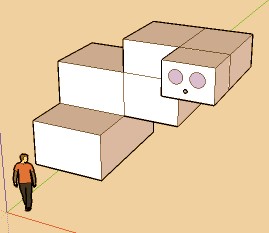

                                        snake.jpg

                                        Frenchy Pilou
                                        Is beautiful that please without concept!
                                        My Little site :)

                                        1 Antwort Letzte Antwort Antworten Zitieren 0
                                        • thomthomT Offline
                                          thomthom
                                          zuletzt editiert von

                                          @cerevellum said:

                                          Hi Ray and Bob,

                                          This is something I've noticed while working on my flattening script, and I still haven't figured out why it happens. The simplest way of reproducing this is to draw a box, add a rectangle to the top surface and connect it with a line to the outer edge loop. When erasing one of the edges of the rectangle that was added, both faces disappear.

                                          [attachment=1:2xv3js9g]<!-- ia1 -->edgeFaceEraseExFinalA.jpg<!-- ia1 -->[/attachment:2xv3js9g]

                                          However, if you were to erase the edge that connects both edge loops first, then you can erase the edges of the inside rectangle just fine. It apparently has to do with the order in which you erase coplanar edges. Delete edges in the following order: edges connected to 0 faces go first, then edges connected to 1 face, and finally edges connected to 2 faces.

                                          [attachment=0:2xv3js9g]<!-- ia0 -->edgeFaceEraseExFinalB.jpg<!-- ia0 -->[/attachment:2xv3js9g]

                                          See ya,
                                          Zach

                                          This explains some of the oddities when I tried to write a script to remove co-planar lines. I found that existing some times didn't work - especially on messy triangulated stepped terrain imported from Max. I tried to write my own version - got pretty close, but all versions had some issues. But from this post - I got some new ideas I'd like to try.

                                          Thomas Thomassen — SketchUp Monkey & Coding addict
                                          List of my plugins and link to the CookieWare fund

                                          1 Antwort Letzte Antwort Antworten Zitieren 0
                                          • thomthomT Offline
                                            thomthom
                                            zuletzt editiert von

                                            @cerevellum said:

                                            However, if you were to erase the edge that connects both edge loops first, then you can erase the edges of the inside rectangle just fine. It apparently has to do with the order in which you erase coplanar edges. Delete edges in the following order: edges connected to 0 faces go first, then edges connected to 1 face, and finally edges connected to 2 faces.

                                            [attachment=0:p7r2k6cj]<!-- ia0 -->edgeFaceEraseExFinalB.jpg<!-- ia0 -->[/attachment:p7r2k6cj]

                                            That line that connects the two squares has two items in it .faces array - both referring to the same face.

                                            I've also come across times when you have a face inside another face. They have one vertex that they share. All the edges in the inner face is also part of the outer face. Some weird cross loop. If you delete one of the edges of the inner face, you'll affect the outerface and it's disappear. It's one of them things that makes removing co-planar edges really hard.

                                            One of my versions has been to recreate the geometry - but even that didn't work perfectly.

                                            Thomas Thomassen — SketchUp Monkey & Coding addict
                                            List of my plugins and link to the CookieWare fund

                                            1 Antwort Letzte Antwort Antworten Zitieren 0
                                            • 1
                                            • 2
                                            • 3
                                            • 2 / 3
                                            • Erster Beitrag
                                              Letzter Beitrag
                                            Buy SketchPlus
                                            Buy SUbD
                                            Buy WrapR
                                            Buy eBook
                                            Buy Modelur
                                            Buy Vertex Tools
                                            Buy SketchCuisine
                                            Buy FormFonts

                                            Advertisement