sketchucation logo sketchucation
    • 登入
    Oops, your profile's looking a bit empty! To help us tailor your experience, please fill in key details like your SketchUp version, skill level, operating system, and more. Update and save your info on your profile page today!
    ⚠️ Important | Libfredo 15.6b introduces important bugfixes for Fredo's Extensions Update

    Unfold.rb script: useful for UV-mapping?

    已排程 已置頂 已鎖定 已移動 Developers' Forum
    61 貼文 23 Posters 15.4k 瀏覽 23 Watching
    正在載入更多貼文
    • 從舊到新
    • 從新到舊
    • 最多點贊
    回覆
    • 在新貼文中回覆
    登入後回覆
    此主題已被刪除。只有擁有主題管理權限的使用者可以查看。
    • S 離線
      sepo
      最後由 編輯

      It could be mighty useful script.

      1 條回覆 最後回覆 回覆 引用 0
      • plot-parisP 離線
        plot-paris
        最後由 編輯

        what I truly would love to see is the possibility to add (and delete) pins to get an extended amount of control over the distortion of a texture (should of course work on curved surfaces too).
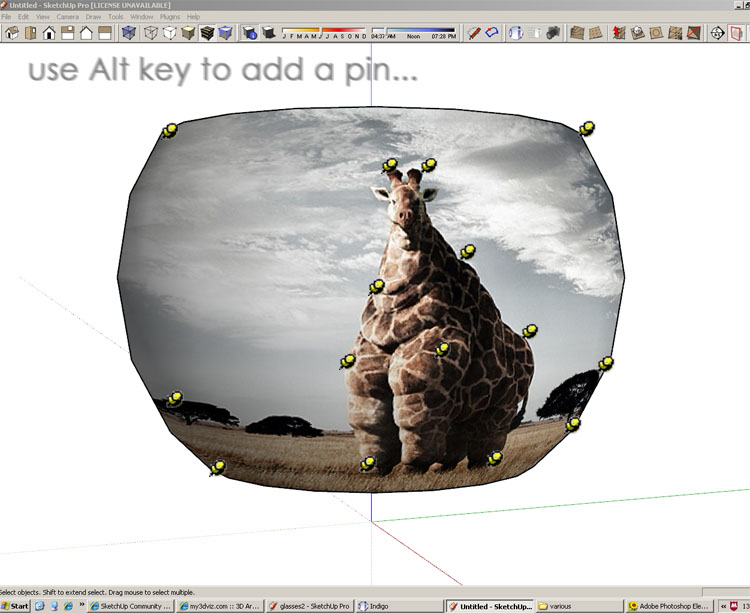
        multi_pins.jpg
        I think this idea was mentioned already somewhere in the forum.

        the workflow of unfolding a shape to texture it could work almost like adjusting a texture today in SketchUp:

        you right click the object and choose "Texture > 2D Mapping" - then you get an unfolded version of the shape (while you still see a pale version of the original geometry- like the rest of a model is shown when you edit a component) with the texture projected on it. now you use the pins (or even add some... 😉 ) to position the image. then you hit "Enter" to confirm.

        now that would be an incredibly easy but nevertheless flexible way of mapping textures! 😍

        1 條回覆 最後回覆 回覆 引用 0
        • K 離線
          kwistenbiebel
          最後由 編輯

          👍 Plot Paris.
          Your method with the pins would be simple and very effective.
          Very Sketchup-like.

          1 條回覆 最後回覆 回覆 引用 0
          • soloS 離線
            solo
            最後由 編輯

            I have downloaded the unfold .rb and it unfolds as expected, how does on refold back to original shape after that?

            Is there anyway it can auto unfold and refold?

            http://www.solos-art.com

            If you see a toilet in your dreams do not use it.

            1 條回覆 最後回覆 回覆 引用 0
            • soloS 離線
              solo
              最後由 編輯

              This is how i would imagine it to work.


              http://img136.imageshack.us/img136/971/uvmappingmm8.jpg


              ivyball.skp

              http://www.solos-art.com

              If you see a toilet in your dreams do not use it.

              1 條回覆 最後回覆 回覆 引用 0
              • W 離線
                Whaat
                最後由 編輯

                I think this can be done. I was meaning to ask Jim about this myself but you beat me to it, biebel!

                Jim,

                Manipulating uvs with the SketchUp API is very finicky. I gained a fair bit of experience with it when I implemented multiple UV sets in SkIndigo. I would be happy to help you out with this.

                SketchUp Plugins for Professionals

                1 條回覆 最後回覆 回覆 引用 0
                • soloS 離線
                  solo
                  最後由 編輯

                  😍

                  I smell a solution on the horizon!!

                  http://www.solos-art.com

                  If you see a toilet in your dreams do not use it.

                  1 條回覆 最後回覆 回覆 引用 0
                  • K 離線
                    kwistenbiebel
                    最後由 編輯

                    Cool!
                    By the way, I think Plot-Paris' suggestion about 'pin control' on 3D surfaces (just like we now have on 2D) is really worth investigating as well.

                    It's by far the simplest concept, and no need to go to Photoshop.
                    I can imagine e.g having a sphere (or any other freeform), assigning a texture to it and moving pins around the spherical surface to 'correct' the distortions of the texture until it looks good. Than hit 'bake texture' (or just 'apply') and the new UV's are in place.
                    Just like it works now on 2D surfaces.
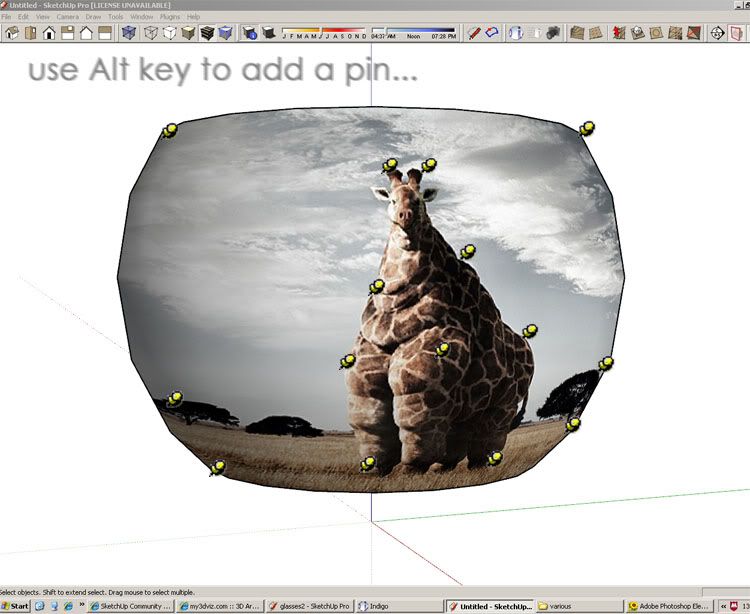
                    http://i140.photobucket.com/albums/r3/kwistenbiebel1/multi_pins.jpg

                    Awesome!

                    1 條回覆 最後回覆 回覆 引用 0
                    • soloS 離線
                      solo
                      最後由 編輯


                      http://img175.imageshack.us/img175/7724/concemv1.jpg

                      http://www.solos-art.com

                      If you see a toilet in your dreams do not use it.

                      1 條回覆 最後回覆 回覆 引用 0
                      • soloS 離線
                        solo
                        最後由 編輯

                        Make a cone shape and then project the texture attached below to the cone from above view, notice it will map the shape of the cone perfectly without distortion.
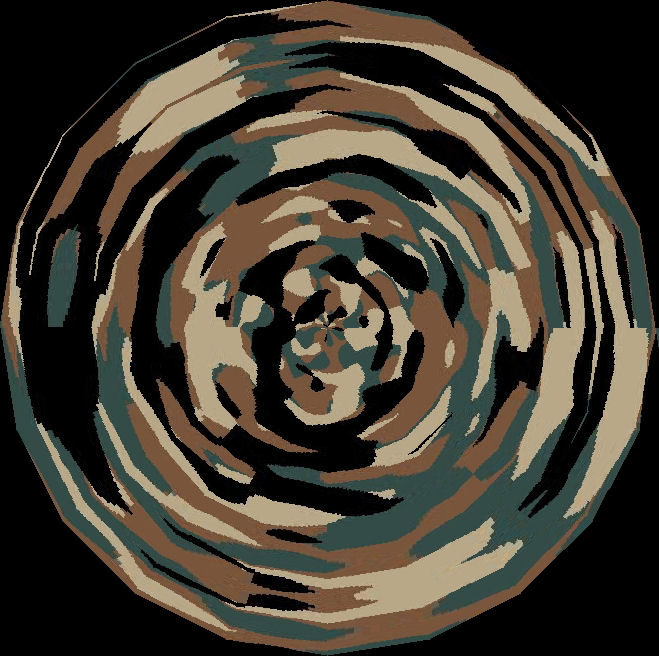

                        camo1.jpg

                        http://www.solos-art.com

                        If you see a toilet in your dreams do not use it.

                        1 條回覆 最後回覆 回覆 引用 0
                        • FrederikF 離線
                          Frederik
                          最後由 編輯

                          Oohhh... I am goosey all over... 😄
                          This sure looks like an awesome feature..!! 👍
                          Would LOVE to have this in SU...!!!

                          Cheers
                          Kim Frederik

                          1 條回覆 最後回覆 回覆 引用 0
                          • J 離線
                            Jim
                            最後由 編輯

                            I have been following, but I don't know the first thing about UV mapping.

                            @unknownuser said:
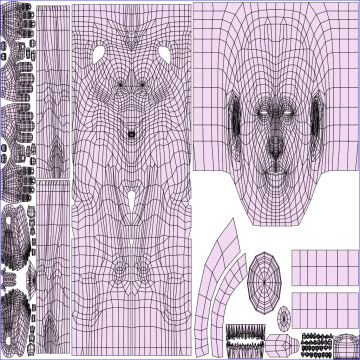
                            http://i140.photobucket.com/albums/r3/kwistenbiebel1/SU/newuv_tb.jpg

                            I'm not sure I understand how this image was created. I don't think it is a simple unfolding. Has there been some deformation of faces in order to close gaps?

                            Hi

                            1 條回覆 最後回覆 回覆 引用 0
                            • K 離線
                              kwistenbiebel
                              最後由 編輯

                              That image derives from (soft) selecting parts of a 3D human body model.
                              The different selected groups (hands, head, etc...) are unfolded on their own so for each item a different texture can be made/edited in Photoshop. So the splitting up thing is user based. The smallest parts you see are finger joints, as they need refined Pshop maps applied etc...

                              This example off course is the most complex one, where different parts of the model get unfolded seperately.
                              Solos sphere demonstration (see his images)or Howardshongs apple are somewhat closer to daily use in SU I guess, but the principle remains the same.

                              The '3D Pin method' earlier described would even make it much more WYSIWYG, as you can directly see the effect of moving a pin on the 3D surface.

                              Stuff to think about 😉....

                              1 條回覆 最後回覆 回覆 引用 0
                              • RichardR 離線
                                Richard
                                最後由 編輯

                                I think the two mapping techniques being discussed here are different or should be! the rewrapping versus pinned deformation!

                                This function of wrapping and rewrapping is quite common to other modelling and texturing apps. Maybe someone with one of these could show example!

                                [BUILTBRAND.COM.AU](http://builtbrand.com.au/)

                                1 條回覆 最後回覆 回覆 引用 0
                                • plot-parisP 離線
                                  plot-paris
                                  最後由 編輯

                                  I think the multi-pin-method should be used throughout the whole texturin process (so that you can apply complicated distortions even to a simple rectangle shape).

                                  I like the idea to select the "2D Mapping" tool from the standart context menu for manipulating textures.
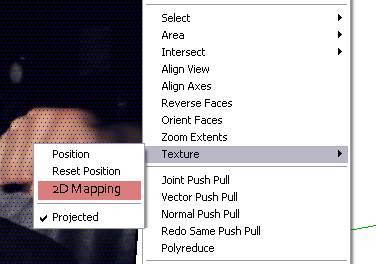
                                  2dmapping.jpg
                                  if you simply select the 2D Mapping option and an unfolded copy of the object is shown, on which you can position your texture - when you are done, press enter and the only thing that remains is the perfectly textured 3D model (no manually unfolding and refolding geometry - very fast and easy workflow!) 😛

                                  1 條回覆 最後回覆 回覆 引用 0
                                  • S 離線
                                    sorgesu
                                    最後由 編輯

                                    Because I just recently became interested in this subject, I found this on a search and I'm resurrecting.

                                    Further to the above speculations, I was thinking it would be great to be able to substitute a whole group of textures that are mapped to the subcomponents of a model,such as a person or a car for instance. That way, instead of providing the person or car in various colour verisons as an skp, all you need to do is substitute a material library on an existing model. If one must create a new skp for the same model, in a different colour, or maybe with some different detailing, when you create the variations you would have to go through mapping all the compoenets one by one again on the same model. Having a swap feature for the material "set" would be great.

                                    Susan Sorger
                                    Former Seller Hand Rendered Entourage
                                    Former Canadian Authorized Training Centre, SketchUp

                                    1 條回覆 最後回覆 回覆 引用 0
                                    • S 離線
                                      sorgesu
                                      最後由 編輯

                                      okay, I found a ruby script on Didier's site: Global material changer.
                                      It is almost doing exactly what I want. It replaces any one or "ALL" of a the materials on an model/component. But your choices for replacing are only with a single default material or something from the existing list. So how difficult to modify this so that you can replace with a material set that has some built in- one to one relationship to the existing materials? Maybe same name with a numeric modifier?

                                      Susan Sorger
                                      Former Seller Hand Rendered Entourage
                                      Former Canadian Authorized Training Centre, SketchUp

                                      1 條回覆 最後回覆 回覆 引用 0
                                      • K 離線
                                        kwistenbiebel
                                        最後由 編輯

                                        @sorgesu said:

                                        Because I just recently became interested in this subject, I found this on a search and I'm resurrecting.

                                        Further to the above speculations, I was thinking it would be great to be able to substitute a whole group of textures that are mapped to the subcomponents of a model,such as a person or a car for instance. That way, instead of providing the person or car in various colour verisons as an skp, all you need to do is substitute a material library on an existing model. If one must create a new skp for the same model, in a different colour, or maybe with some different detailing, when you create the variations you would have to go through mapping all the compoenets one by one again on the same model. Having a swap feature for the material "set" would be great.

                                        Swapping is already possible, even with uv-sets in place (as long as the new bitmap has the same image size as the old one.)
                                        Write down the dimensions of the existing texture (the dimensions specified in the material editor).
                                        Then do the substitution from within the 'Entity layer' (NOT from material editor).
                                        Next thing to do is going to the material editor and change the dimensions to the ones you wrote down.
                                        It's tedious but it works.

                                        1 條回覆 最後回覆 回覆 引用 0
                                        • S 離線
                                          sorgesu
                                          最後由 編輯

                                          NO swapping is not currently passible for ane entire "group" of materials all at once, which is what I was requsting.

                                          Say I have a car component and it has 17 materials assigned to different portions of the car. I want those 17 materials defined as a "set" and I want another set containing a different 17 to be swapped in in one go.

                                          Susan Sorger
                                          Former Seller Hand Rendered Entourage
                                          Former Canadian Authorized Training Centre, SketchUp

                                          1 條回覆 最後回覆 回覆 引用 0
                                          • K 離線
                                            kwistenbiebel
                                            最後由 編輯

                                            Indeed: No for groups of materials, Yes for ungrouped meshes containing 1 material.

                                            1 條回覆 最後回覆 回覆 引用 0
                                            • 1
                                            • 2
                                            • 3
                                            • 4
                                            • 3 / 4
                                            • 第一個貼文
                                              最後的貼文
                                            Buy SketchPlus
                                            Buy SUbD
                                            Buy WrapR
                                            Buy eBook
                                            Buy Modelur
                                            Buy Vertex Tools
                                            Buy SketchCuisine
                                            Buy FormFonts

                                            Advertisement

