sketchucation logo sketchucation
    • Login
    Oops, your profile's looking a bit empty! To help us tailor your experience, please fill in key details like your SketchUp version, skill level, operating system, and more. Update and save your info on your profile page today!
    Mac User? | Join the Rayscaper Beta for Mac Learn More

    [Plugin] Polyreducer 0.1

    Scheduled Pinned Locked Moved Plugins
    61 Posts 45 Posters 139.6k Views 45 Watching
    Loading More Posts
    • Oldest to Newest
    • Newest to Oldest
    • Most Votes
    Reply
    • Reply as topic
    Log in to reply
    This topic has been deleted. Only users with topic management privileges can see it.
    • Dave RD
      Dave R
      last edited by

      @inti11644 said:

      how do I use this in sketchup 2016

      From the first post in this thread:

      @whaat said:

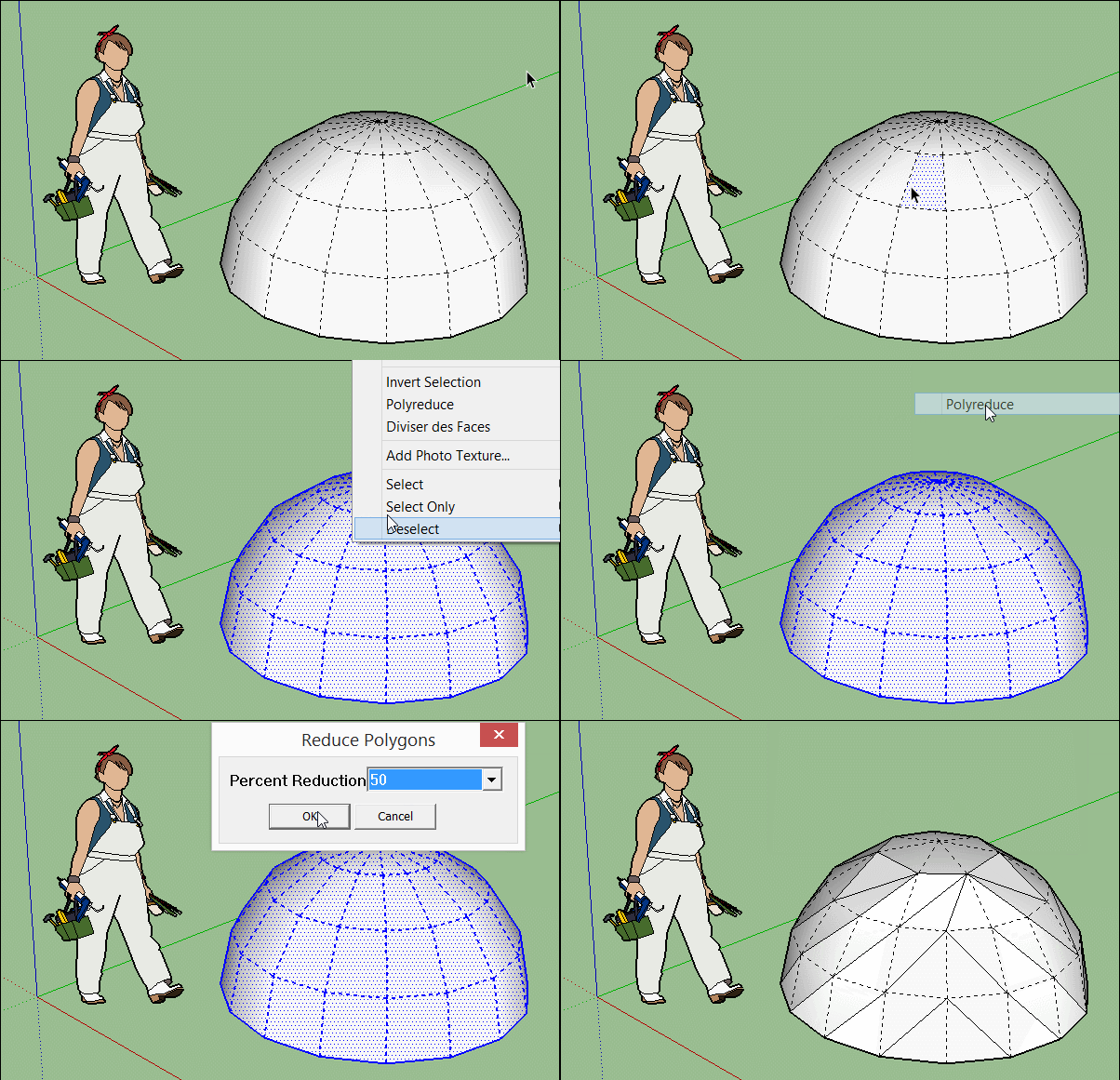
      Usage:

      1. Select the faces that you want to perform the reduction on.
      2. Right click and select 'Polyreduce' from the context menu.
      3. Input the percentage reduction. For example, select 20 to reduce the number of vertices by 20%.
      4. A recommended workflow is to perform several reductions using a smaller percentage (50% or less). Then, use the 'undo' and 'redo' commands to cycle through the reduction operations to choose the level of detail you are most satisfied with.

      Etaoin Shrdlu

      %

      (THERE'S NO PLACE LIKE)

      G28 X0.0 Y0.0 Z0.0

      M30

      %

      1 Reply Last reply
      Reply Quote 0
      • A
        AppleBear
        last edited by

        Thank you to share, to give it a try

        1 Reply Last reply
        Reply Quote 0
        • G
          gaquandui
          last edited by

          how to install Polyreducer in the sketchup 2017?

          1 Reply Last reply
          Reply Quote 0
          • Dave RD
            Dave R
            last edited by

            @gaquandui said:

            how to install Polyreducer in the sketchup 2017?

            Use the Sketchucation Extension Store. Download it, go to Window>Extension Manager and select Install Extension. Find the rbz file, select it, click Open and the affirmative answers to the next message boxes. From there, you can install any extensions from Sketchucation automatically.

            Etaoin Shrdlu

            %

            (THERE'S NO PLACE LIKE)

            G28 X0.0 Y0.0 Z0.0

            M30

            %

            1 Reply Last reply
            Reply Quote 0
            • ZackJordsZ
              ZackJords
              last edited by

              Thank you so much Dale

              1 Reply Last reply
              Reply Quote 0
              • G
                Gerardus
                last edited by

                Hi guys,

                I installed this extension ( several times ), but can't find it back in SU 2017.
                Any tips please?

                1 Reply Last reply
                Reply Quote 0
                • Dave RD
                  Dave R
                  last edited by

                  @gerardus said:

                  Hi guys,

                  I installed this extension ( several times ), but can't find it back in SU 2017.
                  Any tips please?

                  How did you install it? Where are you looking for it "back in SketchUp"?

                  Etaoin Shrdlu

                  %

                  (THERE'S NO PLACE LIKE)

                  G28 X0.0 Y0.0 Z0.0

                  M30

                  %

                  1 Reply Last reply
                  Reply Quote 0
                  • TIGT
                    TIG Moderator
                    last edited by

                    Assuming that all other installation issues are addressed and it's still compatible with v2017... [ it is almost a decade old ! ], then, as its simple instructions explain, you need to select some faces and right-click > context-menu... to run the tool.

                    Remember that not every tool has a menu entry or a toolbar.

                    TIG

                    1 Reply Last reply
                    Reply Quote 0
                    • pilouP
                      pilou
                      last edited by

                      Use of Polyreducer : RighClick on the object! πŸ˜‰

                      http://s6.postimg.cc/ci4lzyqz5/GIF_polyreduce.gif

                      Frenchy Pilou
                      Is beautiful that please without concept!
                      My Little site :)

                      1 Reply Last reply
                      Reply Quote 0
                      • I
                        ISAWHIM
                        last edited by

                        Any chance to "fix" this so that it works in 2018+

                        The drop-down list has the option to select values that don't work, due to a text-issue?

                        ("10
                        20
                        30
                        40
                        50
                        60
                        70
                        80
                        90")

                        10 and 90 don't work, but they are "doing something", which can be undone. However, if you don't "undo", it can break the model.

                        Seems like it is just a simple format issue for the list. (Apparently reading the value from the list, instead of reading the values from an INDEX of a LIST. So, the odd text in the first and last values sort-of break the script.)

                        Personally... I would like to see a slider with 1%, 2% or 5% increments. Maybe also an option to just do a triangulation first, as 0%... Something that would yield some "corrective action", before reducing polygons, if needed. (I don't always agree with the way it triangulates some surfaces, as it doesn't favor neat reductions. Being able to see the way it is going to divide it, before reducing it, allows for some manual triangulation of those potential troubled parts.)

                        Another option would be to subdivide first... (Creating a smoother potential which to begin a more accurate reduction that may retain those micro-details more, without harming large flat surfaces as much.)

                        1 Reply Last reply
                        Reply Quote 0
                        • S
                          samodelkin_77
                          last edited by

                          [quote="ISAWHIM"]Any chance to "fix" this so that it works in 2018+

                          The drop-down list has the option to select values that don't work, due to a text-issue?

                          ("10
                          20
                          30
                          40
                          50
                          60
                          70
                          80
                          90")

                          10 and 90 don't work, but they are "doing something", which can be undone. However, if you don't "undo", it can break the model.
                          ................

                          I fix it : in file polyreduce.rb (open wiht notepad)
                          at line 342 enums=[["10|20|30|40|50|60|70|80|90"]]
                          need make it like this : enums=[" 10|20|30|40|50|60|70|80|90 "]
                          and all is work.
                          after polyreduce need make fix model, is deleting some garbage from.
                          (sorry for mine english)

                          1 Reply Last reply
                          Reply Quote 0

                          Hello! It looks like you're interested in this conversation, but you don't have an account yet.

                          Getting fed up of having to scroll through the same posts each visit? When you register for an account, you'll always come back to exactly where you were before, and choose to be notified of new replies (either via email, or push notification). You'll also be able to save bookmarks and upvote posts to show your appreciation to other community members.

                          With your input, this post could be even better πŸ’—

                          Register Login
                          • 1
                          • 2
                          • 3
                          • 4
                          • 1 / 4
                          • First post
                            Last post
                          Buy SketchPlus
                          Buy SUbD
                          Buy WrapR
                          Buy eBook
                          Buy Modelur
                          Buy Vertex Tools
                          Buy SketchCuisine
                          Buy FormFonts

                          Advertisement