sketchucation logo sketchucation
    • Login
    Oops, your profile's looking a bit empty! To help us tailor your experience, please fill in key details like your SketchUp version, skill level, operating system, and more. Update and save your info on your profile page today!
    ⚠️ Update | Sketchucation Tools 5.0.8 released with licensing improvements and bugfixes Download

    Help me to do this.. "Curved ramp" Please..

    Scheduled Pinned Locked Moved SketchUp Tutorials
    sketchup
    31 Posts 9 Posters 14.3k Views 9 Watching
    Loading More Posts
    • Oldest to Newest
    • Newest to Oldest
    • Most Votes
    Reply
    • Reply as topic
    Log in to reply
    This topic has been deleted. Only users with topic management privileges can see it.
    • I
      Iglesias
      last edited by

      Technical problems with the video tutorial. Coming soon

      1 Reply Last reply
      Reply Quote 0
      • I
        Iglesias
        last edited by

        Hello Witjazz,
        This is the video in Youtube.

        At last the sound works in youtube.
        Thanks to Gaieus
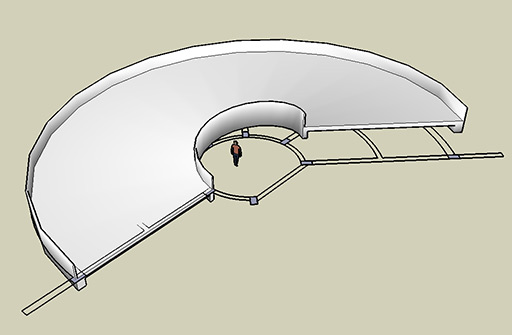

        Park-2-1.skp


        Park-2-1.jpg

        1 Reply Last reply
        Reply Quote 0
        • I
          Iglesias
          last edited by

          Hello,

          At last, the video tutorial is here.
          I beg your pardon by the mistakes.My English is very poor.

          1 Reply Last reply
          Reply Quote 0
          • GaieusG
            Gaieus
            last edited by

            Thanks JosΓ© - really nice tutorial! πŸ‘
            And there's no problem with your English at all; I could perfectly understand it. Special thanks for the effort to make it in English, too! πŸ‘ πŸ‘ πŸ‘

            Gai...

            1 Reply Last reply
            Reply Quote 0
            • I
              Iglesias
              last edited by

              Thank you Gai, one mistake was "in the bottom" instead "at the bottom" and one "is" by "are" plural.
              It is a shame for me to speak in English, but I am making efforts to help people.
              Best regards to all of you.

              1 Reply Last reply
              Reply Quote 0
              • D
                dtrarch
                last edited by

                Hello All

                There is an old ruby called circle slopes that will build a helical ramp.
                [aitop.rb]
                Still works with SU V6

                Here it is

                dtr


                aitop.rb

                1 Reply Last reply
                Reply Quote 0
                • I
                  Iglesias
                  last edited by

                  Hello dtr,

                  I have this plug in in my computer, but to make helical with profile and making the revolution with a number of degrees, it is better using screw, you can look the tutorial above.
                  To make the ramp like the one in this topic, needs finished the ramp by hand, cuting a slice and so on.
                  Thank you for telling here, because this Ruby Script is very useful too.

                  1 Reply Last reply
                  Reply Quote 0
                  • I
                    Iglesias
                    last edited by

                    Hello Gai,
                    Is it possible to see it from youtube?
                    http://youtube.com/watch?v=W-Ox-xCLdbY

                    1 Reply Last reply
                    Reply Quote 0
                    • D
                      dtrarch
                      last edited by

                      Hi Iglesias

                      Good call as Screw does do a better job.
                      Thx for the heads up.

                      Now we need one for non helical curved paths.
                      Anti twist mode.

                      The rez for me on youTube was not good enough to see the tut but you sound like a good guy in any case.

                      Cheers

                      dtr

                      1 Reply Last reply
                      Reply Quote 0
                      • I
                        Iglesias
                        last edited by

                        Hi dtr,
                        If you want a video with more resolution, download from this link.

                        http://rapidshare.com/files/133764909/ramp1.mov.html

                        1 Reply Last reply
                        Reply Quote 0
                        • D
                          dtrarch
                          last edited by

                          Iglesias

                          Thx for the link.
                          Very nice tut and good of you to do the work.

                          Back to business.

                          dtr

                          1 Reply Last reply
                          Reply Quote 0
                          • W
                            witjazz
                            last edited by

                            Hi..Iglesias Thanks for your help
                            but i have no plug-in "screw1_5"
                            please give me here or send it to my e-mail
                            spidermanthai111@yahoo.com
                            Thanks in advance
                            Witjazz πŸ‘

                            1 Reply Last reply
                            Reply Quote 0
                            • I
                              Iglesias
                              last edited by

                              Hello Witjazz,
                              In this link you can download the plugin.
                              Regards
                              http://www.crai.archi.fr/RubyLibraryDepot/Ruby/em_edi_page.htm

                              1 Reply Last reply
                              Reply Quote 0
                              • W
                                witjazz
                                last edited by

                                Hello Iglesias
                                Why i can't do like you did
                                when i type 4,16 m and then enter it not appear a window "steps and turns"
                                i just apply the cursor along the azis "z" already
                                ... ❓

                                1 Reply Last reply
                                Reply Quote 0
                                • I
                                  Iglesias
                                  last edited by

                                  Possibly your SketchUp is different to mine, try to use a point instead of comma.

                                  1 Reply Last reply
                                  Reply Quote 0
                                  • W
                                    witjazz
                                    last edited by

                                    using pc sir
                                    am live in Thailand
                                    i use SketchUp pro 6
                                    i try to type dot already but it not work

                                    1 Reply Last reply
                                    Reply Quote 0
                                    • I
                                      Iglesias
                                      last edited by

                                      Steps to use screw.

                                      • Select the profile.
                                      • choose plugin.
                                      • Select first end, then clic.
                                      • Move upwards z direction.
                                      • Type the distance, in your case 4,16 and push enter key, then appear the menu "steps and turns"
                                      1 Reply Last reply
                                      Reply Quote 0
                                      • W
                                        witjazz
                                        last edited by

                                        Steps to use screw.

                                        • Select the profile.
                                        • choose plugin.
                                        • Select first end, then clic.
                                        • Move upwards z direction.
                                        • Type the distance, in your case 4,16 and push enter key,

                                        then appear the menu "steps and turns"(not appear the menu in this step for me sir)
                                        can you expain what is 4 and 16
                                        now! i finish it already sir thank you so much

                                        1 Reply Last reply
                                        Reply Quote 0
                                        • S
                                          Simon B
                                          last edited by

                                          Excellent tutorial! Muchas Gracias! πŸ˜„

                                          1 Reply Last reply
                                          Reply Quote 0
                                          • Y
                                            yiannosh
                                            last edited by

                                            Where can I find this plugin to try it. Thanks

                                            1 Reply Last reply
                                            Reply Quote 0

                                            Hello! It looks like you're interested in this conversation, but you don't have an account yet.

                                            Getting fed up of having to scroll through the same posts each visit? When you register for an account, you'll always come back to exactly where you were before, and choose to be notified of new replies (either via email, or push notification). You'll also be able to save bookmarks and upvote posts to show your appreciation to other community members.

                                            With your input, this post could be even better πŸ’—

                                            Register Login
                                            • 1
                                            • 2
                                            • 1 / 2
                                            • First post
                                              Last post
                                            Buy SketchPlus
                                            Buy SUbD
                                            Buy WrapR
                                            Buy eBook
                                            Buy Modelur
                                            Buy Vertex Tools
                                            Buy SketchCuisine
                                            Buy FormFonts

                                            Advertisement