[Plugin] SketchyBevel 0.1(Updated May 11)
-
@cphillips said:
Like the built in Outliner tool Bevel doesnt work with "holes" in faces. You can usually work around those problems by subdividing the face with a hole.
Here is an example. The mesh on the left doesn't Bevel right. But add a line to break up the hole and it works. Then you can just erase the extra edges.
[attachment=0:2ckr4p9x]<!-- ia0 -->bevel-holes.png<!-- ia0 -->[/attachment:2ckr4p9x]
Sorry for bumping an old thread like this but I just installed this plugin today and was trying to get what you have shown above working but I can't for the life of me get what you have shown in your images in SU.
I made a box then push-pulled another box on top of that and placed in a line like you have shown. When I select all and control click (OSX) on the selected items and choose Bevel it just deselects what I have but doesn't apply any bevel to the objects.
Please could someone let me in on what I'm doing wrong?
Best wishes,
Mark
-
Thanx...very cool plug-in.

-
Thanks for the script! I'm sure it'll come in handy

-
Thanks very much Veryworks..
-
thankyou
cool -
A very good tool for 3D model design
-
wow! this is what i'm looking for sooo long!! thanks alot! u saved my life!!
-
Dear friends,
How can I downloud Sketchy Bevel?
-
Download this one instead. It's a lot better. Please read carefully the very first post by Fredo for installation and required additional library.
-
very good, thanks for such a good stuff!
-
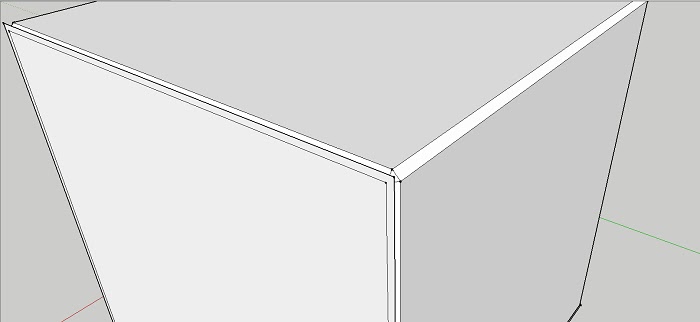
Works great, but when I bevel something I need to manually delete rubbish from previous model.
-
What do you mean?
And why not use Fredo's Round Corner instead? It's a more up to date tool.
-
Thanks Chris
u r great -
thank you for your kindness and brilliant idea.

-
Whenever I use it the bevel pieces are still there making it look like nothing happened. The animation shows that they're deleted. Is there a setting I can change to get rid of the shapes?
-
@jacksoam said:
Whenever I use it the bevel pieces are still there making it look like nothing happened. The animation shows that they're deleted. Is there a setting I can change to get rid of the shapes?
Could you post at least a screen shot showing what you are getting? Better would be a SketchUp file showing it.
Have you tried Fredo's Round Corner extension? It will do bevels too and it is more up to date.
-
Nao consigo instalar


Hello! It looks like you're interested in this conversation, but you don't have an account yet.
Getting fed up of having to scroll through the same posts each visit? When you register for an account, you'll always come back to exactly where you were before, and choose to be notified of new replies (either via email, or push notification). You'll also be able to save bookmarks and upvote posts to show your appreciation to other community members.
With your input, this post could be even better 💗
Register Login


Advertisement