sketchucation logo sketchucation
    • Login
    Oops, your profile's looking a bit empty! To help us tailor your experience, please fill in key details like your SketchUp version, skill level, operating system, and more. Update and save your info on your profile page today!
    Mac User? | Join the Rayscaper Beta for Mac Learn More

    [Plugin] SketchyBevel 0.1(Updated May 11)

    Scheduled Pinned Locked Moved Plugins
    143 Posts 85 Posters 150.1k Views 85 Watching
    Loading More Posts
    • Oldest to Newest
    • Newest to Oldest
    • Most Votes
    Reply
    • Reply as topic
    Log in to reply
    This topic has been deleted. Only users with topic management privileges can see it.
    • M
      maxandvv
      last edited by

      I'm an asian (yellow),can I have it?thank you!!

      1 Reply Last reply
      Reply Quote 0
      • D
        danieljhatton
        last edited by

        @massimo said:

        Simply put the .rb file in your Sketchup plugins folder. Then you will find the bevel tool in context menu (right button click of the mouse).

        I'm doing that in Sketchup Plugins folder in Snow Leopard, but I'm not finding anything on Right Click. Any help is appreciated.

        1 Reply Last reply
        Reply Quote 0
        • M
          markbowen
          last edited by

          @cphillips said:

          Like the built in Outliner tool Bevel doesnt work with "holes" in faces. You can usually work around those problems by subdividing the face with a hole.

          Here is an example. The mesh on the left doesn't Bevel right. But add a line to break up the hole and it works. Then you can just erase the extra edges.

          [attachment=0:2ckr4p9x]<!-- ia0 -->bevel-holes.png<!-- ia0 -->[/attachment:2ckr4p9x]

          Sorry for bumping an old thread like this but I just installed this plugin today and was trying to get what you have shown above working but I can't for the life of me get what you have shown in your images in SU.

          I made a box then push-pulled another box on top of that and placed in a line like you have shown. When I select all and control click (OSX) on the selected items and choose Bevel it just deselects what I have but doesn't apply any bevel to the objects.

          Please could someone let me in on what I'm doing wrong?

          Best wishes,

          Mark

          1 Reply Last reply
          Reply Quote 0
          • R
            Rogue
            last edited by

            Thanx...very cool plug-in. 😎

            1 Reply Last reply
            Reply Quote 0
            • M
              mmscanlo
              last edited by

              Thanks for the script! I'm sure it'll come in handy πŸ˜„

              1 Reply Last reply
              Reply Quote 0
              • J
                jboyza
                last edited by

                Thanks very much Veryworks..

                1 Reply Last reply
                Reply Quote 0
                • M
                  Mmrerw
                  last edited by

                  thankyou
                  cool

                  1 Reply Last reply
                  Reply Quote 0
                  • C
                    ckflyer
                    last edited by

                    A very good tool for 3D model design

                    1 Reply Last reply
                    Reply Quote 0
                    • G
                      gg.hazirah17
                      last edited by

                      wow! this is what i'm looking for sooo long!! thanks alot! u saved my life!!

                      1 Reply Last reply
                      Reply Quote 0
                      • A
                        ARQJCVG
                        last edited by

                        Dear friends,

                        How can I downloud Sketchy Bevel?

                        1 Reply Last reply
                        Reply Quote 0
                        • massimoM
                          massimo Moderator
                          last edited by

                          Download this one instead. It's a lot better. Please read carefully the very first post by Fredo for installation and required additional library.

                          1 Reply Last reply
                          Reply Quote 0
                          • J
                            jimtien
                            last edited by

                            very good, thanks for such a good stuff!

                            1 Reply Last reply
                            Reply Quote 0
                            • M
                              Mohrcore
                              last edited by

                              Works great, but when I bevel something I need to manually delete rubbish from previous model.
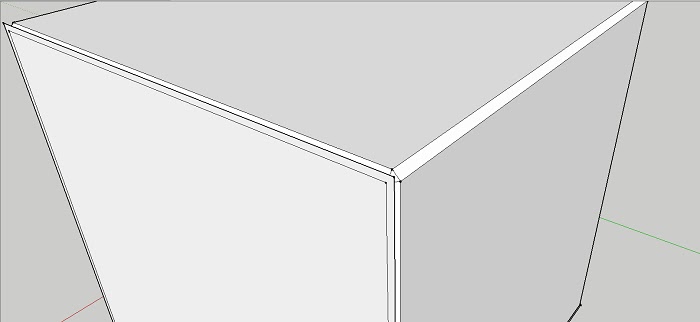

                              sdfgbd.jpg

                              1 Reply Last reply
                              Reply Quote 0
                              • Dave RD
                                Dave R
                                last edited by

                                What do you mean?

                                And why not use Fredo's Round Corner instead? It's a more up to date tool.

                                Etaoin Shrdlu

                                %

                                (THERE'S NO PLACE LIKE)

                                G28 X0.0 Y0.0 Z0.0

                                M30

                                %

                                1 Reply Last reply
                                Reply Quote 0
                                • T
                                  tebas
                                  last edited by

                                  Thanks Chris
                                  u r great

                                  1 Reply Last reply
                                  Reply Quote 0
                                  • B
                                    bong2x
                                    last edited by

                                    thank you for your kindness and brilliant idea.
                                    πŸ‘

                                    1 Reply Last reply
                                    Reply Quote 0
                                    • J
                                      jacksoam
                                      last edited by

                                      Whenever I use it the bevel pieces are still there making it look like nothing happened. The animation shows that they're deleted. Is there a setting I can change to get rid of the shapes?

                                      1 Reply Last reply
                                      Reply Quote 0
                                      • Dave RD
                                        Dave R
                                        last edited by

                                        @jacksoam said:

                                        Whenever I use it the bevel pieces are still there making it look like nothing happened. The animation shows that they're deleted. Is there a setting I can change to get rid of the shapes?

                                        Could you post at least a screen shot showing what you are getting? Better would be a SketchUp file showing it.

                                        Have you tried Fredo's Round Corner extension? It will do bevels too and it is more up to date.

                                        Etaoin Shrdlu

                                        %

                                        (THERE'S NO PLACE LIKE)

                                        G28 X0.0 Y0.0 Z0.0

                                        M30

                                        %

                                        1 Reply Last reply
                                        Reply Quote 0
                                        • R
                                          reflectarqenge
                                          last edited by

                                          Nao consigo instalar

                                          1 Reply Last reply
                                          Reply Quote 0

                                          Hello! It looks like you're interested in this conversation, but you don't have an account yet.

                                          Getting fed up of having to scroll through the same posts each visit? When you register for an account, you'll always come back to exactly where you were before, and choose to be notified of new replies (either via email, or push notification). You'll also be able to save bookmarks and upvote posts to show your appreciation to other community members.

                                          With your input, this post could be even better πŸ’—

                                          Register Login
                                          • 1
                                          • 2
                                          • 3
                                          • 4
                                          • 5
                                          • 6
                                          • 7
                                          • 8
                                          • 8 / 8
                                          • First post
                                            Last post
                                          Buy SketchPlus
                                          Buy SUbD
                                          Buy WrapR
                                          Buy eBook
                                          Buy Modelur
                                          Buy Vertex Tools
                                          Buy SketchCuisine
                                          Buy FormFonts

                                          Advertisement

