Jpg to skm on Mac: a solution
-
prompted by a fellow SUpper and mac user for a solution to the problem of
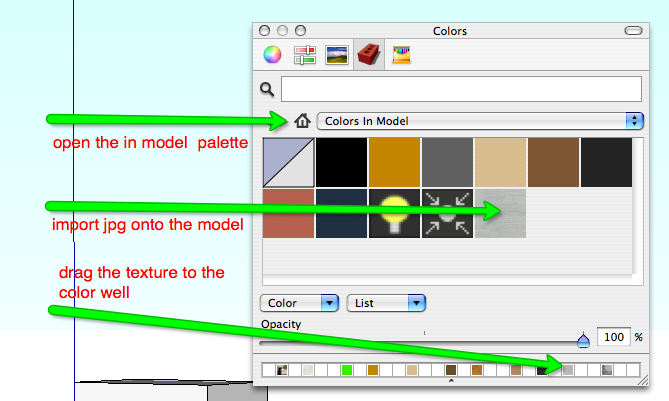
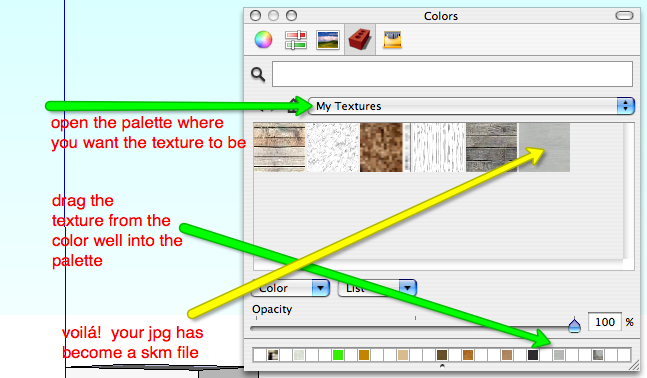
@unknownuser said:how to convert the in-model imported jpg texture to a .skm file that can be saved in the Materials folders
i looked it up and found a good solution in one of bonnie roskes' books on SUp.the two images attached to this should answer the question.
however, the solution i am offering you deals with textures one by one. i am told the script massmaterialimporter does it for more than one texture at a time. i have not tried it yet. if it works well for you let me know.
-
Thanks for the tip on the massmaterialimporter. I have been looking for something that would do that.


Hello! It looks like you're interested in this conversation, but you don't have an account yet.
Getting fed up of having to scroll through the same posts each visit? When you register for an account, you'll always come back to exactly where you were before, and choose to be notified of new replies (either via email, or push notification). You'll also be able to save bookmarks and upvote posts to show your appreciation to other community members.
With your input, this post could be even better 💗
Register Login


Advertisement