sketchucation logo sketchucation
    • Login
    Oops, your profile's looking a bit empty! To help us tailor your experience, please fill in key details like your SketchUp version, skill level, operating system, and more. Update and save your info on your profile page today!
    Mac User? | Join the Rayscaper Beta for Mac Learn More

    [Plugin] Zorro

    Scheduled Pinned Locked Moved Plugins
    53 Posts 34 Posters 70.2k Views 34 Watching
    Loading More Posts
    • Oldest to Newest
    • Newest to Oldest
    • Most Votes
    Reply
    • Reply as topic
    Log in to reply
    This topic has been deleted. Only users with topic management privileges can see it.
    • wzfwzfwzfW
      wzfwzfwzf
      last edited by

      If can use the arc, was better。呡呡

      1 Reply Last reply
      Reply Quote 0
      • free agentF
        free agent
        last edited by

        hey just wanted to know if this tools is going to be updated, this tool and knife in subdivide and smooth will always crash my drawing without fail, it seems to not like like anything thats bigger than a fresh drawing.

        http://i167.photobucket.com/albums/u143/FreeAgent84/bug.gif

        1 Reply Last reply
        Reply Quote 0
        • D
          davereap
          last edited by

          Ive had this script working ok ..then all it does is splat out..
          However its a fault with your model somewhere. Try grouping your model and locking it.
          zorrro will now work on any new bits you make...As an exercise it would be worth grouping and locking in sections to find what is causing the splat.Hopefully when youve grouped the problem area zorro will get working again...

          ........ Dave Reap

          1 Reply Last reply
          Reply Quote 0
          • M
            mbntex
            last edited by

            I am new to this tool, but it seems great! Can you use Zorro on parts that are in different visible components at once, or do you need to explode them to cut them together?

            1 Reply Last reply
            Reply Quote 0
            • W
              Whaat
              last edited by

              you need to explode them. Only the faces inside the component you are currently editing will be cut.

              SketchUp Plugins for Professionals

              1 Reply Last reply
              Reply Quote 0
              • F
                flyashy
                last edited by

                A beautiful, extremely useful and aptly titled script, Whaat.
                Thank You.
                Since you mentioned that you're not going to be working on this anymore, just wanted to inquire if anyone was doing anything with it to resolve the parallel projection usability. That would increase the usability of this tenfold or more.
                I wouldn't mind doing it but I don't know anything about rb, except to use them πŸ˜„
                Ta,
                Ashy

                1 Reply Last reply
                Reply Quote 0
                • W
                  wheay
                  last edited by

                  pls help me. i need this tool badly. it wont work for me. how do you install this. i just put it in to the plugins folder just like the others. but this dont work. pls. help this is what i need. thanks.

                  "i try to learn everyday"
                  http://designerslandmark.blogspot.com/

                  1 Reply Last reply
                  Reply Quote 0
                  • W
                    Whaat
                    last edited by

                    Did you check your 'tools' menu? πŸ˜„

                    SketchUp Plugins for Professionals

                    1 Reply Last reply
                    Reply Quote 0
                    • W
                      wheay
                      last edited by

                      @whaat said:

                      Did you check your 'tools' menu? πŸ˜„

                      oppsssss! stupid me. 🀣
                      i thought it was on the view toolbar. sorry for that. thanks.
                      i love this one. 😍

                      "i try to learn everyday"
                      http://designerslandmark.blogspot.com/

                      1 Reply Last reply
                      Reply Quote 0
                      • K
                        kjc
                        last edited by

                        I'm happy to find this tool, realy nice! I have no idea how you create such impressive things, respect.
                        This tool could be even better if it could work in parallel projection. Are youstill working on it or not?

                        1 Reply Last reply
                        Reply Quote 0
                        • W
                          Whaat
                          last edited by

                          My commercial script 'Subdivide and Smooth' http://www.smustard.com/script/SubdivideAndSmooth
                          has a tool identical to Zorro but it also works in parallel projection mode (and it snaps to axis)

                          I hope to release an update to Zorro sometime in 2009 that works in parallel projection mode, but you might be waiting quite awhile.

                          Dale

                          SketchUp Plugins for Professionals

                          1 Reply Last reply
                          Reply Quote 0
                          • CadFatherC
                            CadFather
                            last edited by

                            Hi Dale - that would be great!

                            1 Reply Last reply
                            Reply Quote 0
                            • W
                              Whaat
                              last edited by

                              Be on the lookout for an update to Zorro coming very soon...
                              It's gonna be good.... πŸ˜‰ πŸ˜„

                              SketchUp Plugins for Professionals

                              1 Reply Last reply
                              Reply Quote 0
                              • CadFatherC
                                CadFather
                                last edited by

                                can't wait to see what diego de la vega has been up to...

                                cheers Whaat!

                                1 Reply Last reply
                                Reply Quote 0
                                • E
                                  evrnaidu
                                  last edited by

                                  It's great! It will be more useful if the divided parts are grouped so that unwanted portion could be deleted easily. Of course it is difficult to make it as two parts when components are nested. If that is the case, grouping may be done within the components.

                                  1 Reply Last reply
                                  Reply Quote 0
                                  • GaieusG
                                    Gaieus
                                    last edited by

                                    Hi Evr (and welcome),

                                    Check out Zorro 2 then:
                                    http://forums.sketchucation.com/viewtopic.php?t=16038

                                    • It "resides" in the context (right click) menu of a section plane (so easy to set up)
                                    • It will actually cut through all nested groups/components
                                    • Finally it actually deletes what is behind (invisibly) the section plane.
                                      %(#BF0000)[So be extra careful to only use it
                                      on a copy of your model!]

                                    Gai...

                                    1 Reply Last reply
                                    Reply Quote 0
                                    • E
                                      evrnaidu
                                      last edited by

                                      Thank you Mr. Gaius. It really works fantastically.

                                      1 Reply Last reply
                                      Reply Quote 0
                                      • GaieusG
                                        Gaieus
                                        last edited by

                                        Now combine it with SectionCutFace and you can fill in those ugly holes.
                                        http://forums.sketchucation.com/viewtopic.php?t=20564

                                        Gai...

                                        1 Reply Last reply
                                        Reply Quote 0
                                        • pilouP
                                          pilou
                                          last edited by

                                          How do you use the section Cut face with this sort of inclined cut face?
                                          Cut first with Zorro2, then ?
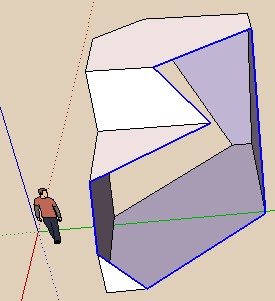
                                          sectionface.jpg


                                          Pilou.skp

                                          Frenchy Pilou
                                          Is beautiful that please without concept!
                                          My Little site :)

                                          1 Reply Last reply
                                          Reply Quote 0
                                          • M
                                            magpie
                                            last edited by

                                            Thanks Dale, really like the plugin and for simple geometry no problem, but on a more complex model I use zorro2 and it either bugsplats or sketchup simply disappears from my screen πŸ˜•

                                            Any modelling errors I should be careful of? It's a model made in skp8 and exported to skp6...any help appreciated.


                                            1 Reply Last reply
                                            Reply Quote 0

                                            Hello! It looks like you're interested in this conversation, but you don't have an account yet.

                                            Getting fed up of having to scroll through the same posts each visit? When you register for an account, you'll always come back to exactly where you were before, and choose to be notified of new replies (either via email, or push notification). You'll also be able to save bookmarks and upvote posts to show your appreciation to other community members.

                                            With your input, this post could be even better πŸ’—

                                            Register Login
                                            • 1
                                            • 2
                                            • 3
                                            • 1 / 3
                                            • First post
                                              Last post
                                            Buy SketchPlus
                                            Buy SUbD
                                            Buy WrapR
                                            Buy eBook
                                            Buy Modelur
                                            Buy Vertex Tools
                                            Buy SketchCuisine
                                            Buy FormFonts

                                            Advertisement
