sketchucation logo sketchucation
    • Login
    Oops, your profile's looking a bit empty! To help us tailor your experience, please fill in key details like your SketchUp version, skill level, operating system, and more. Update and save your info on your profile page today!
    Mac User? | Join the Rayscaper Beta for Mac Learn More

    [Plugin] Zorro

    Scheduled Pinned Locked Moved Plugins
    53 Posts 34 Posters 70.2k Views 34 Watching
    Loading More Posts
    • Oldest to Newest
    • Newest to Oldest
    • Most Votes
    Reply
    • Reply as topic
    Log in to reply
    This topic has been deleted. Only users with topic management privileges can see it.
    • W
      Whaat
      last edited by

      I made this plugin for use with my Subdivide and Smooth script. However, it is useful in other applications as well. Plus, it's about as much fun to use as the first time you ever started push/pulling 😉 Just try hacking Bryce to pieces and tell me you didn't crack a smile... 😄

      Zorro will be added to the 'Tools' menu. Happy slashing!

      I should mention that I have gotten bug splats from using this plugin. So use at your own risk!

      http://www.members.shaw.ca/marshallamp20/zorro.gif


      Zorro v1

      SketchUp Plugins for Professionals

      1 Reply Last reply
      Reply Quote 0
      • soloS
        solo
        last edited by

        Whaat a beauty!!

        You Rock dude!!

        I can certainly use this script in my everyday workflow.

        Thank you very much, it's gems like these that convince me that regardless what Google does in the future SU will continue to grow with the help of talented coders like you.

        http://www.solos-art.com

        If you see a toilet in your dreams do not use it.

        1 Reply Last reply
        Reply Quote 0
        • CadFatherC
          CadFather
          last edited by

          and that has to be the best name ever! 🤣 Thaanks!

          1 Reply Last reply
          Reply Quote 0
          • soloS
            solo
            last edited by

            Imagine what can be achieved with this script and joint pushpull together 😲 .

            How difficult would it be to get the freehand tool to also work with this script?

            http://www.solos-art.com

            If you see a toilet in your dreams do not use it.

            1 Reply Last reply
            Reply Quote 0
            • W
              Whaat
              last edited by

              @solo said:

              Imagine what can be achieved with this script and joint pushpull together 😲 .

              Should be handy for SketchyFFD as well 😄

              @unknownuser said:

              How difficult would it be to get the freehand tool to also work with this script?

              I am not sure if it can be done. Maybe someone else could look into into it. I don't plan on putting any more work into this script. Anyone is welcome to take it and improve it.

              Whaat

              SketchUp Plugins for Professionals

              1 Reply Last reply
              Reply Quote 0
              • D
                Daniel S
                last edited by

                Another great tool for SU!! Thank you!!
                Zorro 🤣
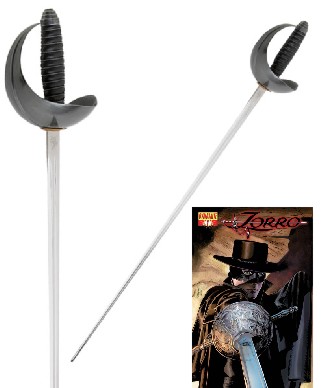

                Zorro tool.jpg

                1 Reply Last reply
                Reply Quote 0
                • boofredlayB
                  boofredlay
                  last edited by

                  Make sure you make a button for this script...

                  http://thisdayindisneyhistory.homestead.com/files/Zorro-Z-for-web.gif

                  http://www.coroflot.com/boofredlay

                  1 Reply Last reply
                  Reply Quote 0
                  • pilouP
                    pilou
                    last edited by

                    Damned! That works! 😎
                    Whaat you see is whaat you get 😉


                    Zooro.jpg

                    Frenchy Pilou
                    Is beautiful that please without concept!
                    My Little site :)

                    1 Reply Last reply
                    Reply Quote 0
                    • K
                      kwistenbiebel
                      last edited by

                      Really cool whaat !
                      By the looks of it, you are making a whole 'organic modeling' module 😮 😲
                      And knowing you, things will really be designed from the users viewpoint.

                      Loving every bit of the things you are producing lately.
                      Keep up the great work 😄

                      1 Reply Last reply
                      Reply Quote 0
                      • W
                        wikii
                        last edited by

                        Whaat,you are genius!!!

                        1 Reply Last reply
                        Reply Quote 0
                        • J
                          Jon
                          last edited by

                          Thank you soo much! 😄

                          I was thinking the other day "hmm, with whaat's subdividing tool, to turn a cube into a smoothed cube rather than a sphere, it will require some extra geometry. That's going to be a bit of a hassle". Not anymore though! ☀
                          you ROCK!!

                          Jon
                          KT Team member

                          1 Reply Last reply
                          Reply Quote 0
                          • PixeroP
                            Pixero
                            last edited by

                            Great, thanks!
                            A question *(I havent tried it yet):*How "far" does the cutting go?
                            Meaning, in the video you dont have a object selected, so If there were two or more overlapping geometry with some distance in between, how far would it cut?

                            Edit: After a quick test it seem to cut "all the way" so my next question is: Whould it be possible to limit it to only cut on faces visible in the viewport or facing the camera?
                            I can think of many cases when I would want it to work like that.

                            1 Reply Last reply
                            Reply Quote 0
                            • urgenU
                              urgen
                              last edited by

                              Fine "emotional" script... Thanks! 👍
                              Some wishes and remarks:
                              1.The script works only in "PERSPECTIVE" 😕
                              2.The binding of the cursor (knife) to axis (Planes)is necessary ❗

                              --pupil forever...------

                              1 Reply Last reply
                              Reply Quote 0
                              • pilouP
                                pilou
                                last edited by

                                1. binding Red, Blue, Green works when you are in view Top, Front...

                                Funny script indeed ☀
                                Whaat you see is whaat you get 😉


                                zorro.jpg

                                Frenchy Pilou
                                Is beautiful that please without concept!
                                My Little site :)

                                1 Reply Last reply
                                Reply Quote 0
                                • R
                                  rv1974
                                  last edited by

                                  It shines Whaat!
                                  But a few things MUST be repaired\added:

                                  1. Work in ortho projection, axis following (mentioned above)
                                  2. Problems with snapping.
                                  1 Reply Last reply
                                  Reply Quote 0
                                  • R
                                    remus
                                    last edited by

                                    Another big thanks from me, and if it hasnt been said enough i cant wait for subdivide+smooth.

                                    http://remusrendering.wordpress.com/

                                    1 Reply Last reply
                                    Reply Quote 0
                                    • K
                                      kwistenbiebel
                                      last edited by

                                      I tried Zorro on a higher poly model (the naked man I posted earlier) but Sketchup crashes .
                                      It's not the ruby's fault (great coding whaat !) ...it's just sketchup I guess 😢

                                      1 Reply Last reply
                                      Reply Quote 0
                                      • J
                                        Jim
                                        last edited by

                                        I get this error:

                                        
                                        C;/Program Files/Google/Google SketchUp 6/Plugins/Zorro.rb;26;in `activate'
                                        C;/Program Files/Google/Google SketchUp 6/Plugins/Zorro.rb;220;in `select_tool'
                                        C;/Program Files/Google/Google SketchUp 6/Plugins/Zorro.rb;220;in `zorrotool'
                                        C;/Program Files/Google/Google SketchUp 6/Plugins/Zorro.rb;226
                                        C;/Program Files/Google/Google SketchUp 6/Plugins/Zorro.rb;226;in `call'
                                        Error; #<NoMethodError; undefined method `GetString' for nil;NilClass>
                                        C;/Program Files/Google/Google SketchUp 6/Plugins/Zorro.rb;74;in `onLButtonDown'


                                        Hi

                                        1 Reply Last reply
                                        Reply Quote 0
                                        • W
                                          Whaat
                                          last edited by

                                          @jim said:

                                          I get this error:

                                          
                                          > C;/Program Files/Google/Google SketchUp 6/Plugins/Zorro.rb;26;in `activate'
                                          > C;/Program Files/Google/Google SketchUp 6/Plugins/Zorro.rb;220;in `select_tool'
                                          > C;/Program Files/Google/Google SketchUp 6/Plugins/Zorro.rb;220;in `zorrotool'
                                          > C;/Program Files/Google/Google SketchUp 6/Plugins/Zorro.rb;226
                                          > C;/Program Files/Google/Google SketchUp 6/Plugins/Zorro.rb;226;in `call'
                                          > Error; #<NoMethodError; undefined method `GetString' for nil;NilClass>
                                          > C;/Program Files/Google/Google SketchUp 6/Plugins/Zorro.rb;74;in `onLButtonDown'
                                          > 
                                          

                                          That's what happens when you cut and paste from the example scripts! Try deleting '$exStrings.GetString' from the two offending lines of code (line 74 and 163)

                                          Let me know if that does the trick.

                                          SketchUp Plugins for Professionals

                                          1 Reply Last reply
                                          Reply Quote 0
                                          • K
                                            kwistenbiebel
                                            last edited by

                                            @whaat said:

                                            '$exStrings.GetString'

                                            I don't know zip about coding....but I like this line for some reason 😄.
                                            Freud is always around when you need him ...

                                            1 Reply Last reply
                                            Reply Quote 0

                                            Hello! It looks like you're interested in this conversation, but you don't have an account yet.

                                            Getting fed up of having to scroll through the same posts each visit? When you register for an account, you'll always come back to exactly where you were before, and choose to be notified of new replies (either via email, or push notification). You'll also be able to save bookmarks and upvote posts to show your appreciation to other community members.

                                            With your input, this post could be even better 💗

                                            Register Login
                                            • 1
                                            • 2
                                            • 3
                                            • 2 / 3
                                            • First post
                                              Last post
                                            Buy SketchPlus
                                            Buy SUbD
                                            Buy WrapR
                                            Buy eBook
                                            Buy Modelur
                                            Buy Vertex Tools
                                            Buy SketchCuisine
                                            Buy FormFonts

                                            Advertisement