Grid on Ground
-
Can you make a grid on the ground? and the grid can be a point of color-coded feedback. The size of square is depend on the unit of the model. Unlike Ruby script 3D Grid, the grid is infinity-extended.
-
If I recall, there are at least 3 different grids I have seen and it seems like they are size-able from a pop-up when you select them.
-
int tools menu, choose grid
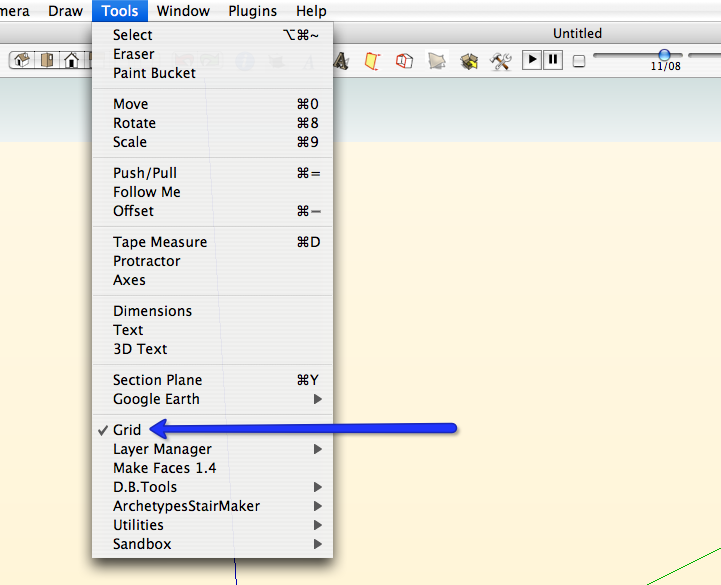
then define the origin, grid spacing and number of units in both directions.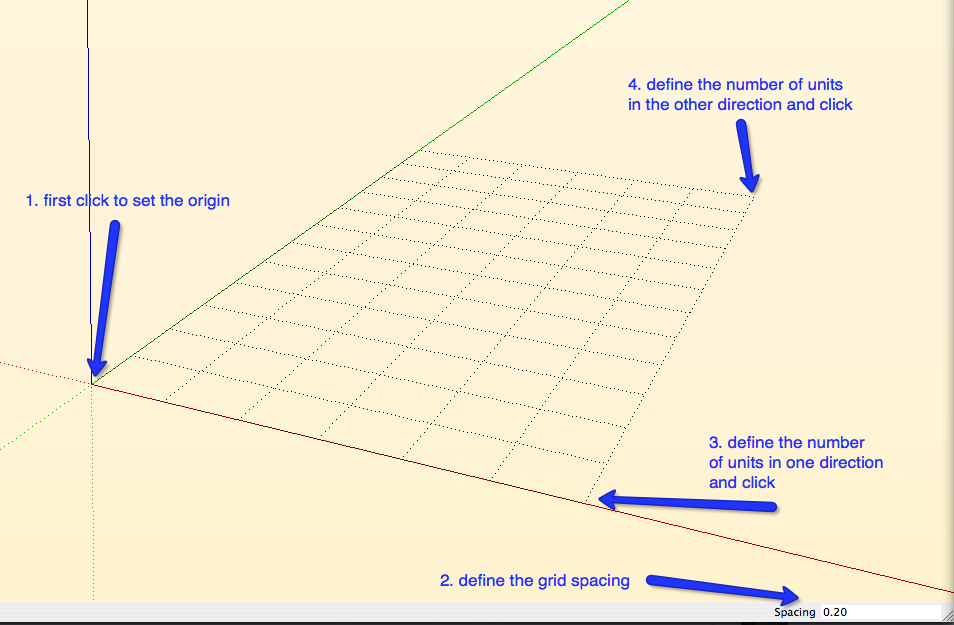
-
Hi Edson,
You must have a "grid" plugin installed.
-
-
Yes, there is one (lthough not like an infinite plane.
I like it because when we dig at excavations, we usually work in 10m X 10m grids and when I get back to SU I can easily navigate within my model. -
So it's not infinte plane...
-
The parametric grid script, like it's name implies, is parametric - infinitely editable. Select grid, r-click and Choose Edit Grid. From there you control the size of the grid and the individual grid increments.
-
The ideal grid:
- it can be scaled by a hotkey which doubles in size
- it is infinite (no need to set distance points)
- it isn't an actual object in the Outliner
- it has line weighting (ie. every 4th or 8th line is darker/heavier)
- it adjusts its visual screen draw to prevent moiré patterns
- if in an orthogonal view, it covers the background (ie. front, top, right)
- it is tied into the snap distance and unit of measurement
Thoughts?


Hello! It looks like you're interested in this conversation, but you don't have an account yet.
Getting fed up of having to scroll through the same posts each visit? When you register for an account, you'll always come back to exactly where you were before, and choose to be notified of new replies (either via email, or push notification). You'll also be able to save bookmarks and upvote posts to show your appreciation to other community members.
With your input, this post could be even better 💗
Register Login


Advertisement