[Plugin] Very fast texture writer
-
@unknownuser said:
A little image of what this plug make?
Install it.
In the Ruby Console type fast_tw + <enter>.
It exports all of the model's materials (including any unused ones) as individual image files (jpg etc) into the model's folder.
... -
-
Pilou
You take me much tooliterally !
Type fast_tw
Then press the <enter>key.
I used the "+" as = "&" - meaning "and then you do..."...
Vous me prendre trop à la lettre!
Taper à la machine fast_tw.
Ensuite, appuyez sur la touche-entrée.
J'ai utilisé la "+" = "&" - sens "et vous faire..."...
. -

I have presumed that

The Duhduh of the day
-
thank you for this very useful, and to takesh h for making it available through plugins dropdown - i hate the ruby consol
-
The import function doesn't work on Sketchup 8 Pro unless I'm missing something -- the textures folder is created but nothing is in it...
Best,
Jason. -
@jason_maranto said:
The import function doesn't work on Sketchup 8 Pro unless I'm missing something -- the textures folder is created but nothing is in it...
Best,
Jason.Do you mean, "The import function doesn't work..."
???
Try with the Ruby Console open and report error messages, if any... -
Edit -- I got it working... It was user error on my part.
Great time-saver of a plugin!
Best,
Jason. -
I've updated the plugin to preserve opacity and color settings for each material. There's also improved regex in the image type checking function, which will better check for imported image filetypes. I've also included the option to export and import by selection, which will give you the option of mass editing textures from certain parts of your model. Follow the link: Very Fast Texture Writer v0.4
-
Outstanding! -- this makes creating and updating material libraries so much easier.
Best,
Jason. -
bentleykfrog and all!
This code is even faster than the code with used temp face if the Outliner window is open.
It is better to create an empty group, rather than create face and then remove its edges:def quickly_tw(operation=true) model = Sketchup.active_model tw = Sketchup.create_texture_writer # Iterate through materials, assign to face, load in tw model.start_operation "texture;)" if operation gr = model.entities.add_group model.materials.each do |mat| if mat.texture gr.material = mat tw.load(gr) end end # Output textures tw.write_all(File.dirname(Sketchup.active_model.path) + "/", false) model.abort_operation if operation endAnd also and if by chance the temp face with the same coordinates is already defined in the model? Can this happen?
Thank you bentleykfrog -
Nice plugin Didier and takesh,
I've modified it slightly to allow for batch processing and updating of textures.
Update - January 15th 2011
This is a minor update to change the entity used to create a texture to a group. This limits any interference with the models geometry on export & import (thanks to AlexMozg for the code).A description of all the operations are below. The plugin can be accessed by the menu [Plugins] - [Export All Textures]:
-
[Export All Textures]
-
This operation will export all the textures from the model to a 'textures' folder in the same directory as the model
-
[Export Settings] - [Update Model's Texture Paths]
-
When exporting textures with this option enabled, each texture path in the model will be updated to the path of the exported texture image.
-
[Import All Textures]
-
Choose a file within a folder to import all the textures in that folder. Each file is compared with the models textures by its namespace (ie. the file "AsphaltCloseups00212M.jpg" will be replaced with the file "AsphaltCloseups00212M" regardless of its extension)
-
[Import Settings] - [Only Update Existing Materials]
-
With this option enabled, only files with namespace equivalents to the models textured materials will be imported.
-
[Import Settings] - [Create New Materials for Unique Textures]
-
With this option enabled, files that have no namespace equivalents to the models textured materials will be imported into a new material.
-
[Import Settings] - [Create New Materials for All Textures]
-
With this option enabled, each texture file will be imported into a new material.
-
[Import Settings] - [Consolidate to Texture Folder]
-
With this option enabled, each texture file will be copied to the 'texture' folder.
-
[Export From Selection]
-
Only textures in the active selection will be exported to the 'texture' folder
-
[Import To Selection]
-
Only textures that have a match to the active selection's materials will be imported.
-
[Selection Settings] - [Make Painted Components Unique]
-
With this option selected, painted components in the selection that aren't unique to the selection will be made unique.
-
[Selection Settings] - [Materials Unique to Selection]
-
With this option selected, materials that aren't unique to the selection will be made unique. (ie. a duplicate of the material is made and all entities in the selection are linked to this duplicate)
-
[Selection Settings] - [Consolidate to Texture Folder on Import]
-
With this option selected, all imported textures will be copied to the 'texture' folder.
I haven't been able to replicate your exporting issues takesh, could you link me to an example?
Also, I haven't tested this on a mac, so there could be further issues.
Changelog
-
15th January 2011 (v0.41)
-
Face->Group Change: Changed the entity used to create a texture file to a group (thanks to AlexMozg)
-
14th January 2011 (v0.4)
-
Export/Import Selection added: Export/import selection option added so parts of the model can be edited
-
Better Image Checking: The regex checking for BMP and JPEG images has been updated
-
Opacity & Color retained: Material opacity and color settings are now retained when they are modified
-
9th January 2011
-
New Materials on Import added: On import, new materials are created for textures that have no existing matching materials in the model
-
Image checking: added some rudimentary regex image checking to the import script, could still be a bit buggy
-
Debug and reports: known errors are reported in the ruby console when open on operation
Known Issues
- Targa files will import but can't be written with the TextureWriter[/list]
-niall
PS:If you run into any trouble importing jpg,png,bmp or tif files please post the image to this topic so I can get a look at its header data.
-
-
@alexmozg said:
It is better to create an empty group, rather than create face and then remove its edges
Nice idea AlexMozg, thanks for the code. I've updated the script to do this. I've also noticed the more times the operations are run, the slower the response from tw.write. I'm not exactly sure whats going on here but it seems if you re-open your file the lag goes away. Anyway, follow the link Very Fast Texture Writer v0.41
-
@jason_maranto said:
Outstanding! -- this makes creating and updating material libraries so much easier.
Best,
Jason.Thanks Jason
I'm thinking of adding some proportion options on import to the next update. For example, you export some textures that aren't tiling well, batch process them through some texture tiling application, and then import the new textures and modify the proportions of the materials to suit...Maybe some options like:
[If Different, Fit Proportions] - fits the new texture inside the width and height of the material dimensions
[If Different, Preseve Proportions] - stretches the new texture to fit the material dimensions
[If Different, Respect Width] - Matches the width dimension and scales the height dimension to suit the new texture
[If Different, Respect Height] - Matches the height dimension and scales the width dimension to suit the new textureWhat do you think?
-niall
-
Sounds very good to me -- also if somehow a custom value for newly created materials could be input in a manner similar to below:
In the recent past I've made a large color range of tiles -- 183 RBG colors + 1 texture file set to colorize for each of the RGB values, all set to the same tiling with each RGB color becoming the custom name of the file.
So being able to automate a batch of new files by specifying:
1) Base Material name (ie: mytile_)
2) Comma separated or tab delimited (or similar) text file with RGB values and names (to be added at the end of the base name ie: mytile_bright green)
3) A Texture
4) Material options (ie: colorize, scale, transparency)Would be a huge time-saver in instances like this -- I've done well over 2000 materials manually like this... to have that process automated would allow me to be far more productive. Although since I seem to be one of the few here excited by this maybe I'm alone in producing huge custom libraries...
Regardless, the plugin as it stands is fantastic and has already saved me a few hours of needlessly navigating for textures when creating materials... so thank-you again.
Best,
Jason. -
I can't tell which is the latest version of this, very confusing.
-
Here is the latest version: http://rhin.crai.archi.fr/rld/plugin_details.php?id=143
-
I'm having a few issues with this plugin when importing image libraries:
-
The tiling settings for the images are coming in with the x and y scales reversed (the aspect ratio is reversed from the actual image).
-
I would like to retain any "-" and "_" characters in the image name (when converted to the SKM name).
Best,
Jason. -
-
Around lines #90 and #129 it reads
mat.texture.size = [twidth,theight]
to swap the height/width values change it to read
mat.texture.size = [theight, twidth]
BUT thewidthSHOULD come first in the.size=[]method as it is originally coded... so I am perplexed...
Around line #59 it reads
filename = filename.delete('^A-Za-z0-9')
to keep the-and_in file-names, change it to read...
filename.gsub!(/[^A-Za-z0-9_-]/, '')
This WILL work... -
Thanks TIG, I did my own hacks to the Ruby to make it usable for right now, but your code is much nicer so I will change it out
For the record the changes I made were at lines 344 and 368 -- but I only barely know my way around a Ruby file

Best,
Jason.


 But I don't know what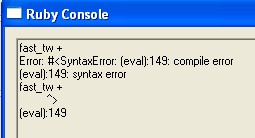






Advertisement