sketchucation logo sketchucation
    • Login
    Oops, your profile's looking a bit empty! To help us tailor your experience, please fill in key details like your SketchUp version, skill level, operating system, and more. Update and save your info on your profile page today!
    ⚠️ Important | Libfredo 15.6b introduces important bugfixes for Fredo's Extensions Update

    Improved Mapping System

    Scheduled Pinned Locked Moved SketchUp Feature Requests
    sketchup
    12 Posts 7 Posters 1.8k Views 7 Watching
    Loading More Posts
    • Oldest to Newest
    • Newest to Oldest
    • Most Votes
    Reply
    • Reply as topic
    Log in to reply
    This topic has been deleted. Only users with topic management privileges can see it.
    • Mike LuceyM Offline
      Mike Lucey
      last edited by

      Hi pibuz,

      I'm not fully sure what your are getting at. Could you possibly provide some graphic examples so we can see exactly what you are talking about.

      Mike

      Support us so we can support you! Upgrade to Premium Membership!

      1 Reply Last reply Reply Quote 0
      • jeff hammondJ Offline
        jeff hammond
        last edited by

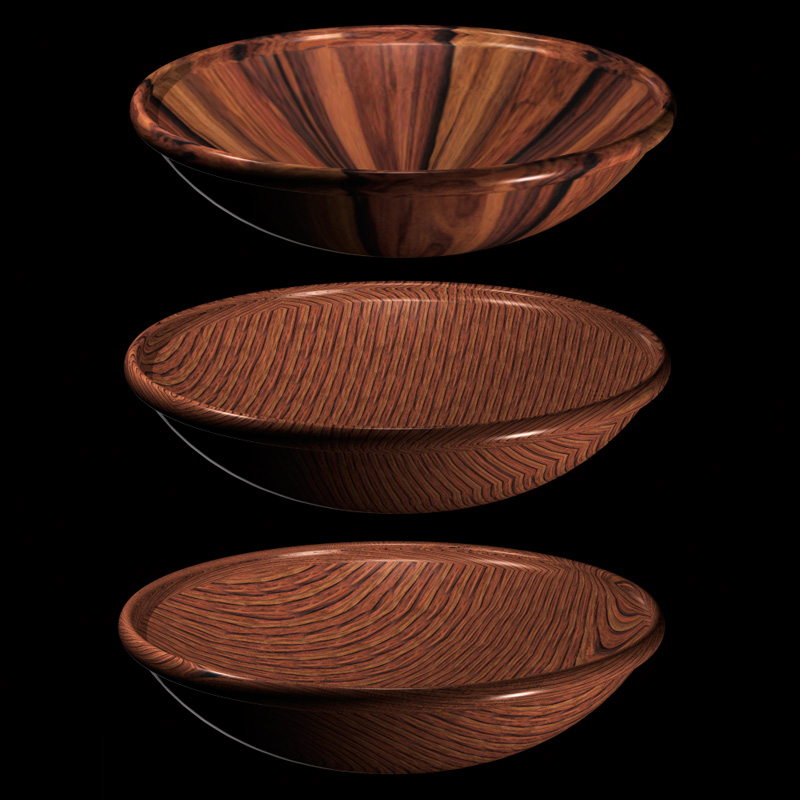
        basically, just different ways to lay the texture down..

        here's three versions of the same texture.. projected planetary, cylindric, and orthogonal..

        projection.jpg

        dotdotdot

        1 Reply Last reply Reply Quote 0
        • jeff hammondJ Offline
          jeff hammond
          last edited by

          oh yeah..

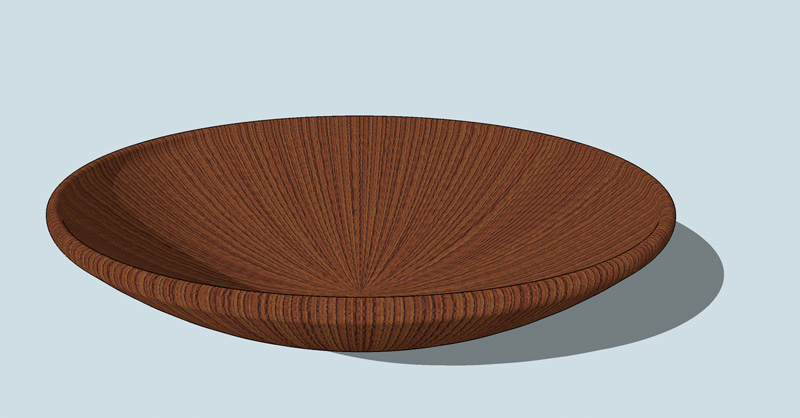
          in contrast, sketchup is pretty much only capable of handling the material one way with this type of shape..

          [edit] fwiw, the bowl here and the one above are slightly different shapes..also, the images in the prior post were done in artlantis..

          bowl.jpg

          dotdotdot

          1 Reply Last reply Reply Quote 0
          • R Offline
            remus
            last edited by

            couldnt you do that with projected textures?

            http://remusrendering.wordpress.com/

            1 Reply Last reply Reply Quote 0
            • jeff hammondJ Offline
              jeff hammond
              last edited by

              @remus said:

              couldnt you do that with projected textures?

              hmm.. maybe you can? it's worth a shot though i don't know how much control you'll have.. i wonder if pibuz is still reading this.. maybe he'll try it out and post the results..

              if it does work, i can imagine it would be an awkward and longer than necessary workflow.. personally, i don't see the need to implement it in sketchup but if the plan is to eventually have it do full blown renderings, then maybe..

              dotdotdot

              1 Reply Last reply Reply Quote 0
              • thomthomT Offline
                thomthom
                last edited by

                I second this suggestion.

                Thomas Thomassen — SketchUp Monkey & Coding addict
                List of my plugins and link to the CookieWare fund

                1 Reply Last reply Reply Quote 0
                • Alan FraserA Offline
                  Alan Fraser
                  last edited by

                  We definitely need better mapping if SU is to be used for anything other than the simplest architectural forms.
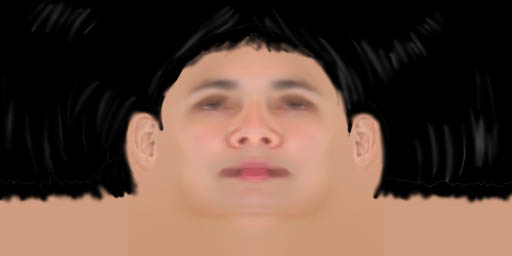
                  Admittedly, the present mapping is capable of wrapping an image around a cylinder, but it will only do that as long as the cylinder is perfectly cylindrical...not if it is even the slightest bit truncated conic. Even then, you have to use trial and error to get the circumference exactly the same as the length of the image; you can't use any UV controls to effectively say "Wrap this around the cylinder exactly once."

                  If the object to be mapped is in any way irregular then all mapping goes right out the window. You can't, for instance, wrap this image around a head. Nor is there any way of mapping any kind of even regular object that is curving along more than one axis...a sphere or hemisphere, for example

                  skin_mirror2.jpg

                  3D Figures
                  Were you required to walk 500 miles? Were you advised to walk 500 more?
                  You could be entitled to compensation. Call the Pro Claimers now!

                  1 Reply Last reply Reply Quote 0
                  • R Offline
                    remus
                    last edited by

                    alan, you might be able to map that texture by projecting it on to the head. would be pretty tricky, but i reckon you could get some ok-ish results.

                    http://remusrendering.wordpress.com/

                    1 Reply Last reply Reply Quote 0
                    • K Offline
                      kwistenbiebel
                      last edited by

                      Pibuz,
                      I am glad you posted this as I second this.

                      Su needs more uv mapping options!

                      Not sure if Google would pick this one up.
                      I kind of have the feeling that if it is not useful to be used in combo with Google earth...the wishes aren't easily granted.

                      1 Reply Last reply Reply Quote 0
                      • Alan FraserA Offline
                        Alan Fraser
                        last edited by

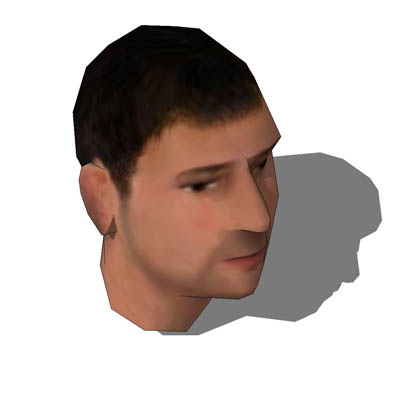
                        Believe me, if there was a way, I'd have found it by now. You can't project it onto the head...you'd get a face front and back, with nasty stuff in between. Nor can you gradually roll it around the head, sampling and painting as you go; unless the surfaces are entirely vertical (like the cylinder example) the results are totally unpredictable.

                        I CAN produce SU heads that are decently mapped, but I have to export them out to another program then back in again to do it.

                        head.jpg

                        3D Figures
                        Were you required to walk 500 miles? Were you advised to walk 500 more?
                        You could be entitled to compensation. Call the Pro Claimers now!

                        1 Reply Last reply Reply Quote 0
                        • R Offline
                          remus
                          last edited by

                          couldnt you just cut out the face area, project the texture and then stick it back onto the head?

                          probably more work and not as good results as exporting it though 😛

                          http://remusrendering.wordpress.com/

                          1 Reply Last reply Reply Quote 0
                          • 1 / 1
                          • First post
                            Last post
                          Buy SketchPlus
                          Buy SUbD
                          Buy WrapR
                          Buy eBook
                          Buy Modelur
                          Buy Vertex Tools
                          Buy SketchCuisine
                          Buy FormFonts

                          Advertisement



