sketchucation logo sketchucation
    • 登入
    Oops, your profile's looking a bit empty! To help us tailor your experience, please fill in key details like your SketchUp version, skill level, operating system, and more. Update and save your info on your profile page today!
    🔌 Smart Spline | Fluid way to handle splines for furniture design and complex structures. Download

    In Development: Subdivide and Smooth

    已排程 已置頂 已鎖定 已移動 Developers' Forum
    262 貼文 65 Posters 49.6k 瀏覽 65 Watching
    正在載入更多貼文
    • 從舊到新
    • 從新到舊
    • 最多點贊
    回覆
    • 在新貼文中回覆
    登入後回覆
    此主題已被刪除。只有擁有主題管理權限的使用者可以查看。
    • W 離線
      Whaat
      最後由 編輯

      @notareal said:

      Fletch is right, Google should hire you.

      I really appreciate all of the kind words and excitement! I can't all of the credit. I was fortunate to find some very useful information on the internet about how to implement subdivision surfaces (A factored approach to subdivision surfaces by Joe Warren, Scott Schaefer Rice University)

      Without the work of others, I would never have come up with this. I think some of the other Ruby scripters deserve more credit. There are some amazing Ruby's out there that I am in awe of. SketchyFFD, JPP, OffsetSurface, SketchyPhysics, to name a few...

      SketchUp Plugins for Professionals

      1 條回覆 最後回覆 回覆 引用 0
      • ely862meE 離線
        ely862me
        最後由 編輯

        u are wrong all credit is your because u are the first who did it

        we don t care where u got the ideea or else u re the guy who did it.

        cheers!

        Elisei (sketchupper)


        Before no life was done on Earth it was THE LIFE ITSELF...GOD
        Come and See EliseiDesign

        1 條回覆 最後回覆 回覆 引用 0
        • CadFatherC 離線
          CadFather
          最後由 編輯

          ..starting to be like the oscar night but i agree with all praise..

          to add to that .. without GOD no sketchup, without sketchup no rubies, without whaat no subdivide and smooth, without subdivide and smooth... 😄

          1 條回覆 最後回覆 回覆 引用 0
          • sk.lionS 離線
            sk.lion
            最後由 編輯

            wow, this plug in gets more intriguing every time i see it

            1 條回覆 最後回覆 回覆 引用 0
            • J 離線
              justry
              最後由 編輯

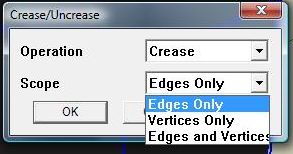
              Hey whaat, I have a suggestion which I think might be useful. Instead of having to click each of the edges or vertices to be creased, why don't you let the user select all the edges he wants, then click a button (crease), and a dialog pops up, asking the user whether he wants to crease edges, vertices (those at the intersection of selected edges), or both.

              That should make it a lot easier, especially in the case of curved edges that become broken up so you'd have to click each little line.

              It's just a suggestion though, the plugin's still great as it is.

              Edit: And maybe the same thing to de-crease ( 😄 ) the edges. Select them, press a de-crease button, etc.

              1 條回覆 最後回覆 回覆 引用 0
              • utilerU 離線
                utiler
                最後由 編輯

                WOW Whaat!!!
                Been on holidays for a while and come back and see this; SU just screamed out to the free form community big time!!!

                I will follow this thread with much interest and anticipation....

                Just Curious...

                1 條回覆 最後回覆 回覆 引用 0
                • RayOchoaR 離線
                  RayOchoa
                  最後由 編輯

                  @justry said:

                  Hey whaat, I have a suggestion which I think might be useful. Instead of having to click each of the edges or vertices to be creased, why don't you let the user select all the edges he wants, then click a button (crease), and a dialog pops up, asking the user whether he wants to crease edges, vertices (those at the intersection of selected edges), or both.

                  That should make it a lot easier, especially in the case of curved edges that become broken up so you'd have to click each little line.

                  It's just a suggestion though, the plugin's still great as it is.

                  Edit: And maybe the same thing to de-crease ( 😄 ) the edges. Select them, press a de-crease button, etc.

                  You know there is a plug-in called weld that you could use to unite the broken lines of a curve. Here's the link http://www.smustard.com/script/Weld

                  CaR DeSiGnS bY mE
                  http://ray-ochoa.com

                  1 條回覆 最後回覆 回覆 引用 0
                  • W 離線
                    Whaat
                    最後由 編輯

                    @justry said:

                    Hey whaat, I have a suggestion which I think might be useful. Instead of having to click each of the edges or vertices to be creased, why don't you let the user select all the edges he wants, then click a button (crease), and a dialog pops up, asking the user whether he wants to crease edges, vertices (those at the intersection of selected edges), or both.

                    That should make it a lot easier, especially in the case of curved edges that become broken up so you'd have to click each little line.

                    It's just a suggestion though, the plugin's still great as it is.

                    Edit: And maybe the same thing to de-crease ( 😄 ) the edges. Select them, press a de-crease button, etc.

                    Haha...The plugin already has this exact feature! I just never demonstrated it in the tutorial.

                    crease.jpg

                    SketchUp Plugins for Professionals

                    1 條回覆 最後回覆 回覆 引用 0
                    • RayOchoaR 離線
                      RayOchoa
                      最後由 編輯

                      Hey Whaat! When do you think this awsome Plug-in will be uploaded? I cant wait. Im so surprised at what it can do

                      CaR DeSiGnS bY mE
                      http://ray-ochoa.com

                      1 條回覆 最後回覆 回覆 引用 0
                      • W 離線
                        Whaat
                        最後由 編輯

                        @rayochoa said:

                        Hey Whaat! When do you think this awsome Plug-in will be uploaded? I cant wait. Im so surprised at what it can do

                        I said this 2-3 weeks ago, but I think it will be released in 2-3 weeks 😉

                        testing is going pretty well so that's a good sign.

                        SketchUp Plugins for Professionals

                        1 條回覆 最後回覆 回覆 引用 0
                        • J 離線
                          justry
                          最後由 編輯

                          @whaat said:

                          Haha...The plugin already has this exact feature! I just never demonstrated it in the tutorial.

                          Wow! You read my mind! I mean... I read your mind! I mean... oh never mind!

                          @RayOchoa: Yeah I have the weld plugin, but it doesn't always work everytime. Besides, that way you'll have no control over the vertices. But fortunately whaat already has it covered!

                          1 條回覆 最後回覆 回覆 引用 0
                          • RayOchoaR 離線
                            RayOchoa
                            最後由 編輯

                            @justry said:

                            @whaat said:

                            @RayOchoa: Yeah I have the weld plugin, but it doesn't always work everytime. Besides, that way you'll have no control over the vertices. But fortunately whaat already has it covered!

                            Oh okay thats cool. Man, i just hope this plugin comes in soon.
                            @Whaat! How bout lettin us give it a little test run? Can you post an attatchment for a few days?

                            CaR DeSiGnS bY mE
                            http://ray-ochoa.com

                            1 條回覆 最後回覆 回覆 引用 0
                            • M 離線
                              Masta Squidge
                              最後由 編輯

                              Still waiting patiently for this script. Every day I come in just to check this thread for a release. 😍

                              1 條回覆 最後回覆 回覆 引用 0
                              • david_hD 離線
                                david_h
                                最後由 編輯

                                I saw the YOu tubes on this. Pretty great stuff. can't wait for it!!!

                                D

                                If I make it look easy...It is probably easy

                                1 條回覆 最後回覆 回覆 引用 0
                                • JClementsJ 離線
                                  JClements
                                  最後由 編輯

                                  Fred06:

                                  This is excerpt of an email from a friend of mine who uses Lightwave extensively.

                                  "Awesome! ...Subdivision modeling is very powerful. That's pretty much the only type of modeling I do in LightWave nowadays. Do you know if this is Catmull-Clark subdivision? The results look like it might be. ....This is definitely a great addition to SketchUp. It would be awesome if you could import LW sub-d meshes into SketchUp and vise-versa."

                                  Regards, John

                                  John | Illustrator | Beaverton, Oregon

                                  1 條回覆 最後回覆 回覆 引用 0
                                  • F 離線
                                    Fletch
                                    最後由 編輯

                                    take your time, Whaat, get it right... 😉
                                    ... have patience people! it's a virtue, and is usually greatly rewarded!

                                    Fletch
                                    Twilight Render Cross-platform Plugin for SketchUp on PC or Mac

                                    1 條回覆 最後回覆 回覆 引用 0
                                    • RayOchoaR 離線
                                      RayOchoa
                                      最後由 編輯

                                      @fletch said:

                                      take your time, Whaat, get it right... 😉
                                      ... have patience people! it's a virtue, and is usually greatly rewarded!

                                      True that!
                                      Still i can't wait. Its going to be awsome

                                      CaR DeSiGnS bY mE
                                      http://ray-ochoa.com

                                      1 條回覆 最後回覆 回覆 引用 0
                                      • M 離線
                                        Masta Squidge
                                        最後由 編輯

                                        I noticed the crease tool only displays when you mouse over the edges in the videos. Is there a way to display the state of all creased/uncreased edges? I imagine once you start doing that to a lot of edges it will get hard to remember what is in what state.

                                        1 條回覆 最後回覆 回覆 引用 0
                                        • T 離線
                                          Tella
                                          最後由 編輯

                                          @fletch said:

                                          ... have patience people! it's a virtue, and is usually greatly rewarded!

                                          Patience is the virtue that ends when is most needed. 😆

                                          1 條回覆 最後回覆 回覆 引用 0
                                          • J 離線
                                            Jon
                                            最後由 編輯

                                            Just wondering, Whaat... how much will this plugin cost (if anything)?

                                            Jon
                                            KT Team member

                                            1 條回覆 最後回覆 回覆 引用 0
                                            • 1
                                            • 2
                                            • 3
                                            • 4
                                            • 5
                                            • 13
                                            • 14
                                            • 2 / 14
                                            • 第一個貼文
                                              最後的貼文
                                            Buy SketchPlus
                                            Buy SUbD
                                            Buy WrapR
                                            Buy eBook
                                            Buy Modelur
                                            Buy Vertex Tools
                                            Buy SketchCuisine
                                            Buy FormFonts

                                            Advertisement