Searching the better way to split a shape in two.
-
It seems to be so an evidence for lot of you that i havn't found the way to do it anywhere:
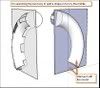
"How do we split a complexe shape by the middle"??
[
](http://i274.photobucket.com/albums/jj245/Spendauballet/SketchUp/splitn2.jpg)
For now, i make a parallel rectangular face ,-, move the shape by is center to surface ,-, Select all, intersect with model ,-, delete an half part. >> laborious, long, many wrong erased pieces. I'm shure we can do it bettersimon.
-
Simon,
If there is a better way I don't know it. One way to ease the post-intersect selecting is to switch to Parallel Projection, but with a complex model it can still be tedious to get just the geometry you want to keep or erase.
Fred
-
-
Jean,
Simple and clever.

Fred
-
Hello everyone
I wanted to add my 5 cents.
Sometimes I find myself working at the unusual angle and with a complex overlapping geometry. This does not always allows me to switch my view in a way where i can select one half. Espatially if i am not cutting by a simple single face.So here is my method
-
Good,, very Good,, Excellent i would say.
I think we've got all we needed.. Thanks SCF folks
simon
-
Good tuts guys.
The tip about grouping after the intersect is very useful for the more complicated shapes.Thanks


Hello! It looks like you're interested in this conversation, but you don't have an account yet.
Getting fed up of having to scroll through the same posts each visit? When you register for an account, you'll always come back to exactly where you were before, and choose to be notified of new replies (either via email, or push notification). You'll also be able to save bookmarks and upvote posts to show your appreciation to other community members.
With your input, this post could be even better 💗
Register Login


Advertisement