Smoothing issue?
-
Hi all,
I've got a problem. I've created 1/2 a model and want to mirror it to the other half, which I do using components. Now I want the polygons of the components to smooth correctly across the seam and was wondering if anyone knew of a good way to do this?Here's a pic showing the problem and a file which demonstrates it.
FILE: http://www.gadgetplugins.com/chippstuff/smoothingProblem.skp
-
Probably the best way to avoid that would be to increase the number of segment in your arch. After drawing your arc (and before you extrude the shape), click select the curve, right click and open the entity info window - you should see the number of segments displayed. Change that number until the curve appears as smooth as you like.
-
Do you mean like this?
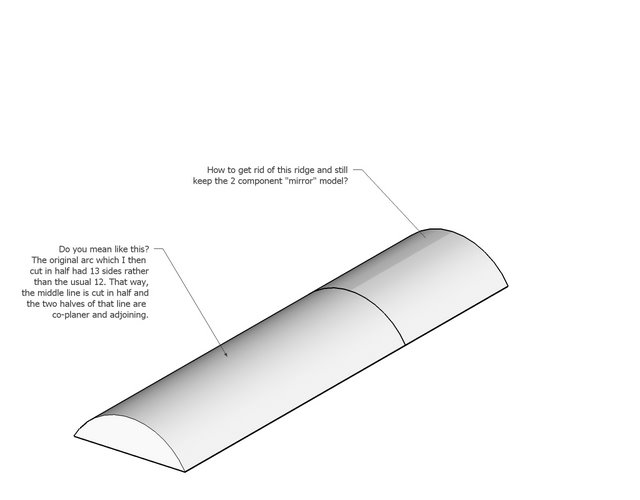 smoothingSolution.skp
It's still divided into two components, but for the original arc, I made it from a 13 sided curve rather than the usual 12. That way, the middle side is cut in half and the two halves of that line are co-planer and adjoining.
I learned this trick just the other day right here in this community.
It also works for circular objects. Divide someplace other than at an intersection and the shading works right.
-
Brillant! Thanks for the tip. It of course makes sense.
-
Oooooooooooooooooooh! Very crafty John!
13 faces, cut the middle one in half and join the co-planer halves.
Fiendishly elegant solution !
! -
Problem is gone when you explode left and right side.
But this is smooth.
-
@unknownuser said:
Problem is gone when you explode left and right side.
Yeah, I know. But I wanted to keep the components 'intact'. Thanks for sharing.
-
Hi Chipp,
The "default" (24 segmented) circle fulfils this formula: 11*2=22+2=24 and is still not smooth when creating a cylinder from it.
-
OOPS! Thanks for pointing that out.
The formula should just be:
The number of sides for the circle = (any odd number * 2)
Here's a tute which shows it.
http://www.gadgetplugins.com/chippstuff/SmoothMirrorModelingAndCylinders.skp -
So, for those still here, and interested. To create a cylindrical surface, and work on only 1/2 (or 1/4) of it as a component, and have it STILL smooth correctly, use this formula:
The number of sides for the circle = (any odd number * 2) + 2
EDITED: The number of sides for the circle = (any odd number * 2)HTH, Chipp
-
Well, actually any circle can do that provided you split izt up at the midpoint not the endpoints. I remember a thread about this but simply cannot find it any more (funny though - I mostly know about everything that's going on here...)

-
I don't understand what your saying. Of course any circle can be used this way, but only circles with the number of faces = odd number *2 can create the smooth seam on the front of the cylindrical surface WHILE the object is still a component. If you explode the mirrored components, then of course the seam can be smoothed.
The formula works only when you create a circle by clicking first on the center then next on a point which is 90 degrees from where the intended seam is to be. The trick, as explained above (and in my skp file), is to make a circle so that the front seam polyline HAS to be divided in half.
I hope I'm making myself clear...perhaps I'm not? Sorry...
-
-
That skp doesn't use the component mirror example, which is the question at the top of this thread.
-
Ah yes, that's tru. Sorry I went off-topic in this case totally forgetting what the original issue was.
But anyway, the idea is still the same. In your example you have also split the geometry at the midpoint of the polygon. This is possible and the resulting, mirrored geometry will look smooth because the matching faces are coplanar (not like when you split something at an endpoitnt).
See these two cylinders here. One was split into half from endpoint to endpoint an then mirrored; you can see the seam. The other one from midpoint to midpoint; there is no seam.
-
Exactly. You have to divide at a midpoint. My example shows the same. Thanks
-
You should try repeating my example (using the cube as reference) and the default number of sides for your circle, and I think you'll see where I'm coming from. It's much easier to 'snap' to the end of the side of the cube using my equation.
-
Since the trick is to split along a flat surface, it doesn't really matter exactly how many surfaces a cylinder has. If it has 24 sides, and while making the cylinder the radius used was along one of the axes, rotating the cylinder 7.5° makes the face perpendicular to the axes line which you will probably use to halve or quarter the circle.
On an unrelated note. All even numbers = any whole number*2. Just a bit of mathematical trivia.
-
Hi folks.
If you want your splitting plane to be parallel the any standard plane (red-green or red blue or green-blue), you may rotate the circle (before extrusion) or cylinder (after extrusion).
Use 7.5° if the circle has 24 segments.
The formula is 180 ÷ number of segments.
Just ideas.
-
@unknownuser said:
If you want your splitting plane to be parallel the any standard plane (red-green or red blue or green-blue), you may rotate the circle (before extrusion) or cylinder (after extrusion).
Use 7.5° if the circle has 24 segments.
The formula is 180 ÷ number of segments.
Exactly...and that is what my skippy (and formula) are about. The whole idea is using the formula:
number of sides of circle = any odd number * 2
is so that one doesn't need to rotate the circle after creating it. See the skippy example and you'll see.
best regards,
Chipp




Hello! It looks like you're interested in this conversation, but you don't have an account yet.
Getting fed up of having to scroll through the same posts each visit? When you register for an account, you'll always come back to exactly where you were before, and choose to be notified of new replies (either via email, or push notification). You'll also be able to save bookmarks and upvote posts to show your appreciation to other community members.
With your input, this post could be even better 💗
Register Login


Advertisement