Free open-source tool that opens your .skp and gives you a cut list (I'm the author, looking for testers)
-
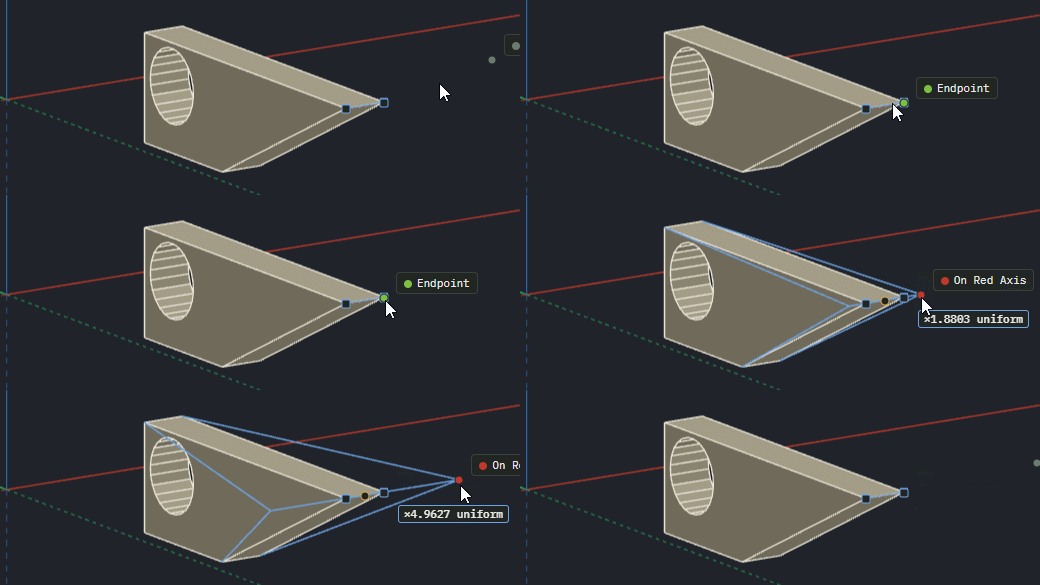
OK! Have you a little animation of the Alt to fold a face(s) during moving points ?
I don't know if you have yet this new little request : Align selected objects
and something very useful : Right click for "contextual menu" or not for Group, Components or other things!
Now we must use a shortcut or go to the Menu!
In other ones that works!
-


-
@pilou There is no animation of it yet. In words: while moving a corner or an edge with Move, tap Alt once (press and let go) and folding switches on or off, so a face that would have to bend gets a new edge and folds instead.
Align for selected objects is not there. I have written it down as a request.
On the right click: in the model view the right button pans, so there is no menu there yet. The menu you are after is in the Outliner. Right-click a group or a component in its list for Edit inside, Make Group, Make Component, Make Unique, Explode, Hide, Lock, Rename and Delete. A menu in the model view itself is a fair request, and it is written down too.
-
Sawhorse 0.1.0-alpha.6 is out: https://github.com/sawhorse3d/sawhorse/releases/tag/v0.1.0-alpha.6 (or try it in the browser at https://sawhorse3d.com/app/, no account).
The biggest change is in the cut list. A solid part wider than any board in the stock library is now planned as a glue-up: full-width strips of a board and a last strip, chosen so the part takes the fewest joints and no strip is left thin. A 17 in cabinet side comes out as 12 + 5 1/8 in from a 12 in board, for example. Narrow parts also share a board's width when that saves a board, so four 1 1/2 in rails come off one 4 in board instead of two.
The desktop app now asks before it closes over unsaved work, and File has Close and Exit. On Windows a double-clicked .shz file opens in Sawhorse, and the title bar names the model.
After a move that splits or merges shapes the selection is what you would expect, and dragging a big sketch keeps up with the cursor.
On a Mac, Control+click is now the right click, so Control+drag pans. Nobody has reported that from a real Mac yet, so a word from anyone who tries it would help.
Most of this came from people outside the project: eleven changes from four contributors, named in the release notes. The notes also list what is still missing, including a metric stock library, cutting allowances, joints and .skp export.
-
Request : Possibility to draw Circle vertically! (if not yet existing)
PushPull multiple -
@pilou sorry for the slow answer on these two.
A circle drawn vertically: yes, two ways. Draw it on an upright face of a solid and it lies on that face. Or draw it on the ground, select it, take Rotate (Q), press the Right arrow key and type 90: it stands up, and it is still a circle. The Circle tool has no arrow key of its own for choosing the plane, as Rectangle has. I have written that down as a request.
Push/Pull on several faces at once is not there. It takes one face at a time, and a double-click on the next face repeats the last distance. Written down as a request too.
Sawhorse 0.1.0-alpha.7 is out: https://github.com/sawhorse3d/sawhorse/releases/tag/v0.1.0-alpha.7 (or try it in the browser at https://sawhorse3d.com/app/, no account).
Glue-ups now show in the cut list. A glued part's row says what it is glued from, and a Minimum strip setting beside Kerf and Trim sets the narrowest last strip a glue-up may leave.
Unsaved work is kept in up to five sets. An old "Restore unsaved work?" offer left unanswered no longer hides newer work, and Restore sets the model you have open aside first.
Big sketches are quicker. Importing a file of many circles and arcs, and a Move, Copy or Array of a large selection, now take time that grows with the selection and not with its square.
Scale's box follows Undo, Delete and Hide. The Nesting fields leave what you are typing alone. The cabinet generator's back takes a thickness, so a 16 or 18 mm back is one number to type.
On Linux, GNOME and Cinnamon now name Sawhorse in their logout dialog while a model has unsaved changes.
Twenty-two of the changes came from six people outside the project, named in the release notes. The notes also list what is still missing, including a metric stock library, cutting allowances, joints and .skp export.
-
Take your time!
Some waits in massive files (complex objects) (even Groups & Components)
-
@pilou thank you. On the waits in big files: which step is slow for you, opening the file, turning the view, or a Move of a group or a component?
If you can say roughly how big the model is (how many groups and components, or the size of the .skp), that tells me where to look. Moving many curves got much faster in 0.1.0-alpha.7, so the version matters too.
-
something like
a group with an object with 3 edges filleted
then 1 0 copy rotations
group all
then 10 copy rotations
group all
then 10 copy rotation
group all
then 10 copy rotation
Group all
Then 10 copy movething slow is the calculate!
But i have an old one computer more 13 years old! -
@pilou thank you, that is clear: one rounded part, ten of it, ten of those, and so on. Five levels of ten is 100,000 copies of the part.
Your old computer is not the only reason. Sawhorse is slow there on a recent desktop PC too. It was measured here with a small box with three rounded edges (42 faces):
- Up to 1,000 copies, a copy step takes about a second or less.
- The step from 1,000 to 10,000 copies takes 20 to 30 seconds, and moving the whole thing afterwards about 28 seconds.
- The last step, to 100,000, is refused: the model may hold 100,000 groups and component copies, and this one would hold 111,110.
- With 10,000 copies in groups, Save is refused as well, because the file would be too big. Nothing is lost when that happens, but the model cannot be saved as it is.
Why: every copy of a group is a full solid of its own, and after each step the whole model is checked and drawn again. And nothing on screen says that it is working.
Two things make it lighter:
- Make each level a component (Make Component…) in place of a group. With 10,000 copies the copy step took about 10 seconds where groups took 22, moving everything took 6 seconds where groups took 28, and the file saved (11 MB). Making the component itself takes a few seconds at that size.
- Type the count once after the first copy (
x9gives nine more) and do not copy nine times by hand.
What was found is written down:
- https://github.com/sawhorse3d/sawhorse/issues/142 (moving and copying groups inside groups)
- https://github.com/sawhorse3d/sawhorse/issues/143 (a model too big to save)
- https://github.com/sawhorse3d/sawhorse/issues/144 (no sign that an edit is running)
One question: Sawhorse has no fillet tool, so here the edges were rounded with arcs and Push/Pull. How did you round yours, in Sawhorse or in a .skp that you opened?
-
I have confused with another one!
So you can avoid the fillets inside your calculate!
replace it by a simple circular hole! -
@pilou no harm done, and thank you for saying so.
The recipe was worth measuring anyway: the three things it found are real, with or without fillets. A part with one round hole has nearly as many faces as the rounded one, so the waits should be much the same. That one was not measured here.
-
Yep but i have not this slow impression with some of your challengers! ;
Above 5 level yes!
-
@pilou fair point, and your recipe is what found it. The slowdown with groups inside groups is fixed on main since last night.
Measured on one desktop PC with the same small rounded part, 10,000 copies in nested groups: moving the whole thing takes about 4.5 seconds where it took 23, and copying it about 4.6 seconds where it took 33. The groups themselves now cost almost nothing. What is left is the 10,000 parts.
The app in the browser at https://sawhorse3d.com/app is built from main, so it has the fix. The desktop download does not.
Two things your recipe found are as they were: a model that large can be too big to save (https://github.com/sawhorse3d/sawhorse/issues/143), and nothing on screen says a long edit is running (https://github.com/sawhorse3d/sawhorse/issues/144). The fifth level, 100,000 copies, is still refused.
Thank you for the recipe.

Hello! It looks like you're interested in this conversation, but you don't have an account yet.
Getting fed up of having to scroll through the same posts each visit? When you register for an account, you'll always come back to exactly where you were before, and choose to be notified of new replies (either via email, or push notification). You'll also be able to save bookmarks and upvote posts to show your appreciation to other community members.
With your input, this post could be even better 💗
Register Login


Advertisement