Free open-source tool that opens your .skp and gives you a cut list (I'm the author, looking for testers)
-
Thx for the infos!
Tell me if i am wrong : no special knowledge of programming are necessary for make this sort of thing ? (a personnal SketchUp)
It's just ask / answer with the ai ? -
@pilou Not quite. The typing is the small part. Deciding what to build, cutting it into small pieces and checking each piece against real files is most of the work, and for that it helps a lot to know how software is put together.
If you would like to try the result on one of your own models, https://sawhorse3d.com/app/ opens a .skp in the browser with no account. A note here about anything that comes in wrong is the most useful thing a SketchUp user can send.
-
THx for the info!
Requests : Edit Points, Subdivision
-
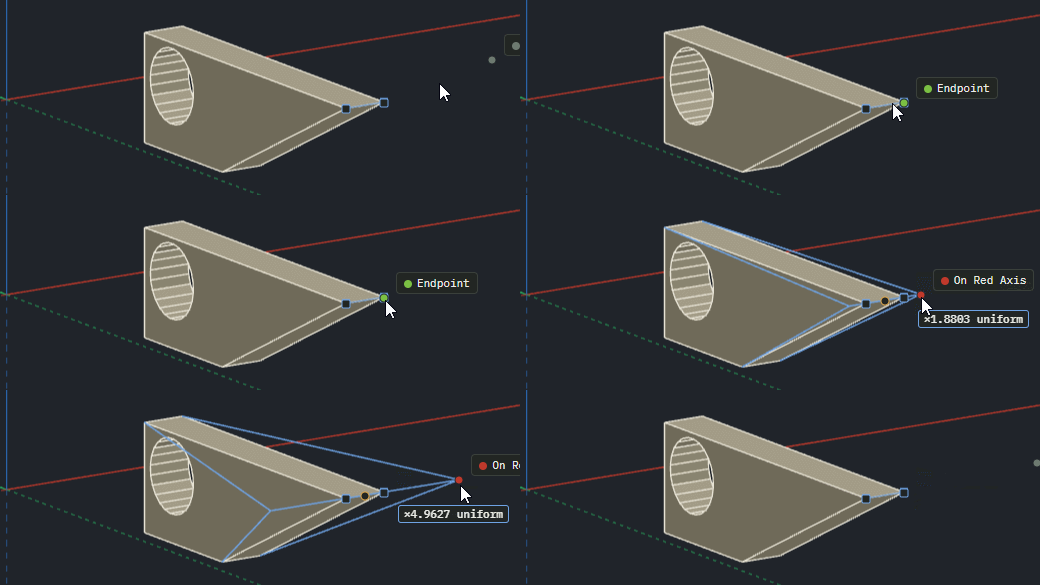
@pilou Thank you for both. Part of Edit Points is there already: select a corner, an edge or a face of a solid, press M and move it, and the faces beside it follow (tap Alt to fold a face that would otherwise have to bend). The same works on a corner or an edge of a shape you have not pushed yet. A point of a circle or arc does not move on its own; Edit > Explode Curve turns it into plain edges first.
A separate point editor like the SketchUp vertex plugins is not there, and neither is Subdivision. I have written both down as requests, with no date to offer. -
OK! Have you a little animation of the Alt to fold a face(s) during moving points ?
I don't know if you have yet this new little request : Align selected objects
and something very useful : Right click for "contextual menu" or not for Group, Components or other things!
Now we must use a shortcut or go to the Menu!
In other ones that works!
-


-
@pilou There is no animation of it yet. In words: while moving a corner or an edge with Move, tap Alt once (press and let go) and folding switches on or off, so a face that would have to bend gets a new edge and folds instead.
Align for selected objects is not there. I have written it down as a request.
On the right click: in the model view the right button pans, so there is no menu there yet. The menu you are after is in the Outliner. Right-click a group or a component in its list for Edit inside, Make Group, Make Component, Make Unique, Explode, Hide, Lock, Rename and Delete. A menu in the model view itself is a fair request, and it is written down too.
-
Sawhorse 0.1.0-alpha.6 is out: https://github.com/sawhorse3d/sawhorse/releases/tag/v0.1.0-alpha.6 (or try it in the browser at https://sawhorse3d.com/app/, no account).
The biggest change is in the cut list. A solid part wider than any board in the stock library is now planned as a glue-up: full-width strips of a board and a last strip, chosen so the part takes the fewest joints and no strip is left thin. A 17 in cabinet side comes out as 12 + 5 1/8 in from a 12 in board, for example. Narrow parts also share a board's width when that saves a board, so four 1 1/2 in rails come off one 4 in board instead of two.
The desktop app now asks before it closes over unsaved work, and File has Close and Exit. On Windows a double-clicked .shz file opens in Sawhorse, and the title bar names the model.
After a move that splits or merges shapes the selection is what you would expect, and dragging a big sketch keeps up with the cursor.
On a Mac, Control+click is now the right click, so Control+drag pans. Nobody has reported that from a real Mac yet, so a word from anyone who tries it would help.
Most of this came from people outside the project: eleven changes from four contributors, named in the release notes. The notes also list what is still missing, including a metric stock library, cutting allowances, joints and .skp export.
-
Request : Possibility to draw Circle vertically! (if not yet existing)
PushPull multiple -
@pilou sorry for the slow answer on these two.
A circle drawn vertically: yes, two ways. Draw it on an upright face of a solid and it lies on that face. Or draw it on the ground, select it, take Rotate (Q), press the Right arrow key and type 90: it stands up, and it is still a circle. The Circle tool has no arrow key of its own for choosing the plane, as Rectangle has. I have written that down as a request.
Push/Pull on several faces at once is not there. It takes one face at a time, and a double-click on the next face repeats the last distance. Written down as a request too.
Sawhorse 0.1.0-alpha.7 is out: https://github.com/sawhorse3d/sawhorse/releases/tag/v0.1.0-alpha.7 (or try it in the browser at https://sawhorse3d.com/app/, no account).
Glue-ups now show in the cut list. A glued part's row says what it is glued from, and a Minimum strip setting beside Kerf and Trim sets the narrowest last strip a glue-up may leave.
Unsaved work is kept in up to five sets. An old "Restore unsaved work?" offer left unanswered no longer hides newer work, and Restore sets the model you have open aside first.
Big sketches are quicker. Importing a file of many circles and arcs, and a Move, Copy or Array of a large selection, now take time that grows with the selection and not with its square.
Scale's box follows Undo, Delete and Hide. The Nesting fields leave what you are typing alone. The cabinet generator's back takes a thickness, so a 16 or 18 mm back is one number to type.
On Linux, GNOME and Cinnamon now name Sawhorse in their logout dialog while a model has unsaved changes.
Twenty-two of the changes came from six people outside the project, named in the release notes. The notes also list what is still missing, including a metric stock library, cutting allowances, joints and .skp export.
-
Take your time!
Some waits in massive files (complex objects) (even Groups & Components)

Hello! It looks like you're interested in this conversation, but you don't have an account yet.
Getting fed up of having to scroll through the same posts each visit? When you register for an account, you'll always come back to exactly where you were before, and choose to be notified of new replies (either via email, or push notification). You'll also be able to save bookmarks and upvote posts to show your appreciation to other community members.
With your input, this post could be even better 💗
Register Login


Advertisement