[Plugin] Coords Text Tag from Datum
-
I have been trying so hard to find something like this for importing and exporting GPS points for the site planning we do, thank you!!!
Question- I can import from Google Earth points and they seem to be very accurate and I notice that is part of the GPS points fractional part (how many numbers after the decimal). But when I export the points don't have that level of accuracy so exporting new points back into Google Earth is off. IS there a way to get better accuracy on exporting?
I am going to donate, the app will save me so much time instead of overlaying images and doing all the other stuff I had to do to bring GPS points in. Thank you for what you do! IF this were upgraded and improved I would purchase and I am sure there is a market for it.
Please let me know if there is a way to improve accuracy on exported points.
-
The exported points dp are set for XY and Z in the tool's dialog.
These are remembered with the model... e.g. with 4dp 1.2345 even if largerThe imported points dp is set by the formatting of the file they come in...
but this can be 'cropped-down' if the dp set in the tool's dialog is less
e.g. with 4dp 1.2345 comes from 1.23451234So adjust your dp settings to suit your needs...
PS: It is a veeery old plugin - but still works - feel free to tweak it for your own use...
-
Hi there, I'm having problems with the visibility of the tags. When I import from a CSV file the message comes up that the points have been imported yet I can't see them on the screen. I'm using windows and Sketchup 2022
-
Without seeing the CSV it's not obvious...
I suspect that the points are miles from the origin ?
Try doing a zoom extents and see what you have.Also ensure that Guides are switched on in the View menu - otherwise you won't see them at all !
-
Hi Tigs,
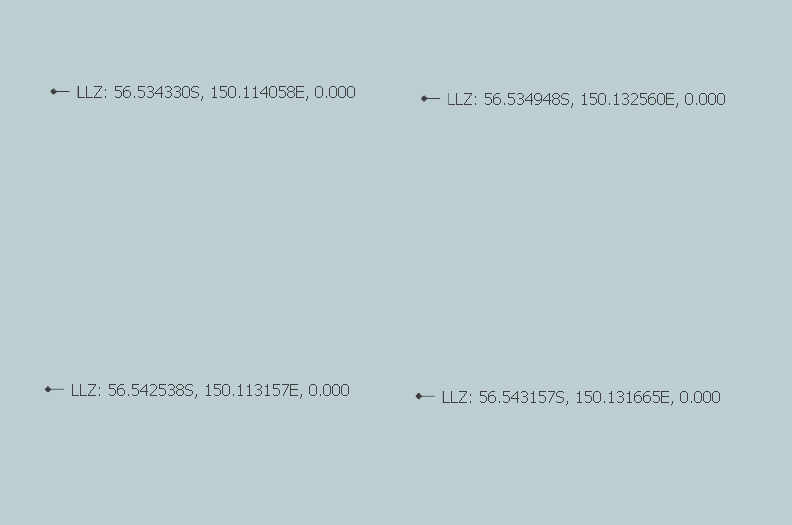
I zoomed to extents and found the points were importing in a different format, far from where I intended. 33.693361S, 151.085060E is becoming something like 56.5343330S, 150.114058EHere is a snapshot of the CSV file, the setting I use when importing and then the results in SketchUp. I suspect I've got the settings wrong somewhere.
[mod=:1mgr9tn0]Embedding Google Drive will not work...[/mod:1mgr9tn0]
-
Read your post.
You cannot embed files like that !
More helpful info is needed to resolve this... -
@advancedcad said:
far from where I intended. 33.693361S, 151.085060E is becoming something like 56.5343330S, 150.114058E
When I need to deal with importing points that would otherwise be a long distance from the origin I first edit the CSV file in a spreadsheet to correct the distance. I find the lowest value for each axis direction and subtract that from all of the others.
Here's an example.
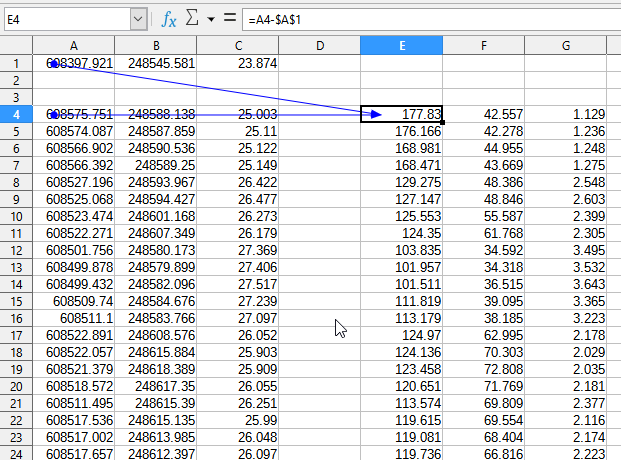
The three columns on the right are the ones then used for the point cloud.
-
Hi Tigs,
I can't figure out how to embed an image, so I've added them as attachments. Hopefully this helps.
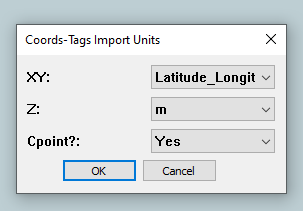
-
Your LLZ points are millions of meters from the SKP origin, so little wonder that SketchUp is having these issues.
Have you tried setting the axes origin 'datum' to something near the LLZ values, so this import more logically ??
When I import your CSV I get points in meters... are you then referencing these back to LLZ ?
I'm confused... -
Hey there, do you know why the points I set on my SketchUp-map are different when I cut and paste them into Google Maps? There is always a difference of about 20-50 radius.


Hello! It looks like you're interested in this conversation, but you don't have an account yet.
Getting fed up of having to scroll through the same posts each visit? When you register for an account, you'll always come back to exactly where you were before, and choose to be notified of new replies (either via email, or push notification). You'll also be able to save bookmarks and upvote posts to show your appreciation to other community members.
With your input, this post could be even better 💗
Register Login


Advertisement