How to make a face from a closed curve in FredoSpline. Methods
-
-
Hi:
Most of the spline commands can generate a face when they are closed:
If this is not the case, select the spline and type in the Ruby console:
spline=Sketchup.active_model.selection[0]
# will return something like => #<Sketchup::Edge:0x000001a70b1968e8>
face = spline.find_faces
# will return something like => 1 (1 being the number of face(s) created
or simply redraw a segment of the spline and the face will also be created.
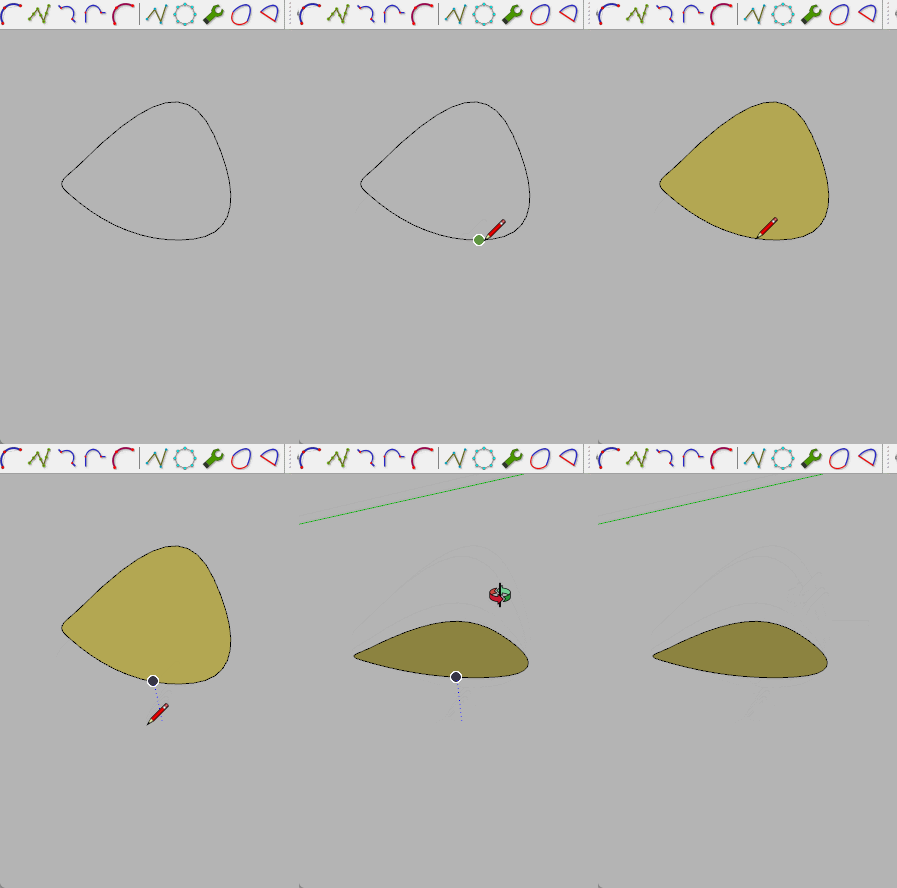
Regards
-
You'll have to give us more to work with if you want help.
-
Hi:
Most of the spline commands can generate a face when they are closed:If this is not the case, select the spline and type in the Ruby console:
spline=Sketchup.active_model.selection[0]
# will return something like => #<Sketchup::Edge:0x000001a70b1968e8>
face = spline.find_faces
# will return something like => 1 (1 being the number of face(s) created
or simply redraw a segment of the spline and the face will also be created.
Regards
-
 R Rich O Brien marked this topic as a question on
-
R Rich O Brien has marked this topic as solved on


Hello! It looks like you're interested in this conversation, but you don't have an account yet.
Getting fed up of having to scroll through the same posts each visit? When you register for an account, you'll always come back to exactly where you were before, and choose to be notified of new replies (either via email, or push notification). You'll also be able to save bookmarks and upvote posts to show your appreciation to other community members.
With your input, this post could be even better 💗
Register Login


Advertisement