Slicer5 - Object is not manifold solid
-
Hi guys, I tried to use the Slicer5 plugin on this model and it said that the object is not manifold solid. I used to “find edge gaps” tool and it said that there were no open ends. Would appreciate any help on this, thank you, guys! File below.
-
Surface borders, holes in the surface, and some internal face edges. Use Solid Inspector 2 to help identify problems.
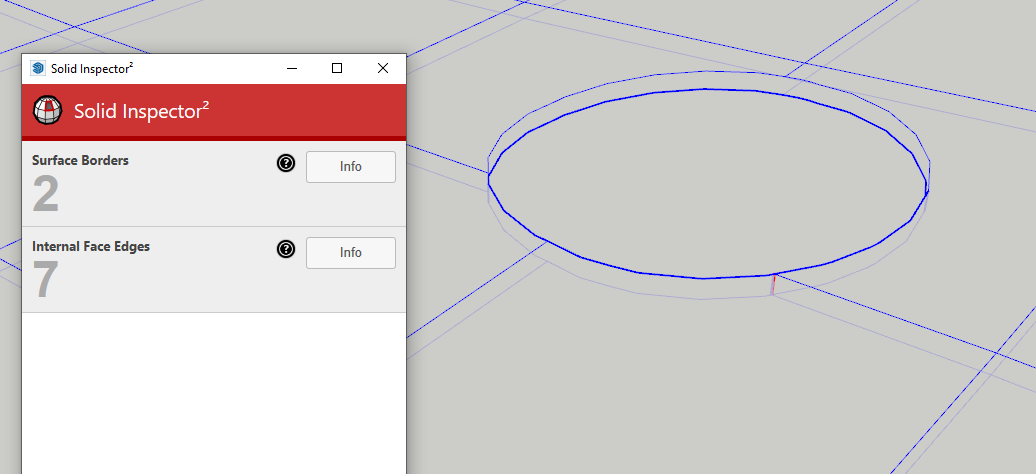
What version of SketchUp are you actually using? Your profile indicates 2019 Free/Make which is impossible since there never was such a version.
-
Your model is not a manifold solid.
Change the way you view it to help yourself.
View > Hidden Geometry > On - you'll see lots of stuff that was hidden or smoothed.
That doesn't improve solidity tests.View Mode > MonoChrome to remove confusion of a textured surface.
There are several 'flaps' and edges with only one face - every edge must have exactly one face.Manually fix these errors and the object should then report as a Solid in Entity info.
To help identify the problem geometry I suggest you use Thomthom's SolidInspector2... and then doing a manual fix by editing it.
Using a Style with distinctive profiles and endpoints might help.
Also Xray mode would let you see what's a problem 'internally'...My Solidsolver fails to mend it at all.
Fixit101 fixes somethings but then leaves it not solid !PS: Delete the unwanted 'Sumele' figure as that doesn't help anything...


Hello! It looks like you're interested in this conversation, but you don't have an account yet.
Getting fed up of having to scroll through the same posts each visit? When you register for an account, you'll always come back to exactly where you were before, and choose to be notified of new replies (either via email, or push notification). You'll also be able to save bookmarks and upvote posts to show your appreciation to other community members.
With your input, this post could be even better 💗
Register Login


Advertisement