How do I extrude a 2D profile along multiple lines at once?
-
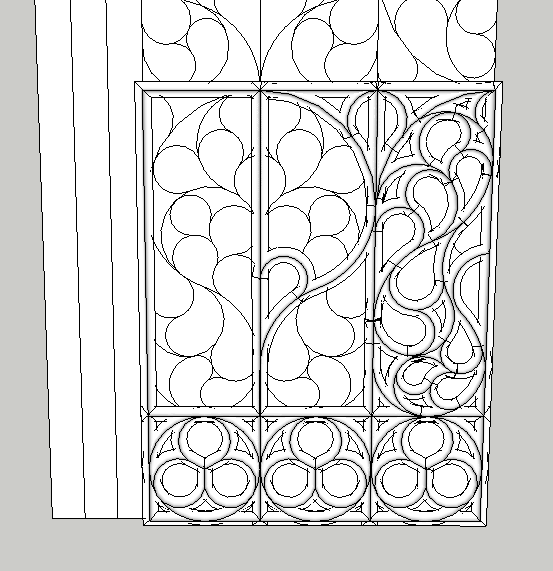
I'm in the process of turning a 2D design pattern into 3D openwork tracery. What I've been doing is using the Follow Me tool for each individual curve. I've been trying to find a different method that would save time by allowing me to take a 2D profile and extrude it on all of the selected curves instead of doing each one at a time. Attached picture is results after 30-40 minutes of work using follow me.
The closest thing I've found is the lines to tubes plugin, but that obviously only creates cylinders. I've used Extrude Tools a lot for my work; extrude edges by faces sounds like what I need but that specific tool doesn't seem to work at all.
If anyone has a solution please let me know.
-
You can't do multiple extrusions at the same time. It looks to me as if there are a number of repeated shapes, though. You could be making good use of components and use the same extrusions more than once which would save you a lot of time. I would be making solid components so I could trim them with Eneroth Solid Tools at the ends to get the correct shapes.
-
Another way MIGHT be to use 'line to tube" plugin. Perhaps you could turn the lines into tubes and squash the result to make them ovaloid. Just a thought
-
'1001 bits Pro' has some extrusion tools to test.

Hello! It looks like you're interested in this conversation, but you don't have an account yet.
Getting fed up of having to scroll through the same posts each visit? When you register for an account, you'll always come back to exactly where you were before, and choose to be notified of new replies (either via email, or push notification). You'll also be able to save bookmarks and upvote posts to show your appreciation to other community members.
With your input, this post could be even better 💗
Register Login


Advertisement