Now you see it! - Now you Don't!
-
I am using SketchUP Make 2016 (Build 16.1.1450 32 Bit) on Windows 7. Once a Background has been loaded in the Style Settings, it is 'Lost Forever' after only a few Pan, Zoom and Orbit Manouevres! The Watermark Settings reports no Watermark at all! Updating the Scene and Saving, before it disappears have no effect either. However, the Background Reloads when the file is reopened and SketchUP has been rebooted. I have tried various JPG Files for Watermarks (Background and Foreground) But the same problem occurs - Any thoughts?
-
Are you updating the style after you add the watermark image?
-
You need to update your new style setting as shown on the attached image.
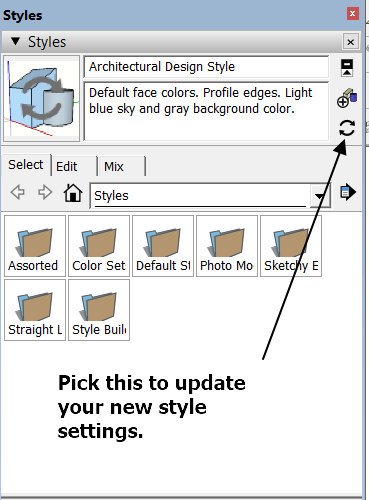
-
@unknownuser said:
You need to update your new style setting as shown on the attached image.
Or even just click on the large thumbnail in the upper left corner of the Styles window. The circular arrows on it indicate the style has been edited but not updated.
-
this again is a D'oh! Book moment to me


I didn´t get that so far as well - so thanks Dave and Ken for clarifying this



Hello! It looks like you're interested in this conversation, but you don't have an account yet.
Getting fed up of having to scroll through the same posts each visit? When you register for an account, you'll always come back to exactly where you were before, and choose to be notified of new replies (either via email, or push notification). You'll also be able to save bookmarks and upvote posts to show your appreciation to other community members.
With your input, this post could be even better 💗
Register Login


Advertisement