UNKNOWN FONT
-
@djh said:
Is there any any way to remove any fonts from the SU or LO file? When I exported a file to PDF without any fonts, it worked okay. The fonts seem to be the problem.
You could delete all of the text from the SU file, save, update the LO file and make the export.
-
Dave R., yes, I removed the dimension lines from the SU file, saved, updated the LO file and made the export ... with no problem.
-
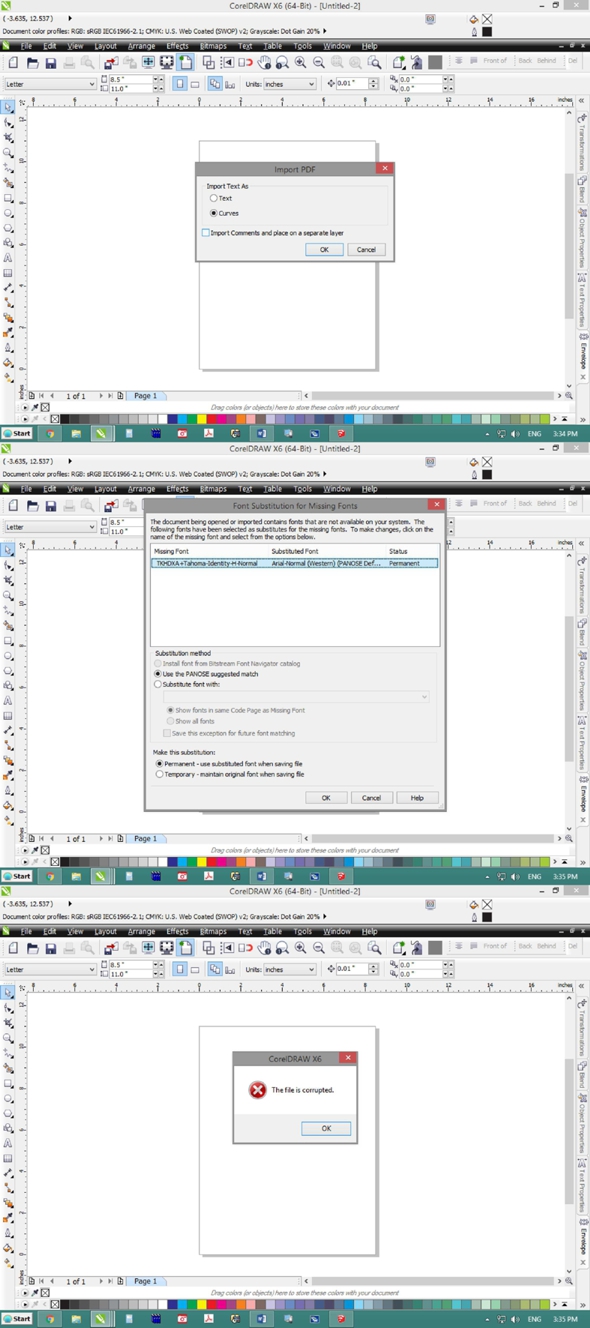
Dave R, after extensive effort with CDR, it seems there is a problem with the export from LO to PDF. Can one reinstall or repair the installation of LO?
Someone who works with CDR, wrote to me,"Your file is corrupt. Try this file instead." He seemed to have fixed the "corrupt file".
-
You can try to reinstall SketchUp and LayOut. Right click on the installer and choose Run as administrator. Then, when presented with the option, choose Repair.
I wonder why Adobe reader and Acrobat display the font without problem. If the PDF file is corrupt, they should have problems reading it, too.
-
Dave R, thanks for your patience and suggestion. I repaired the installation but ... it still doesn't import into CDR X6.
-
As I indicated in my last post, I find it difficult to believe that LayOut is creating a corrupt PDF considering that Adobe Read and Acrobat have no problem with it. I think despite what the guy at CDR told you, the problem is on the Corel end. I don't have a fix for you, though. Sorry about that.
-
But, even Illustrator (according to the version) couldn't import the file properly.
-
Try a different font and see if you get the same results.
-
Same results.
-
Weird.
Do you get the same results with a brand new LO file?
-
-
-
@driven said:
does this version of your pdf open in Corel?
[attachment=0:1ztrr0d6]<!-- ia0 -->Test_026.pdf.pdf<!-- ia0 -->[/attachment:1ztrr0d6]
john
Yes, it opened in CD.
-
All I did was opened and saved on my mac...
the only real difference is OS X 'shows' the 'lowest' pdf version number 'needed' to open but your file shows the pdf version as being v1.7...
Corel must prefer the v1.4 tag as the contents is identical...
john
-
Is there any way to change how LO exports pdf?
-
Dear John, can one save it as v1.4 tag in Acrobat? I don't have a Mac.
-
sorry, I don't have Acrobat installed...
the guy who 'fixed' your file earlier in this thread saved it using Acrobat Distiller 11.0 (Windows) as v1.5...
there are on-line and downloadable pdf convertors...
john
-
John, thank you.
Now, I'll try to figure out how to fix my file using Acrobat Distiller 11.0 (Windows) as v1.5...

Hello! It looks like you're interested in this conversation, but you don't have an account yet.
Getting fed up of having to scroll through the same posts each visit? When you register for an account, you'll always come back to exactly where you were before, and choose to be notified of new replies (either via email, or push notification). You'll also be able to save bookmarks and upvote posts to show your appreciation to other community members.
With your input, this post could be even better 💗
Register Login


Advertisement