sketchucation logo sketchucation
    • Login
    Oops, your profile's looking a bit empty! To help us tailor your experience, please fill in key details like your SketchUp version, skill level, operating system, and more. Update and save your info on your profile page today!
    🚨 Skimp | 25% Off until March 30 Buy Now

    SketchUV Shortcuts

    Scheduled Pinned Locked Moved Plugins
    11 Posts 5 Posters 1.2k Views 5 Watching
    Loading More Posts
    • Oldest to Newest
    • Newest to Oldest
    • Most Votes
    Reply
    • Reply as topic
    Log in to reply
    This topic has been deleted. Only users with topic management privileges can see it.
    • srxS Offline
      srx
      last edited by

      Try activating the commands before setting shortcuts.

      www.saurus.rs

      1 Reply Last reply Reply Quote 0
      • R Offline
        rv1974
        last edited by

        there's no way do that.
        Unfortunately, for some reason Whaat doesn't enable access to shortcuts for many important commands. 'Build profile' or 'build profile along the path' in PB2 for example.

        1 Reply Last reply Reply Quote 0
        • L Offline
          leminilab
          last edited by

          No way... I was hoping some ruby genius would have replied something like 'yea, no problem!'...
          πŸ˜„

          • "Live every day as if it were your last and then some day you'll be right."
          • "ThomThom rules!!!"
          1 Reply Last reply Reply Quote 0
          • thomthomT Offline
            thomthom
            last edited by

            If you need to map shortcuts to context menu items you need to make a selection that will make them appear in order for them to appear in Preferences > Shortcuts.

            Thomas Thomassen β€” SketchUp Monkey & Coding addict
            List of my plugins and link to the CookieWare fund

            1 Reply Last reply Reply Quote 0
            • P Offline
              Pherim
              last edited by

              But SketchUV has its own context menu and the commands only appear there.

              1 Reply Last reply Reply Quote 0
              • L Offline
                leminilab
                last edited by

                Well it seems impossible then...
                Does sanyone know of another plugin which would do the same thing but would be usable with a keyboard shortcut? ❓

                • "Live every day as if it were your last and then some day you'll be right."
                • "ThomThom rules!!!"
                1 Reply Last reply Reply Quote 0
                • thomthomT Offline
                  thomthom
                  last edited by

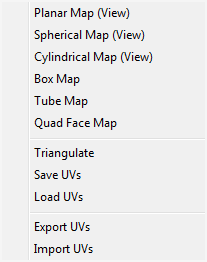
                  @pherim said:

                  But SketchUV has its own context menu and the commands only appear there.

                  Can you screenshot the menu?

                  Thomas Thomassen β€” SketchUp Monkey & Coding addict
                  List of my plugins and link to the CookieWare fund

                  1 Reply Last reply Reply Quote 0
                  • P Offline
                    Pherim
                    last edited by

                    Here you go:

                    SketchUV_menu.png

                    Only appears with the SketchUV tool selected.

                    1 Reply Last reply Reply Quote 0
                    • thomthomT Offline
                      thomthom
                      last edited by

                      Ah, I see. Yea, they probably cannot be assigned shortcuts. Maybe Dale can add alternative menus?

                      Thomas Thomassen β€” SketchUp Monkey & Coding addict
                      List of my plugins and link to the CookieWare fund

                      1 Reply Last reply Reply Quote 0
                      • L Offline
                        leminilab
                        last edited by

                        Nah, he replied this to me:
                        "Regarding keyboard shortcuts, unless they are listed as an option in the SketchUp keyboard shortcuts (Preferences), then it can't be done. Sorry!"
                        😞

                        • "Live every day as if it were your last and then some day you'll be right."
                        • "ThomThom rules!!!"
                        1 Reply Last reply Reply Quote 0

                        Hello! It looks like you're interested in this conversation, but you don't have an account yet.

                        Getting fed up of having to scroll through the same posts each visit? When you register for an account, you'll always come back to exactly where you were before, and choose to be notified of new replies (either via email, or push notification). You'll also be able to save bookmarks and upvote posts to show your appreciation to other community members.

                        With your input, this post could be even better πŸ’—

                        Register Login
                        • 1 / 1
                        • First post
                          Last post
                        Buy SketchPlus
                        Buy SUbD
                        Buy WrapR
                        Buy eBook
                        Buy Modelur
                        Buy Vertex Tools
                        Buy SketchCuisine
                        Buy FormFonts

                        Advertisement