SketchUV Shortcuts
-
Hi, I'd like to create shortcuts for the very often used 'Save UVs' and 'Load UVs' in SketchUV. But the commands cannot be found in the Preference/Shortcuts Panel.
Is it impossible? Really? Forever?
Seriously, it's really not vital, but I would certainly enjoy it!

-
Try activating the commands before setting shortcuts.
-
there's no way do that.
Unfortunately, for some reason Whaat doesn't enable access to shortcuts for many important commands. 'Build profile' or 'build profile along the path' in PB2 for example. -
No way... I was hoping some ruby genius would have replied something like 'yea, no problem!'...
-
If you need to map shortcuts to context menu items you need to make a selection that will make them appear in order for them to appear in Preferences > Shortcuts.
-
But SketchUV has its own context menu and the commands only appear there.
-
Well it seems impossible then...
Does sanyone know of another plugin which would do the same thing but would be usable with a keyboard shortcut?
-
@pherim said:
But SketchUV has its own context menu and the commands only appear there.
Can you screenshot the menu?
-
Here you go:
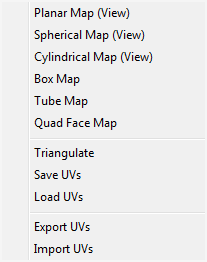
Only appears with the SketchUV tool selected.
-
Ah, I see. Yea, they probably cannot be assigned shortcuts. Maybe Dale can add alternative menus?
-
Nah, he replied this to me:
"Regarding keyboard shortcuts, unless they are listed as an option in the SketchUp keyboard shortcuts (Preferences), then it can't be done. Sorry!"



Hello! It looks like you're interested in this conversation, but you don't have an account yet.
Getting fed up of having to scroll through the same posts each visit? When you register for an account, you'll always come back to exactly where you were before, and choose to be notified of new replies (either via email, or push notification). You'll also be able to save bookmarks and upvote posts to show your appreciation to other community members.
With your input, this post could be even better 💗
Register Login


Advertisement