Dimension Lines ... disappear
-
Dimension Lines appear at certain angles and then disappear when I orbit around the model. All of the objects are on one layer.
-
Yes. That's how they are. They are like objects in the drawing. You want to make the view you need then do your dimensions. (save a scene)
Place the dimensions on their own layer, so you can hide them. If you need different dimensions at a different view, you may need more than one layer to hide the dimensions which you wish not to see in respective views.
-
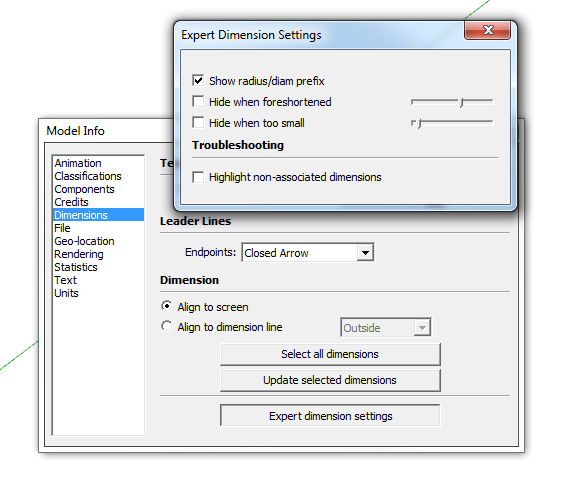
There is an Expert dimension setting that will turn them off if they are foreshortened. You can adjust the slider to determine how foreshortened the need to be before they get hidden. Perhaps you have this enabled?
-
Thank you, Dave R. That was the solution: to disable "Hide when foreshortened".


Hello! It looks like you're interested in this conversation, but you don't have an account yet.
Getting fed up of having to scroll through the same posts each visit? When you register for an account, you'll always come back to exactly where you were before, and choose to be notified of new replies (either via email, or push notification). You'll also be able to save bookmarks and upvote posts to show your appreciation to other community members.
With your input, this post could be even better 💗
Register Login


Advertisement