Black outline disappears when an object has color added
-
When I color a model the black outline disappears making the detail harder to see. I have gone to Window--> Style--> Color--> All Same and committed the change. When I save the file though, the black outline disappears again. I'm sure this is a simple setting but I wasted several hours trying to figure this out. Any insight would be greatly appreciated
-
Go View/Edge Styles and untick Profiles.
-
@davedhall said:
I have gone to Window--> Style--> Color--> All Same and committed the change. When I save the file though, the black outline disappears again.
It sounds to me as if you aren't updating the style after you set the edge color to All Same. After making the change (and make sure the edge color is set to black or whatever color you want them to be) click on the style's large thumbnail in the upper left of the Styles window.
-
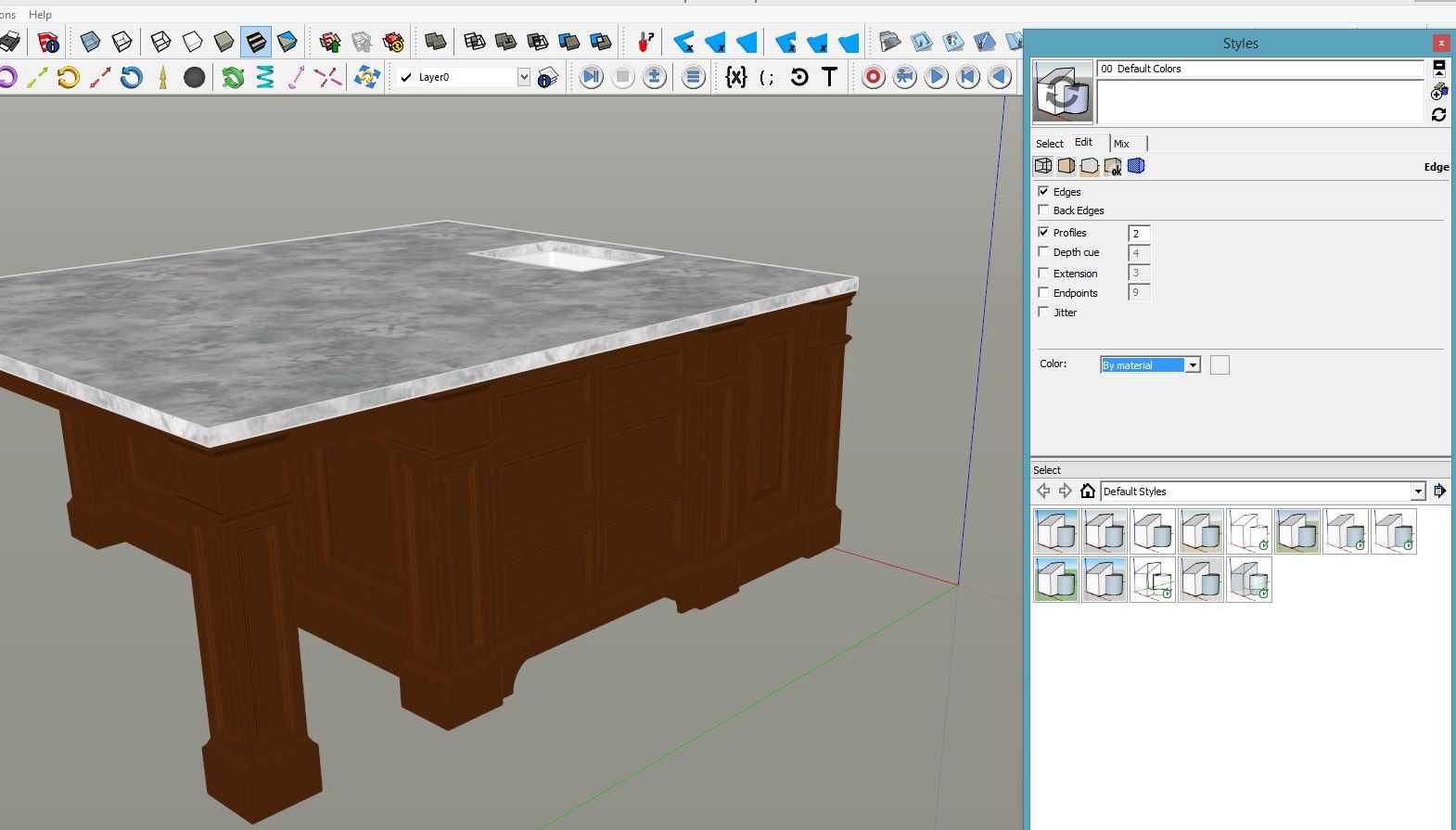
Thank you for the quick response. I tried that but it didn't work. Here is the really odd thing. With the Styles window open, I change the color to "All Same" and the lines show up perfect. I then update the style by clicking on the upper left box or the right upper chasing arrows. When I then save the file the outline disappears and the color has been CHANGED back to "By Material". I have save this over and over and can't get it to stick. I would be happy to share the file if you think you could figure it out.
-
You could share the file and that would probably help. One last thing. Is there a different style associated with the scene that it's opening to?
-
I'm not sure. I have not created any other scenes intentionally yet. How would I send you the file? Email? or can I attach it to this thread? I totally new to forums and protocol
-
You can upload it here. Click on Upload attachment below the text window in a reply. It should be self-explanatory.
-
Thank you! If you go to Window -- Styles -- Color -- All Same the black outlines appear. I can commit the changes but when I save my file to the computer it reverts back to "By Material" every time. I'm sure its something simple but I have wasted and embarrassing amount of time trying to fix this for presentations with clients.
-
He is a screen shot of what happens including the Styles editor function to the right.
Thanks again!

-
-
That worked great! What do I do to fix it on all my other projects?
-
Please don't post identical threads.
I have no idea why that worked and your others don't. All I did was adjust to all same and saved the file. It stays that way for me and now for you but not when you do it.
-
can you save the file as a 2015 file? I have pro version 2015 but I had to download a temp version of pro 2016 to view the file. I can't view this in my current version to see what is happening. Thank you again for helping me
-
Here it is as 15.
For future reference, now that you have 2016 you can Save as back to 2015 or earlier.
-
Ok thank you! I will give this a try
-
Darn! It didn't work in the 2015 version... I can't imagine what is really going on here. I did not purchase the 2016 version... I just downloaded the 30 day trial so I don't want to get too attached to it if I can find a solution for pro 2015
-
it works for me in 2015 and 2014........
Are you opening it? or importing it into another template? -
Both. I can not get to stay on "All Same". It ALWAYS reverts back to "By Material" as soon as I save the file. So frustrating


Hello! It looks like you're interested in this conversation, but you don't have an account yet.
Getting fed up of having to scroll through the same posts each visit? When you register for an account, you'll always come back to exactly where you were before, and choose to be notified of new replies (either via email, or push notification). You'll also be able to save bookmarks and upvote posts to show your appreciation to other community members.
With your input, this post could be even better 💗
Register Login


Advertisement