sketchucation logo sketchucation
    • Login
    Oops, your profile's looking a bit empty! To help us tailor your experience, please fill in key details like your SketchUp version, skill level, operating system, and more. Update and save your info on your profile page today!
    ⚠️ Important | Libfredo 15.6b introduces important bugfixes for Fredo's Extensions Update

    Black outline disappears when an object has color added

    Scheduled Pinned Locked Moved SketchUp Discussions
    sketchup
    18 Posts 3 Posters 931 Views 3 Watching
    Loading More Posts
    • Oldest to Newest
    • Newest to Oldest
    • Most Votes
    Reply
    • Reply as topic
    Log in to reply
    This topic has been deleted. Only users with topic management privileges can see it.
    • D Offline
      davedhall
      last edited by

      Thank you! If you go to Window -- Styles -- Color -- All Same the black outlines appear. I can commit the changes but when I save my file to the computer it reverts back to "By Material" every time. I'm sure its something simple but I have wasted and embarrassing amount of time trying to fix this for presentations with clients.


      STEVENS MANTLE.skp

      1 Reply Last reply Reply Quote 0
      • D Offline
        davedhall
        last edited by

        He is a screen shot of what happens including the Styles editor function to the right.

        Thanks again!
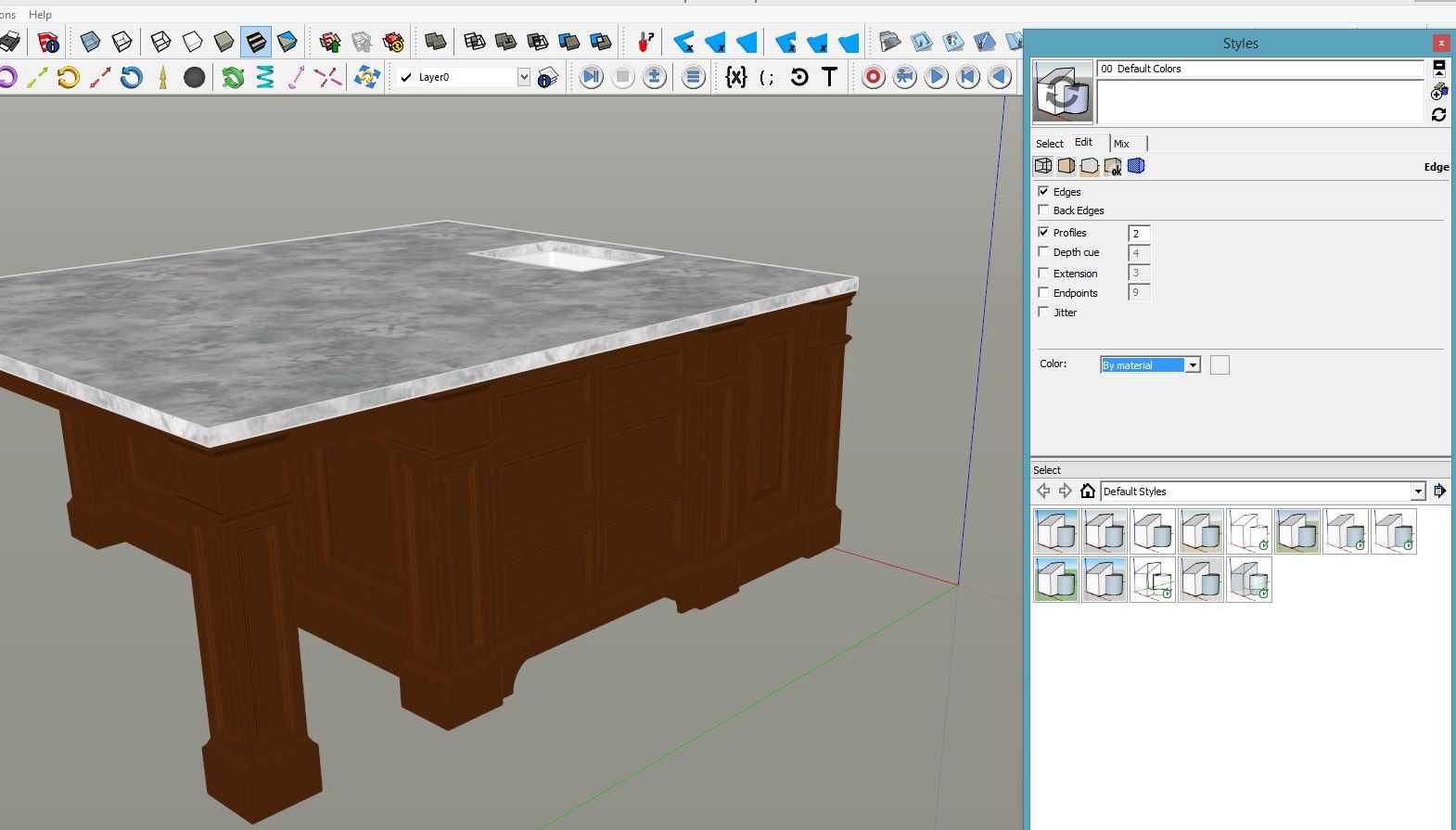

        render no outline.JPG


        render with outline.JPG

        1 Reply Last reply Reply Quote 0
        • BoxB Offline
          Box
          last edited by

          Try this one.


          BoxS MANTLE.skp

          1 Reply Last reply Reply Quote 0
          • D Offline
            davedhall
            last edited by

            That worked great! What do I do to fix it on all my other projects?

            1 Reply Last reply Reply Quote 0
            • BoxB Offline
              Box
              last edited by

              Please don't post identical threads.

              I have no idea why that worked and your others don't. All I did was adjust to all same and saved the file. It stays that way for me and now for you but not when you do it.

              1 Reply Last reply Reply Quote 0
              • D Offline
                davedhall
                last edited by

                can you save the file as a 2015 file? I have pro version 2015 but I had to download a temp version of pro 2016 to view the file. I can't view this in my current version to see what is happening. Thank you again for helping me

                1 Reply Last reply Reply Quote 0
                • BoxB Offline
                  Box
                  last edited by

                  Here it is as 15.
                  For future reference, now that you have 2016 you can Save as back to 2015 or earlier.


                  BoxS MANTLE.skp

                  1 Reply Last reply Reply Quote 0
                  • D Offline
                    davedhall
                    last edited by

                    Ok thank you! I will give this a try

                    1 Reply Last reply Reply Quote 0
                    • D Offline
                      davedhall
                      last edited by

                      Darn! It didn't work in the 2015 version... I can't imagine what is really going on here. I did not purchase the 2016 version... I just downloaded the 30 day trial so I don't want to get too attached to it if I can find a solution for pro 2015

                      1 Reply Last reply Reply Quote 0
                      • BoxB Offline
                        Box
                        last edited by

                        it works for me in 2015 and 2014........
                        Are you opening it? or importing it into another template?

                        1 Reply Last reply Reply Quote 0
                        • D Offline
                          davedhall
                          last edited by

                          Both. I can not get to stay on "All Same". It ALWAYS reverts back to "By Material" as soon as I save the file. So frustrating

                          1 Reply Last reply Reply Quote 0
                          • 1 / 1
                          • First post
                            Last post
                          Buy SketchPlus
                          Buy SUbD
                          Buy WrapR
                          Buy eBook
                          Buy Modelur
                          Buy Vertex Tools
                          Buy SketchCuisine
                          Buy FormFonts

                          Advertisement