[Plugin] [CityGen] - Street Generator [WIP] (0.5.2a)
-
@jermboy27 said:
@thomthom said:
@jermboy27 said:
Can you please add road signs in the UK in this plug-in?
That's a bit vague request. Add road sign - how, and by what rules?
Or are you looking for a library of components?By the Sketch-up road sign plug-in rules in any country you choose.
This is still too vague. What rules are these?
In any case - creating the signs for all the signs in the world - even just one is a bit of a task. But if you wan't to suggest it as a plugin you really need to be more spesific to what it would be used for and how it is supposed to work. -
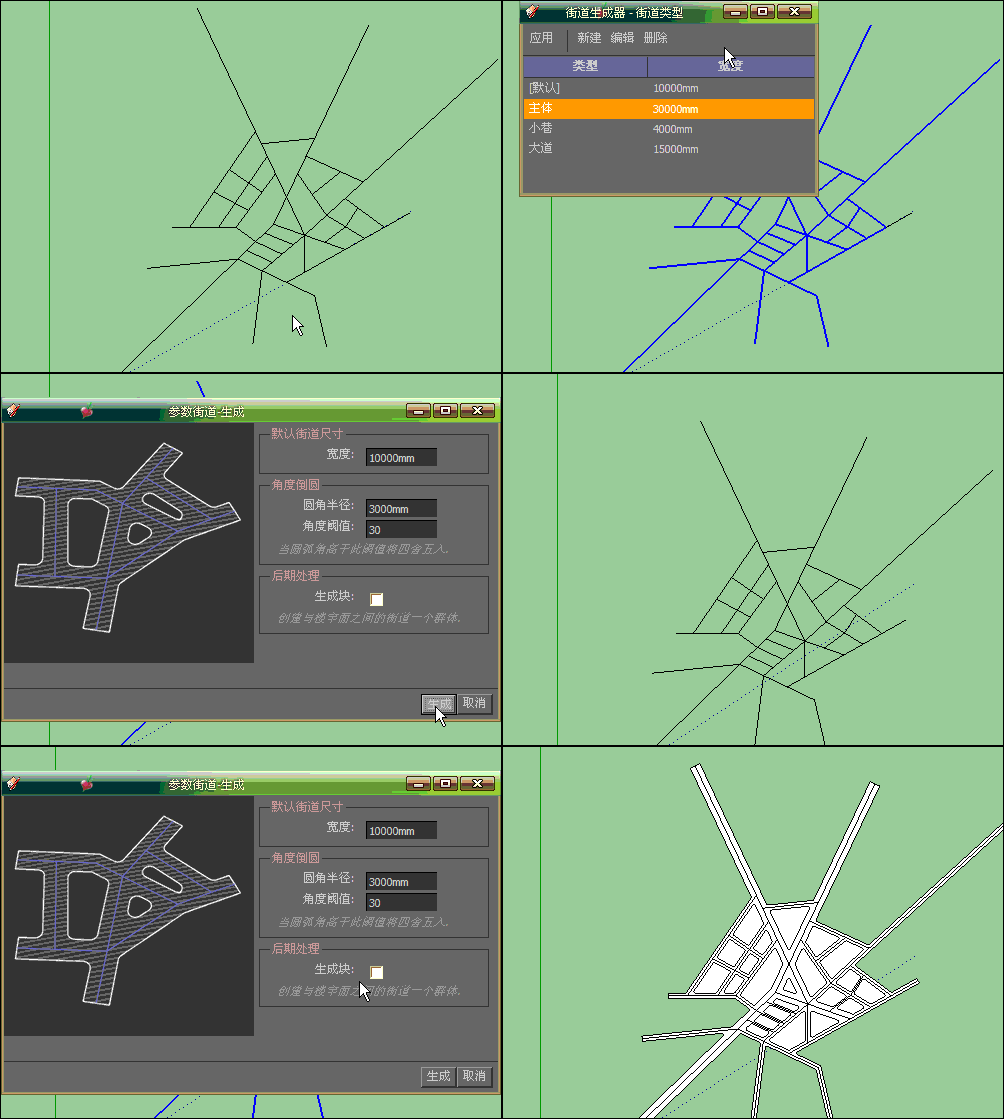
Good tool to do the planning useful, there is a problem, you can not change the road style
-
you could just type in 1234 main street like anyone else...
-
I do realise this is kind of dead but did it stop working with SU 2015 because I installed it correctly the city generator is displayed in tools but the street generator isn't showing. So I can't do anything.
-
I don't think SU2015 should cause this extension to break. What was the last SketchUp version you used? If you used it on SU2014 I would have expected it to work on SU2015.
-
@thomthom said:
I don't think SU2015 should cause this extension to break. What was the last SketchUp version you used? If you used it on SU2014 I would have expected it to work on SU2015.
Well I must confess this is the first time I'm using this plugin. The city generator shows up in my installed extensions but the street generator does not. Also what's the difference between the extension manager and the plugin manager in The SketchUcation plugin, because in extensions TT_lib² is disabled and in Plugins it's enabled. And I can't seem to activate it in extensions. See screenshot, also for the city generator, this is as far as I can get. Don't get a submenu.
-
The image doesn't seem to load for me.
-
@thomthom said:
The image doesn't seem to load for me.
That's weird it's an imgur image. Seems to load fine here: http://i.imgur.com/JXp0Zlw.jpg?1
-
@ash. said:
I do realise this is kind of dead but did it stop working with SU 2015 because I installed it correctly the city generator is displayed in tools but the street generator isn't showing. So I can't do anything.
How did you install Street Generator? To what location?
-
@thomthom said:
@ash. said:
I do realise this is kind of dead but did it stop working with SU 2015 because I installed it correctly the city generator is displayed in tools but the street generator isn't showing. So I can't do anything.
How did you install Street Generator? To what location?
C:\Users<username>\AppData\Roaming\SketchUp\SketchUp 2015\SketchUp\Plugins I extracted citygen folder and citygen ruby here and the streetgen folder and ruby in the citygen folder. As it should?
-
That does sound right... hm...
and no errors upon startup? -
@thomthom said:
That does sound right... hm...
and no errors upon startup?Nothing, I tried on a different computer that has more or less the same plugins but SketchUp 2014 and with same result no submenu showing.
-
Hmm... I'd have to dig deeper.
(I'm sorry to be slow to respond, but I'm living out of a hotel until the end of Feb. Business trip. Really poor WiFi quality... grumble) -
I used it in sketchup2015 ,however ,when I click“create blocks”,it can't work .you can see the message:
:236:infind_blocks' C:/Users/xxx/AppData/Roaming/SketchUp/SketchUp 2015/SketchUp/Plugins/citygen/modules/street_gen.rb:197:instreets_from_centre_lines'
C:/Users/xxx/AppData/Roaming/SketchUp/SketchUp 2015/SketchUp/Plugins/citygen/modules/street_gen.rb:164:inselection_streets_from_centre_lines' C:/Users/xxx/AppData/Roaming/SketchUp/SketchUp 2015/SketchUp/Plugins/citygen/modules/street_gen.rb:125:inblock in module:Street_Gen'
SketchUp:1:in `call' -
any chance that in the path above, where you wrote "XXX", there are non standard english characters? My windows is brazilian portuguese and by DEFAULT the user path in brazilian Windows is "user/usuário"... with that "á" there.
And several Sketchup plugins (since Sketchup moved the Plugins to the User path) seem to break because of the damn "á".
-
I didn´t find any info on the thread... but does it only work on lines all on the same plane?
or can I create a terrain mesh, create lines over the terrain mesh with ToS and then apply Street Generator?
-
Seems City Street don't work with the 2015 ?
This is curious because Sketchup.rb is effectivly present!
Erreur de chargement du fichier C;/Users/AppData/Roaming/SketchUp/SketchUp 2015/SketchUp/Plugins/citygen/modules/street_gen.rb Error; C;/Users/AppData/Roaming/SketchUp/SketchUp 2015/SketchUp/Plugins/citygen/modules/street_gen.rb;97; invalid multibyte char (UTF-8) C;/Users/AppData/Roaming/SketchUp/SketchUp 2015/SketchUp/Plugins/citygen/modules/street_gen.rb;100; syntax error, unexpected tCONSTANT, expecting ')' cmd_define_streets = UI;;Command.new('Define Types ') { ^ C;/Users/AppData/Roaming/SketchUp/SketchUp 2015/SketchUp/Plugins/citygen/modules/street_gen.rb;100; invalid multibyte char (UTF-8) C;/Program Files/SketchUp/SketchUp 2015/Tools/Sketchup.rb;85;in `require' C;/Program Files/SketchUp/SketchUp 2015/Tools/Sketchup.rb;85;in `block in require_all' C;/Program Files/SketchUp/SketchUp 2015/Tools/Sketchup.rb;85;in `each' C;/Program Files/SketchUp/SketchUp 2015/Tools/Sketchup.rb;85;in `require_all' C;/Users/AppData/Roaming/SketchUp/SketchUp 2015/SketchUp/Plugins/citygen/city_gen.rb;93;in `<module;City_Gen>' C;/Users/AppData/Roaming/SketchUp/SketchUp 2015/SketchUp/Plugins/citygen/city_gen.rb;46;in `<top (required)>' C;/Program Files/SketchUp/SketchUp 2015/Tools/extensions.rb;197;in `require' C;/Program Files/SketchUp/SketchUp 2015/Tools/extensions.rb;197;in `load' C;/Users/AppData/Roaming/SketchUp/SketchUp 2015/SketchUp/Plugins/city_gen_loader.rb;43;in `register_extension' C;/Users/AppData/Roaming/SketchUp/SketchUp 2015/SketchUp/Plugins/city_gen_loader.rb;43;in `<top (required)>'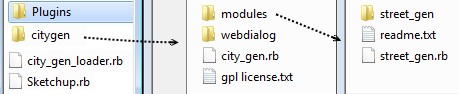
-
@pilou said:
Seems City Street don't work with the 2015 ?
This is curious because Sketchup.rb is effectivly present!Erreur de chargement du fichier C;/Users/AppData/Roaming/SketchUp/SketchUp 2015/SketchUp/Plugins/citygen/modules/street_gen.rb > Error; C;/Users/AppData/Roaming/SketchUp/SketchUp 2015/SketchUp/Plugins/citygen/modules/street_gen.rb;97; invalid multibyte char (UTF-8) > C;/Users/AppData/Roaming/SketchUp/SketchUp 2015/SketchUp/Plugins/citygen/modules/street_gen.rb;100; syntax error, unexpected tCONSTANT, expecting ')' > cmd_define_streets = UI;;Command.new('Define Types ') { > > ^ > C;/Users/AppData/Roaming/SketchUp/SketchUp 2015/SketchUp/Plugins/citygen/modules/street_gen.rb;100; invalid multibyte char (UTF-8) > C;/Program Files/SketchUp/SketchUp 2015/Tools/Sketchup.rb;85;in `require' > C;/Program Files/SketchUp/SketchUp 2015/Tools/Sketchup.rb;85;in `block in require_all' > C;/Program Files/SketchUp/SketchUp 2015/Tools/Sketchup.rb;85;in `each' > C;/Program Files/SketchUp/SketchUp 2015/Tools/Sketchup.rb;85;in `require_all' > C;/Users/AppData/Roaming/SketchUp/SketchUp 2015/SketchUp/Plugins/citygen/city_gen.rb;93;in `<module;City_Gen>' > C;/Users/AppData/Roaming/SketchUp/SketchUp 2015/SketchUp/Plugins/citygen/city_gen.rb;46;in `<top (required)>' > C;/Program Files/SketchUp/SketchUp 2015/Tools/extensions.rb;197;in `require' > C;/Program Files/SketchUp/SketchUp 2015/Tools/extensions.rb;197;in `load' > C;/Users/AppData/Roaming/SketchUp/SketchUp 2015/SketchUp/Plugins/city_gen_loader.rb;43;in `register_extension' > C;/Users/AppData/Roaming/SketchUp/SketchUp 2015/SketchUp/Plugins/city_gen_loader.rb;43;in `<top (required)>'[attachment=0:1kw1ybvh]<!-- ia0 -->folders.jpg<!-- ia0 -->[/attachment:1kw1ybvh]
Load City_Gen Loader.rb in to Notepad++ and check the encoding. Make sure UTF-8 without BOM is selected and save.
-
Alas same result!
-
@pilou said:
Alas same result!
I recently tried this plugin and I had the same problem. Maybe I did this for all .rb files.




Hello! It looks like you're interested in this conversation, but you don't have an account yet.
Getting fed up of having to scroll through the same posts each visit? When you register for an account, you'll always come back to exactly where you were before, and choose to be notified of new replies (either via email, or push notification). You'll also be able to save bookmarks and upvote posts to show your appreciation to other community members.
With your input, this post could be even better 💗
Register Login


Advertisement