Layout won't save
-
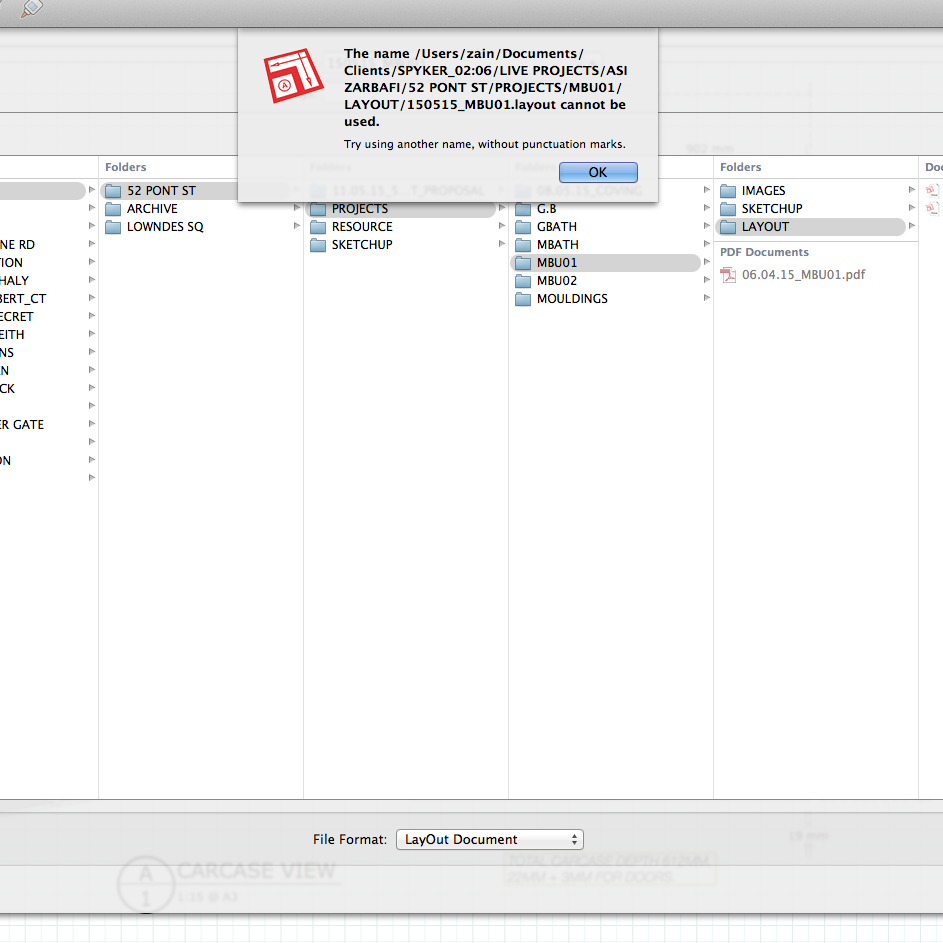
Hi can anyone tell me why Layout has started to show an error message saying i cant save a document with punctuation marks in the name? I have taken the punctuation marks out and it still wont save so basically i cant save anything. Thanks in advance.
-
You can't normally use : in a filename on a mac, it's a path posix separator...
Did you import the set of folders from a PC?
I really can't make a folder named "Test:Folder" for example, but you have the one named SPYKER_2:06, which is possibly the cause for your issue...
john
-
This appears to be a Layout-specific catch. From the command line, I can create a folder with a : in the name (though Finder displays it as a / afterward). Layout refuses to save a file to that folder. However, SketchUp quite happily saves to the folder. So it is in the Layout code, not a generic issue!
-
@steve, I can't even make them in 'Finder', so it's not Layout specific for me...
if I attempt to use : from a 'Save' dialog in SU, it shows a dash, not a colon I'm trying to enter...
and as you found mkdir converts it to a slash...
-
John, your experience seems to differ from mine...I wonder why? Having a ":" in a folder name is a very bad idea, bound to cause problems, so I am interested mainly from a technical point of view.
Using the terminal command line, I can mkdir a folder with a ":" in its name. The "ls" command shows it with a ":". So Mac OS itself can deal with a ":". But Finder displays it as a "/" even though ":" is not a path separator (foo:bar is a single folder, not two nested ones as foo/bar), and when I save a SU file to that folder, the save dialog also shows "/" (and SU successfully saves the file). The save dialog in Layout also shows it as "/", but when I try to save there, I get that popup with the message that I can't save to a folder with punctuation in its name. So, I conclude that this is due to how the various apps were programmed, not a fundamental aspect of Mac OS X.
-
just dug this up...
@unknownuser said:
The only illegal character for file and folder names in Mac OS X is the colon ":"
File and folder names are not permitted to begin with a dot "."
File and folder names may be up to 255 characters in length
how apps handle it obviously differs, for me SU changes it to a dash, LO rejects it with a message, Terminal changes it to an escaped colon, as seen if you drag the folder in i.e. /private/tmp/new:tmp...
Bottomline for the OP is in the quote The only illegal character for file and folder names in Mac OS X is the colon ":"
john
-
Thanks all for the info
I have been saving files in Layout with names like for example
22.06.15_MBU_01
for the past 2 years with no issues
All of a sudden it wouldn't save it to the target folder so i saved it to the desktop and then moved it afterwards.
And now i am having to re link the SU file every time i open the relevant Layout file.
Can anyone tell me why i am having this re linking problem?
The amount of time i am wasting navigating to the file to re link is ingratiating.
Also dangerous if subtle changes in the model are not reflected in Layout as the joinery i am drafting is constantly changing.
Regards -
So evidently you didn't get this from the last post by John?
@unknownuser said:
Bottomline for the OP is in the quote The only illegal character for file and folder names in Mac OS X is the colon ":"
-
to clarify what I was pointing out...
any filename includes the path, and yours contains ../SPYKER_2:06/.., with the 2 and the 0 separated by a colon...then Steve and I chat about how some apps cope with what is considered by Apple the only 'illegal' character.
Change the colon and all should work...
john


Hello! It looks like you're interested in this conversation, but you don't have an account yet.
Getting fed up of having to scroll through the same posts each visit? When you register for an account, you'll always come back to exactly where you were before, and choose to be notified of new replies (either via email, or push notification). You'll also be able to save bookmarks and upvote posts to show your appreciation to other community members.
With your input, this post could be even better 💗
Register Login


Advertisement