RBeautify - Ruby Code Beautifier
-
There are a couple of things I like to do to Ruby code to make it easier to work with:
-
Use Indents properly to make it easy to follow groups of code
-
Add #xxx after 'end' to make it easier to remember what they are the end of:
#e.g.
    if (a == b)
        c = d
    end#if
(I really wish the Ruby inventors had not decided to use the same word, 'end', for the end of everything. It would make it a lot easier to track down mistakes.
- Make blank lines consistent.
So I borrowed a Ruby Beautifier Script from Paul Lutus, (which did #1), and added logic to it to do #2 and #3.
I have attached a copy if you want to try it out.
Here is what it does to a ruby script which was already in good shape - bomb.rb by Rick Wilson (A free script I downloaded from Smustard)
Original on right, RBeautify version on left
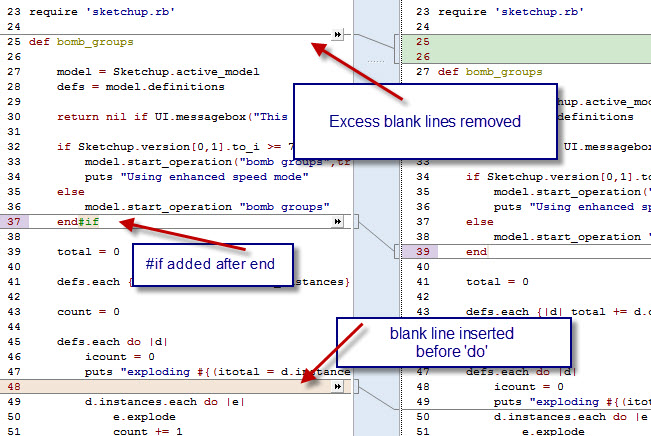
(This output is from Araxis Merge - a great program we use to show changes between versions of source code)Al Hart

IRender nXt from Render Plus -
-
Hi Al
I'm trying to use your rbeautify.rb but I get this error:RBeautify.beautify_file("c:/rotular.rb")
Error: #<NoMethodError: undefined methodeach' for #<String:0x0000000fef1050>> C:/rbeautify.rb:90:inbeautify_string'
C:/rbeautify.rb:194:inbeautify_file' <main>:in<main>'
SketchUp:1:in `eval'where rotular.rb is just a generic rb that I'm using as a sample.
Could you please help me?Tks
-
This is an old script.
It's not compatible with >= v2014's Ruby 2.
You can 'fix it' by finding the offending line -
source.each do |line|
that is processing the string OK in earlier Ruby's and use something like:
source**.split**.each do |line|IMHO the script is a bit flawed and flaky.
It uses $ global variables that are frowned on in current coding circles...
You'd be better off getting Notepad++ [or TextWrangler for MAC] and using its built-in Ruby syntax highlighting and learn to indent your code manually as you go...
That would do much of what Al's script did anyway
-
@cesaro36 said:
Hi Al
I'm trying to use your rbeautify.rb but I get this error:RBeautify.beautify_file("c:/rotular.rb")
Error: #<NoMethodError: undefined methodeach' for #<String:0x0000000fef1050>> C:/rbeautify.rb:90:inbeautify_string'
C:/rbeautify.rb:194:inbeautify_file' <main>:in<main>'
SketchUp:1:in `eval'where rotular.rb is just a generic rb that I'm using as a sample.
Could you please help me?Tks
I just downloaded this plugin and the line numbers,C:/rbeautify.rb:90:in
beautify_string' and C:/rbeautify.rb:194:inbeautify_file', don't seem to match the current version. My initial test produced a similar error but at C:/rbeautify.rb:146:inbeautify_string' and C:/rbeautify.rb:368:inbeautify_file'.After changing line 146 from "source.each do |line|" to "source.each_line do |line|", the plugin worked. So I would suggest downloading a new copy and make that change.
-
[Seems to be working ok - give it a try]
SketchUp 2014 and 2015, (ruby 1.9), changed the name of the .each function for strings.
Change line 146 or 147 to read:
source.each_line do |line|I have also uploaded a new version into the original post.
Al Hart
IRender nXt from Render Plus -
Al, The only problem I have encountered is a line with multiple closing braces, ie }}}.
This causes an imbalance between indents and outdents. I don't know enough about regular expressions to know it is even possible to trap such a string.
-
Wow thank you all,
Now it does what I needed.
Anyhow I found a workaround by using the sublime text 2 code editor.
Here it is:
https://packagecontrol.io/packages/RubyFormatGracias
¡Saludos a todos!
-
I found a different problem. I was using this code to set a string:
(This loads all text up to the word HERE into a string with new lines, etc.)` smess = <<HERE
This face will not render in the material you have created, since it is on placed the reverse side of a face.Use "Setup Options/Special/Process 2 Sided Faces" to allow materials on reverse faces to be rendered.
HERE`and the beautifier indented the last line (HERE) which cause the ruby to fail
Al Hart
IRender nXt from Render Plus



Hello! It looks like you're interested in this conversation, but you don't have an account yet.
Getting fed up of having to scroll through the same posts each visit? When you register for an account, you'll always come back to exactly where you were before, and choose to be notified of new replies (either via email, or push notification). You'll also be able to save bookmarks and upvote posts to show your appreciation to other community members.
With your input, this post could be even better 💗
Register Login


Advertisement