Export Only Selected Scenes as Video
-
Hi everyone! This is my first ever question on SketchUcation although I've been here for years. I searched the topics but couldn't find what I was looking for.
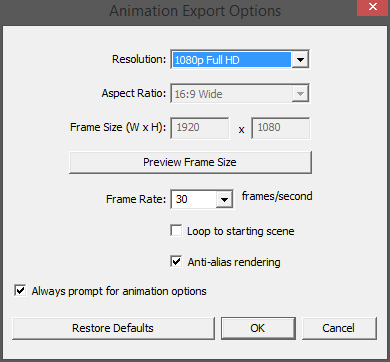
I'm making a project and I have about 14 scenes in my SketchUp file. I need to export an MP4 video file from my scenes but I need several videos, each one containing only 2 scene transitions for post production purposes. So my question is, is there any way to select the scenes I want to be exported into MP4 before clicking the Ok button in the Animation Export Options window? Thank you all!
-
You select scene tabs to be included/excluded in an animation in the scene-manager.
Then only the selected ones are in the animation.
Ones excluded from animations have their name displayed in the scene-tab in parentheses ( )So you need to open the scene-manager and set up the desired scene-tabs included/excluded, then make the animation export.
Then change the included/excluded scene-tabs for the next animation export... and so on... -
OMG! I think it worked. Couldn't wait for the exporting process to finish and opened the video to see how it was. Thanks a lot Tig!



Hello! It looks like you're interested in this conversation, but you don't have an account yet.
Getting fed up of having to scroll through the same posts each visit? When you register for an account, you'll always come back to exactly where you were before, and choose to be notified of new replies (either via email, or push notification). You'll also be able to save bookmarks and upvote posts to show your appreciation to other community members.
With your input, this post could be even better 💗
Register Login


Advertisement