Relative location of a bezier curve
-
Hi,
I have a quick question for you guys: I'm using BZ_Toolbar->Classic Bezier Curve extension to draw curves representing alleys, for example. How can I dimension the relative location of the curve (points?), so the execution team knows exactly how to do it? Basically, let's take an example I found:
I want my bezier curve to be represented in the detailed plan just like the purple one in the above image. How can that be done in Sketchup?
Also, is there a way to automatically add a scale like the one in the pictures (up-right scale: 1,2,3,4,5,10,15m)? Perhaps a plugin or something? -
For the scale, you can create one component and reuse it for different models...

-
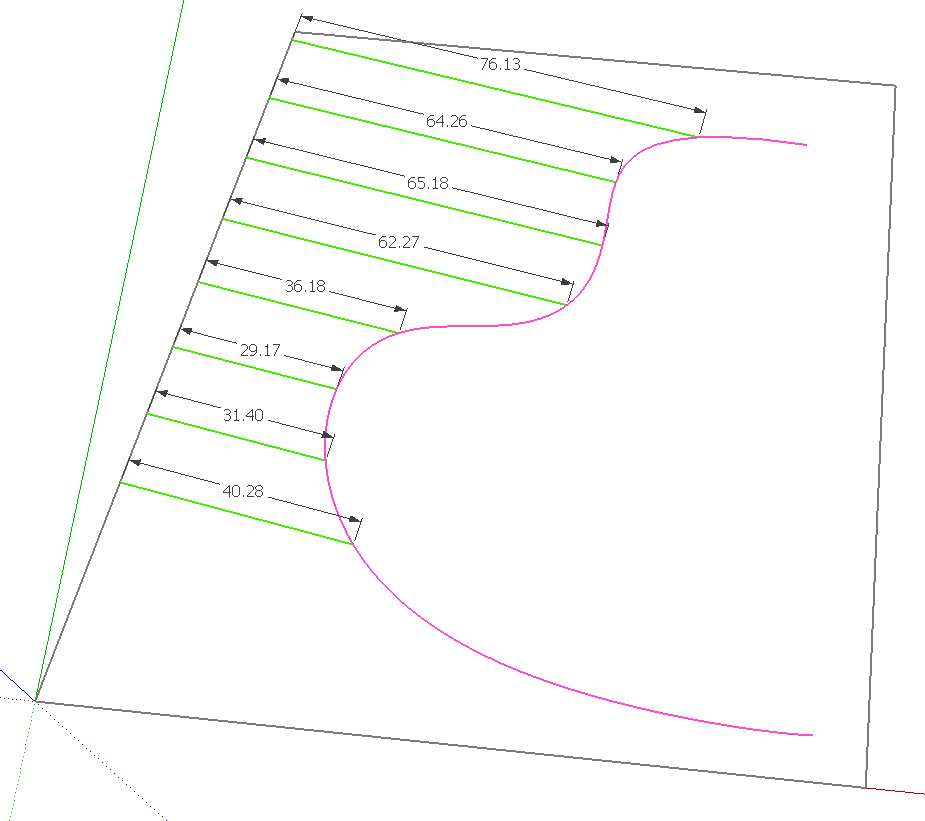
Draw lines at intervals like the green lines and then dimension them with the Dimension tool. Put the Bezier curve in a component or group so it remains separated from the green lines. Then, if needed, you'll be able to edit the Bezier curve later.
Edit: I just zipped this out in SketchUp but if I were doing it for a job, I would do the dimensioning in LayOut.
-
Thank you both!
@dave r said:
Edit: I just zipped this out in SketchUp but if I were doing it for a job, I would do the dimensioning in LayOut.



Hello! It looks like you're interested in this conversation, but you don't have an account yet.
Getting fed up of having to scroll through the same posts each visit? When you register for an account, you'll always come back to exactly where you were before, and choose to be notified of new replies (either via email, or push notification). You'll also be able to save bookmarks and upvote posts to show your appreciation to other community members.
With your input, this post could be even better 💗
Register Login


Advertisement