LO2015: no scale indication @ right-click anymore
-
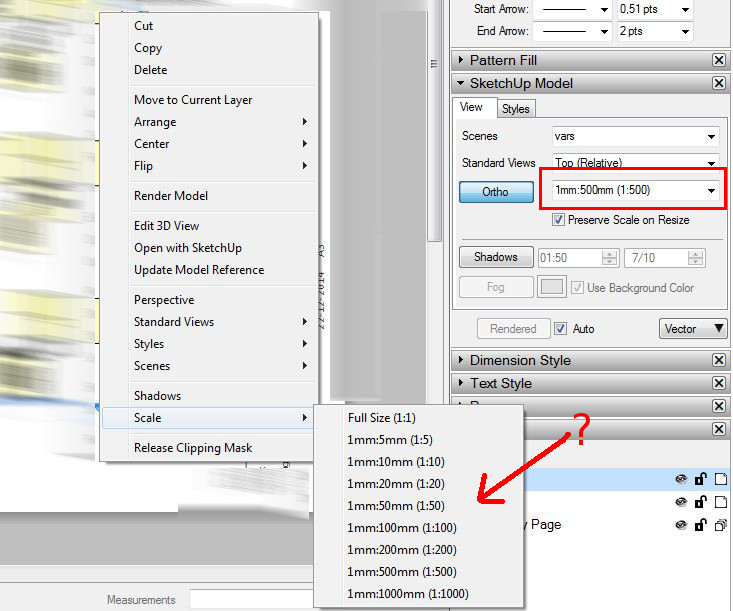
In previous versions of LayOut, after right-clicking any SketchUp-page, you would get the current scale indicated for that element. In the right-click 'rollout' it's gone in 2015 so now you have to open the sketchup-model-tab to see the current scale. Would be nice if that old feature could be implemented again.
-
On Windows I see the current scale marked with a check mark and a "Current Scale" label. On mac I'm not seeing the "Current Scale" label, but there is still a check mark next to the active scale.
If you select "1:500" in that context menu, does a check mark appear?
-
@marcdurant said:
...If you select "1:500" in that context menu, does a check mark appear?
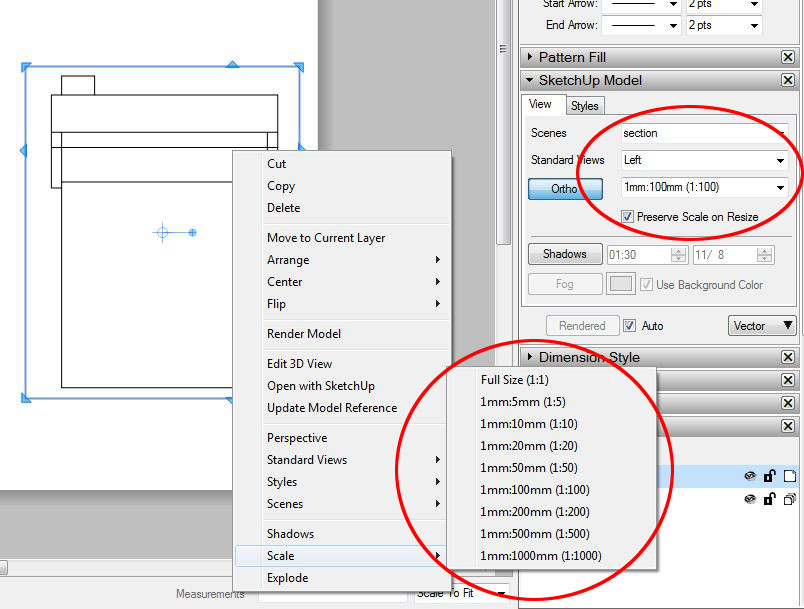
If I change the scale in the context menu, it does appear. But, after a short while, it's gone again. I haven't been able to detect any logic or pattern in it.
To test again, I made a simple house and added some scenes. Send it to layout:
1 changed scene from context menu,
2 changed scale from context menu,
3 copied the scene to another position on the paper
4 go to step 1 + repeat5 after all the scenes were placed on the paper, I checked if the check marks were still there. They were gone.
6 re-did the scaling so the checkmarks were there. saved + closed Layout. Opened layout again, the checkmarks were gone again....?
-
Same here (Mac). Just after setting the scale, it will show a check, but simply right clicking an existing scaled reference does not show a check mark at the scale.
-
I made an entry for this in our bug tracker, so we'll take a look at it.
Thanks,
Marc

Hello! It looks like you're interested in this conversation, but you don't have an account yet.
Getting fed up of having to scroll through the same posts each visit? When you register for an account, you'll always come back to exactly where you were before, and choose to be notified of new replies (either via email, or push notification). You'll also be able to save bookmarks and upvote posts to show your appreciation to other community members.
With your input, this post could be even better 💗
Register Login


Advertisement