Ocean water rendering artifacts on single surface
-
Hi,
I'm a beginner with rendering. I have spent a whole day trying to render ocean water with vray for sketchup (vray 2.0 version and sketch up pro 2014).
I basically follow this good tutorial:
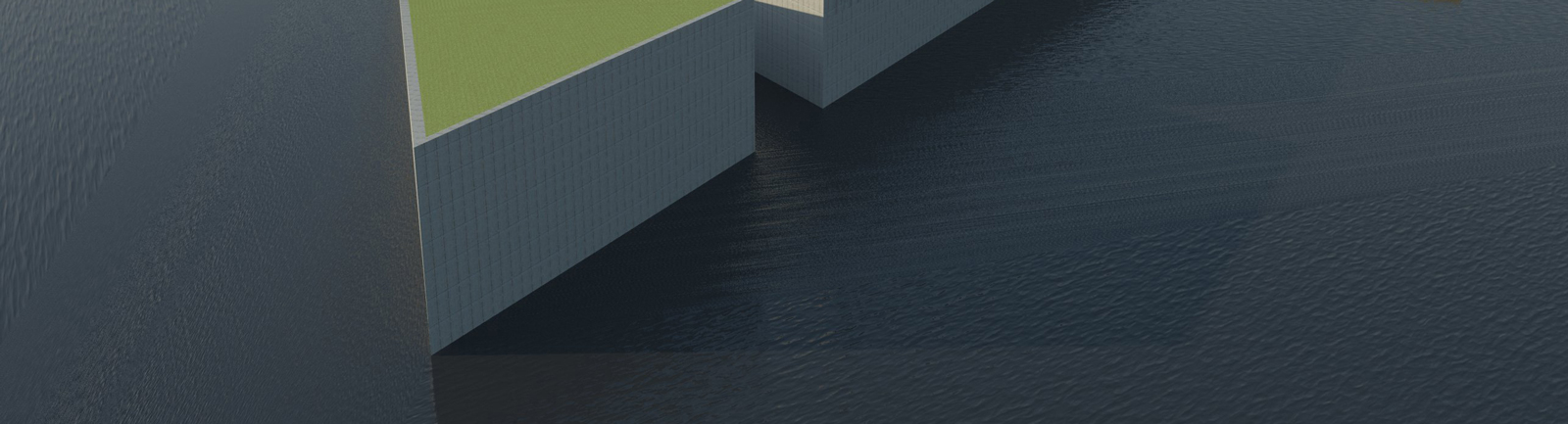
https://www.youtube.com/watch?v=LAA2Yxe4P6EIt looks ok for the most part, but I don't understand why I get part of the sea with different bumping and orientation.
In the attached picture, you can see at least 3 different areas where this happens. But the water surface in sketch up is just 1 single rectangle. I really don't understand.Thanks for the help.
Ale
-
This is because there is either a bump or a displacement on the surface. Try adding a map to the diffuse slot and disabling the mapping. V-Ray needs the diffuse mapping to generate UVW information that Sketchup doesn't provide at render time.
-
@tedvitale_cg said:
This is because there is either a bump or a displacement on the surface. Try adding a map to the diffuse slot and disabling the mapping. V-Ray needs the diffuse mapping to generate UVW information that Sketchup doesn't provide at render time.
So, is the video above incorrect?
Anyway I will do some tests with a diffuse map, thanks for the advice !
! -
The video is using V-Ray 1.49. 2.0 works a little differently and needs the Diffuse map to pull UVW information from the geometry.

Hello! It looks like you're interested in this conversation, but you don't have an account yet.
Getting fed up of having to scroll through the same posts each visit? When you register for an account, you'll always come back to exactly where you were before, and choose to be notified of new replies (either via email, or push notification). You'll also be able to save bookmarks and upvote posts to show your appreciation to other community members.
With your input, this post could be even better 💗
Register Login


Advertisement