sketchucation logo sketchucation
    • Login
    Oops, your profile's looking a bit empty! To help us tailor your experience, please fill in key details like your SketchUp version, skill level, operating system, and more. Update and save your info on your profile page today!
    ⚠️ Update | Sketchucation Tools 5.0.8 released with licensing improvements and bugfixes Download

    Curviloft result between a rectangle and circle

    Scheduled Pinned Locked Moved SketchUp Discussions
    sketchup
    11 Posts 4 Posters 810 Views 4 Watching
    Loading More Posts
    • Oldest to Newest
    • Newest to Oldest
    • Most Votes
    Reply
    • Reply as topic
    Log in to reply
    This topic has been deleted. Only users with topic management privileges can see it.
    • P
      pipingguy
      last edited by

      1. why is the result assymetrical?
      2. why is the result always softened?

      curviloft is assymetrical.skp

      1 Reply Last reply
      Reply Quote 0
      • Dave RD
        Dave R
        last edited by

        Setting change in the toolbar will help.

        Screenshot - 12_20_2014 , 7_11_07 AM.png

        Deselect the button for "Orientate countours..." At the right end of the Vx Matching section.
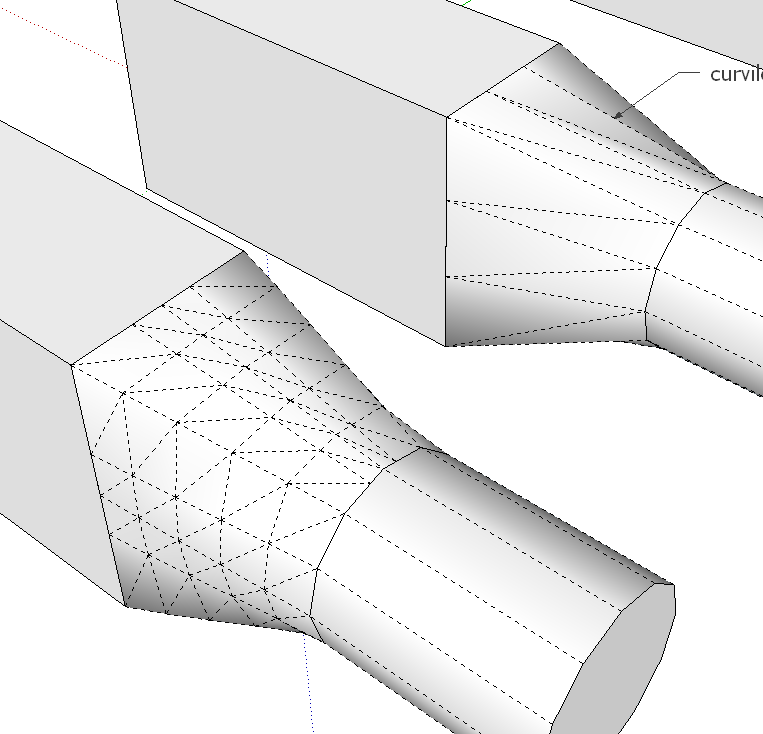
        Screenshot - 12_20_2014 , 7_12_25 AM.png

        I divided each of the edges of the rectangle into three segements before running Curviloft for the screen shots above. If you don't, the shape will be a little different. Maybe it's more accurate without dividing the edges.
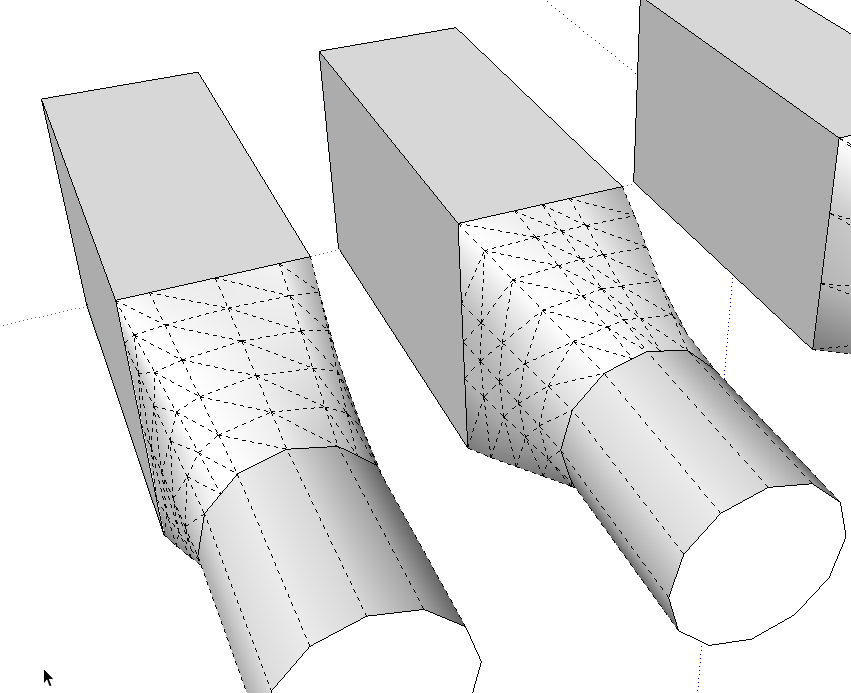
        Undivided edges on the left, divided edges second from left.

        Etaoin Shrdlu

        %

        (THERE'S NO PLACE LIKE)

        G28 X0.0 Y0.0 Z0.0

        M30

        %

        1 Reply Last reply
        Reply Quote 0
        • P
          pipingguy
          last edited by

          That works! Thank you.

          As far as the edges being softened....must I always unsoften them in a separate operation after I complete the lofting operation, or can Fredo's settings handle it?

          1 Reply Last reply
          Reply Quote 0
          • Dave RD
            Dave R
            last edited by

            I don't think there's any setting for preventing the softening. If you select all the geometry after creation, you can use the Soften Edges slider to unsoften. It's pretty fast that way.

            Etaoin Shrdlu

            %

            (THERE'S NO PLACE LIKE)

            G28 X0.0 Y0.0 Z0.0

            M30

            %

            1 Reply Last reply
            Reply Quote 0
            • BoxB
              Box
              last edited by

              There's also a simple plugin that will soften/unsoften at the click of a button.
              http://sketchucation.com/pluginstore?pln=Soften

              1 Reply Last reply
              Reply Quote 0
              • P
                pipingguy
                last edited by

                Way cool.......I downloaded the 'soften' ruby script and I like it. Only problem is I have so many toolbars now that the workspace has become miniscule! πŸ˜„

                1 Reply Last reply
                Reply Quote 0
                • Dave RD
                  Dave R
                  last edited by

                  Do you have the toolbars set to display as large buttons or small? You could assign a keyboard shortcut to the plugin and skip the button altogether.

                  Etaoin Shrdlu

                  %

                  (THERE'S NO PLACE LIKE)

                  G28 X0.0 Y0.0 Z0.0

                  M30

                  %

                  1 Reply Last reply
                  Reply Quote 0
                  • P
                    pipingguy
                    last edited by

                    small buttons; all keys have been assigned shortcuts.

                    1 Reply Last reply
                    Reply Quote 0
                    • pilouP
                      pilou
                      last edited by

                      It's more elegant to keep the soft edges and call the "Show Hidden Geometry" ! πŸ˜‰

                      Frenchy Pilou
                      Is beautiful that please without concept!
                      My Little site :)

                      1 Reply Last reply
                      Reply Quote 0
                      • Dave RD
                        Dave R
                        last edited by

                        @pipingguy said:

                        small buttons; all keys have been assigned shortcuts.

                        I bet you don't use all of those plugins. Might be worth culling some.

                        Etaoin Shrdlu

                        %

                        (THERE'S NO PLACE LIKE)

                        G28 X0.0 Y0.0 Z0.0

                        M30

                        %

                        1 Reply Last reply
                        Reply Quote 0
                        • BoxB
                          Box
                          last edited by

                          And in 2015 You can customise your toolbars so you don't need to have all the buttons you only use rarely.
                          Not to mention sets, part of the sketchucation tools which let's you load tools selectively.

                          1 Reply Last reply
                          Reply Quote 0

                          Hello! It looks like you're interested in this conversation, but you don't have an account yet.

                          Getting fed up of having to scroll through the same posts each visit? When you register for an account, you'll always come back to exactly where you were before, and choose to be notified of new replies (either via email, or push notification). You'll also be able to save bookmarks and upvote posts to show your appreciation to other community members.

                          With your input, this post could be even better πŸ’—

                          Register Login
                          • 1 / 1
                          • First post
                            Last post
                          Buy SketchPlus
                          Buy SUbD
                          Buy WrapR
                          Buy eBook
                          Buy Modelur
                          Buy Vertex Tools
                          Buy SketchCuisine
                          Buy FormFonts

                          Advertisement
