Plugins will not install
-
Hello,
When I select a plugin download, a window comes up asking me to choose between 2 plugin folder locations, with the first location highlighted.
The idea is to select one of these locations but clicking away (on either) does nothing, and the plugin is not installed.
Can someone tell me what I'm missing here? I'm running 64 bit Windows 7 on an HPZ1 workstation, and using the latest release of S'kup Pro 2014. I'm using the latest version of Sketchucation Tools. (2.6)
-
What is the first location offered? Your profile indicates you're using SU8 on a Mac. What are you really using?
What plugin are you trying to install?
-
There is a button at the bottom of the dialog.
You click on that to confirm your choice of destination folder****** If you have the dialog 'minimized' drag its bottom edge downwards a little so that you can see the button...
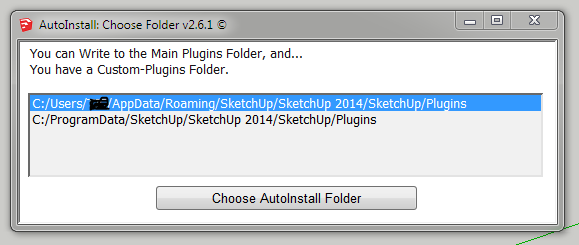
Incidentally any idea why you have more than one destination offered, if you haven't specified one using a tool like Fredo's AdditionPluginsFolder tool ?
What is the choice ?
Always choose your own User Plugins folder UNLESS you have a good reason to choose otherwise !
Some 3rd party Plugins with their own installers** can put things into the 'shared' location without asking clearly, that then gets listed as an option
**Like 'octane_render'...


Hello! It looks like you're interested in this conversation, but you don't have an account yet.
Getting fed up of having to scroll through the same posts each visit? When you register for an account, you'll always come back to exactly where you were before, and choose to be notified of new replies (either via email, or push notification). You'll also be able to save bookmarks and upvote posts to show your appreciation to other community members.
With your input, this post could be even better 💗
Register Login


Advertisement