Everything is an outline
-
Right from the start all the shapes I draw are an outline,Why aren't they solid objects. I see on YouTube videos that after people make a shape it fills in. I've tried using the paint bucket tool to fill them in but that does nothing. I can't fill in color or texture on anything.
any advise/help would be greatly appreciated.
-
Make sure you have a style active other than "Wireframe".
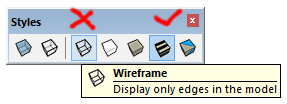
-
If the View settings ought to show faces, then perhaps it's a Graphics Card issue...
Preferences > OpenGL
Try switching 'Fast Feedback' off [or on] and see if that helps...
Or select a lower AntiAlias setting if there's a list...Also check that your GC's driver is up to date...
-
@cotty said:
Make sure you have a style active other than "Wireframe".
Thanks for the suggestion cotty,
I just tried all the different styles and there was no noticeable difference between them. -
@tig said:
If the View settings ought to show faces, then perhaps it's a Graphics Card issue...
Preferences > OpenGL
Try switching 'Fast Feedback' off [or on] and see if that helps...
Or select a lower AntiAlias setting if there's a list...Also check that your GC's driver is up to date...
Thank you TIG,
Switching fast feedback on seem to have worked.
Thanks for taking the time to help me!


Hello! It looks like you're interested in this conversation, but you don't have an account yet.
Getting fed up of having to scroll through the same posts each visit? When you register for an account, you'll always come back to exactly where you were before, and choose to be notified of new replies (either via email, or push notification). You'll also be able to save bookmarks and upvote posts to show your appreciation to other community members.
With your input, this post could be even better 💗
Register Login


Advertisement