sketchucation logo sketchucation
    • Login
    Oops, your profile's looking a bit empty! To help us tailor your experience, please fill in key details like your SketchUp version, skill level, operating system, and more. Update and save your info on your profile page today!
    Mac User? | Join the Rayscaper Beta for Mac Learn More

    Tutorial for Extrude Tools

    Scheduled Pinned Locked Moved Plugins
    32 Posts 12 Posters 8.8k Views 12 Watching
    Loading More Posts
    • Oldest to Newest
    • Newest to Oldest
    • Most Votes
    Reply
    • Reply as topic
    Log in to reply
    This topic has been deleted. Only users with topic management privileges can see it.
    • M
      Migmat
      last edited by

      EXTRUDE TOOLS TUTORIAL
      The second part of the tutorial (5 pages )

      NOTE: The first page is the page 0. There is 10 pages at all (0....9)
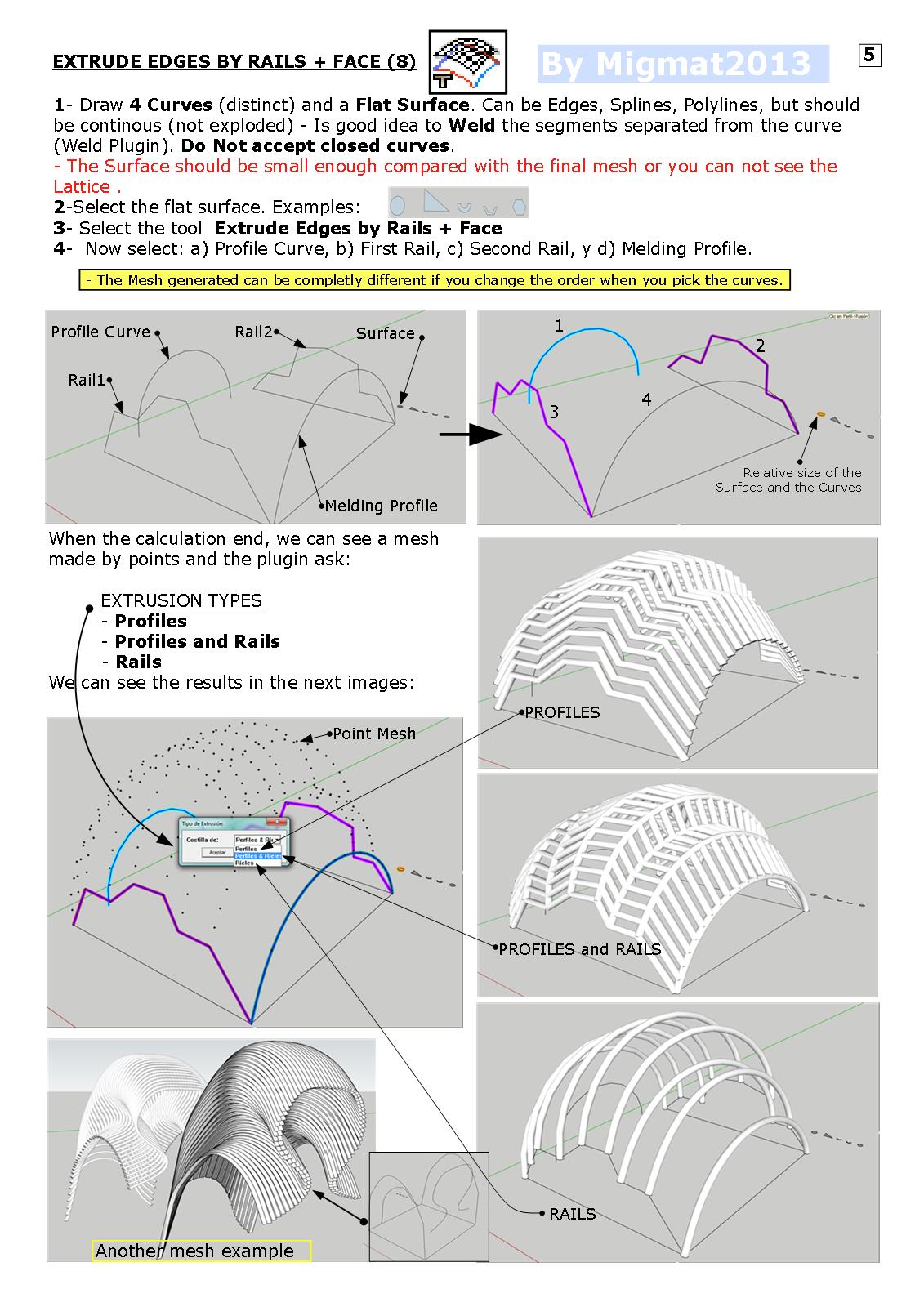

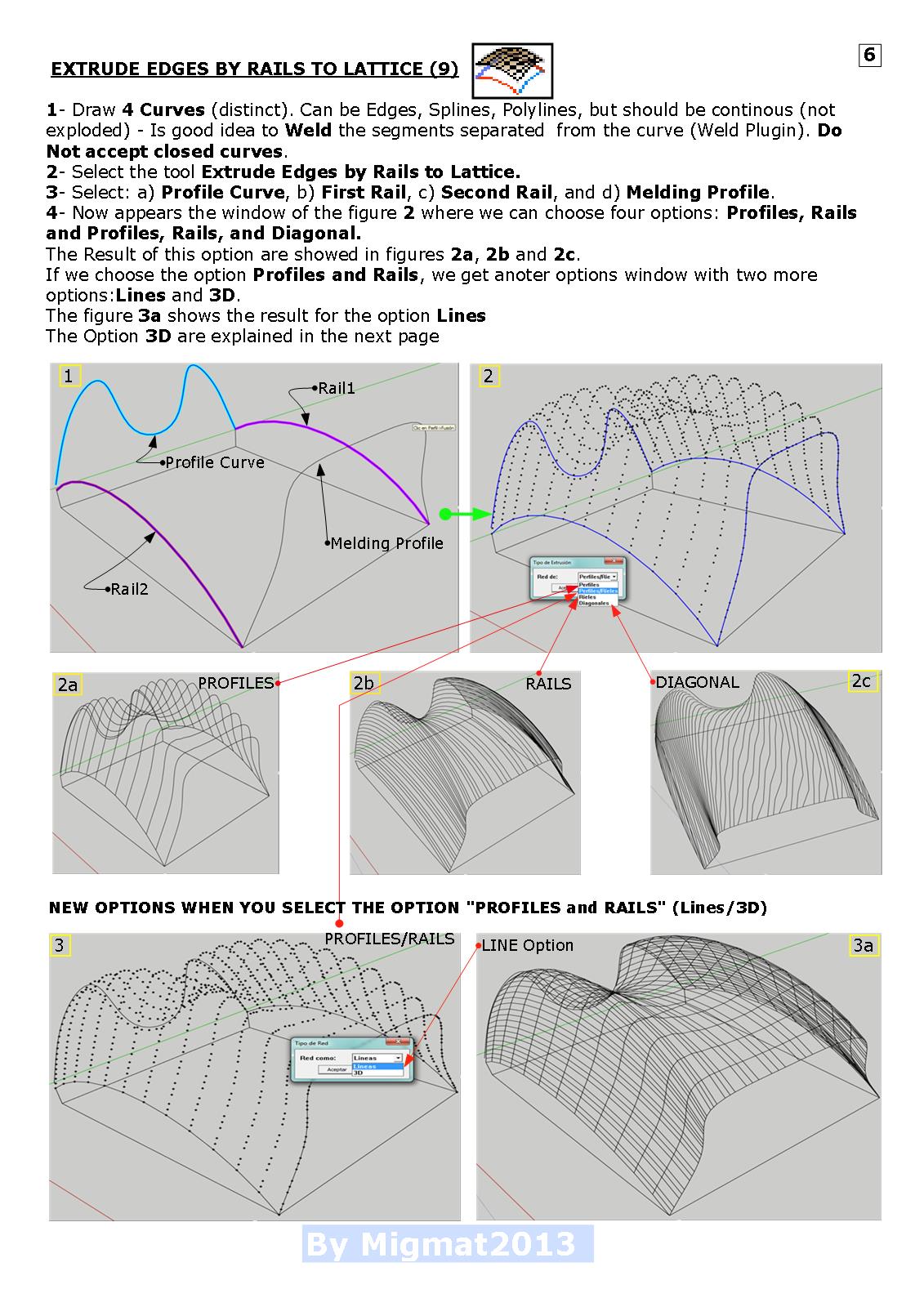
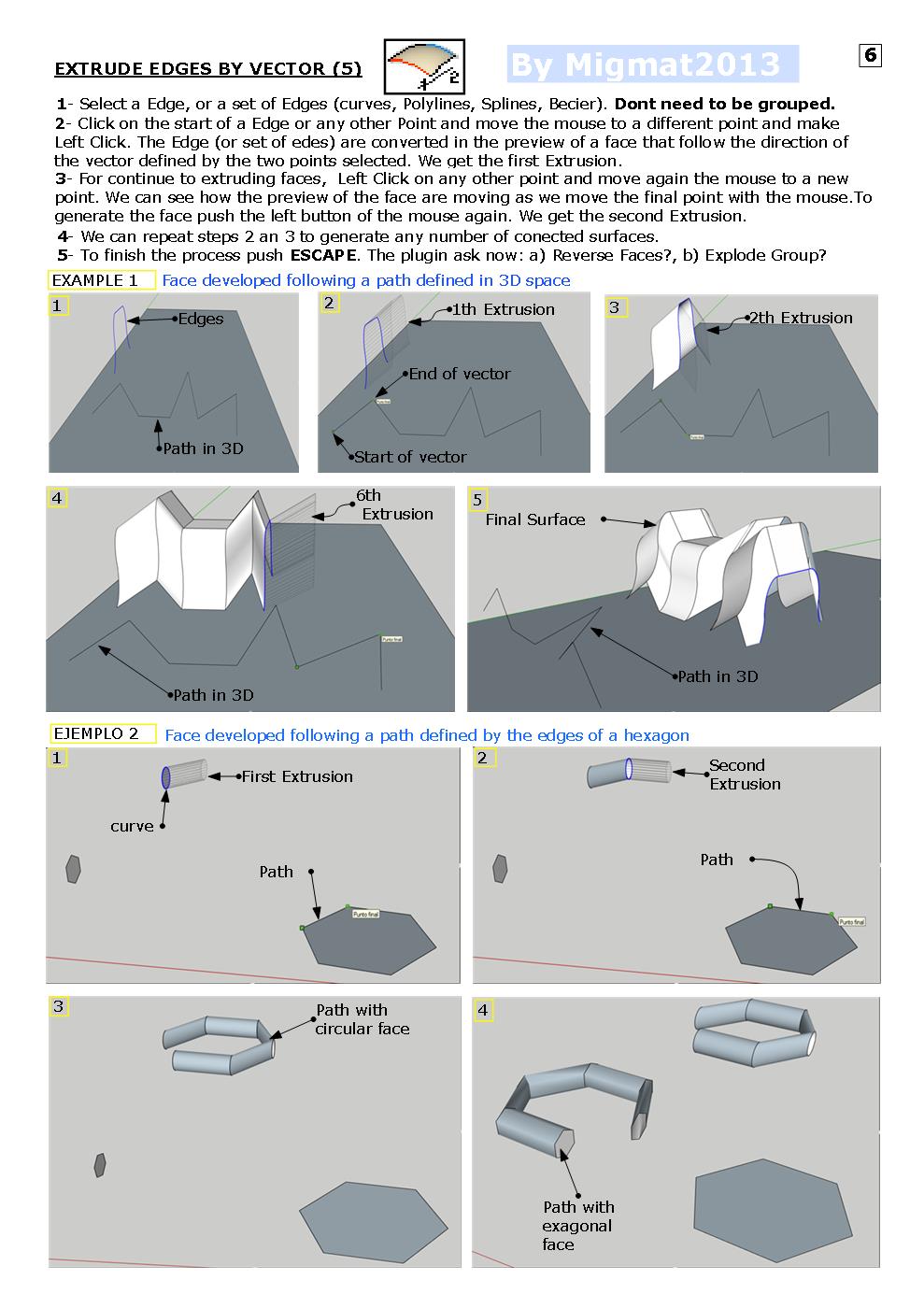
      Page 6 EXTRUDE TOOLS TUTORIAL


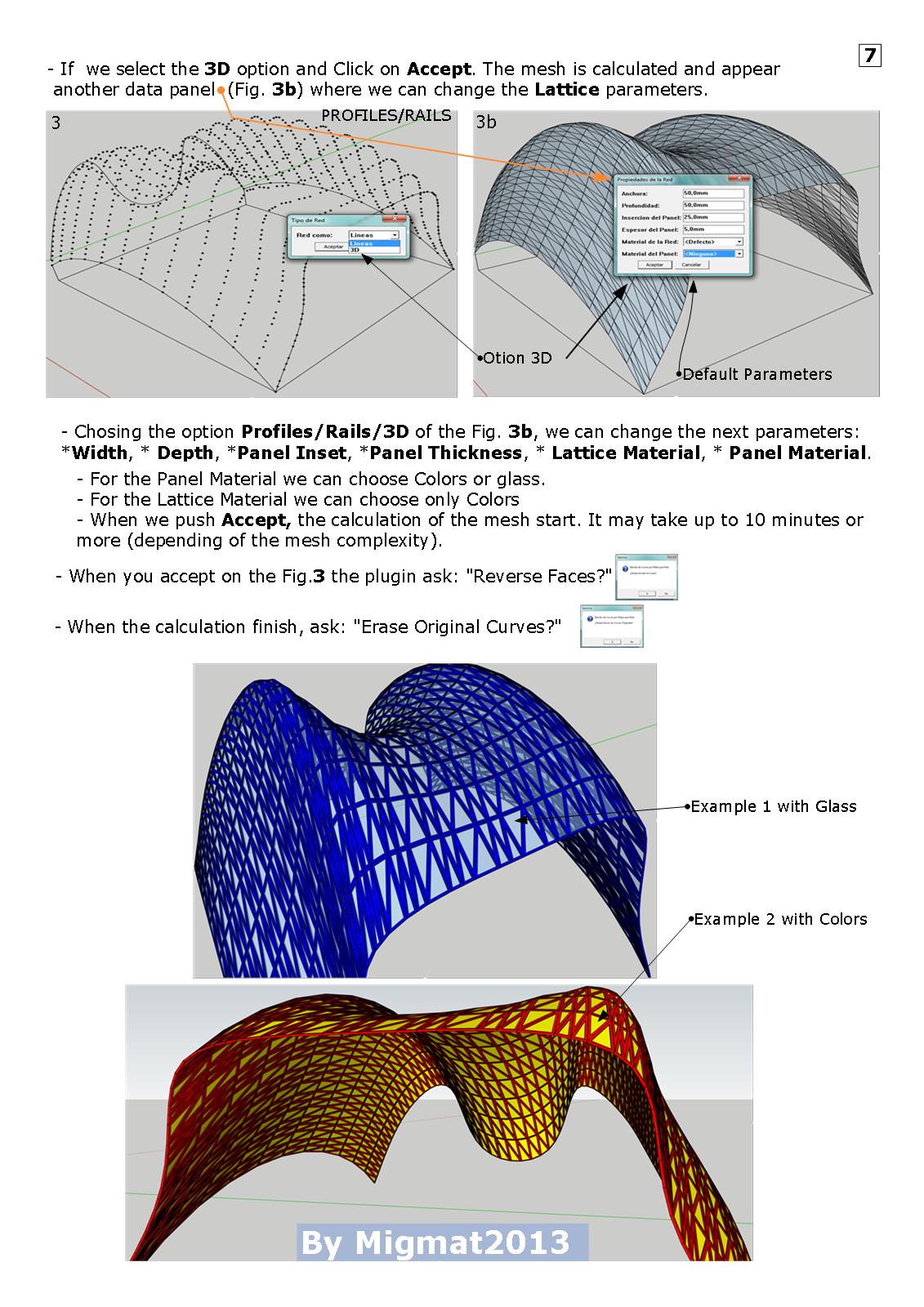
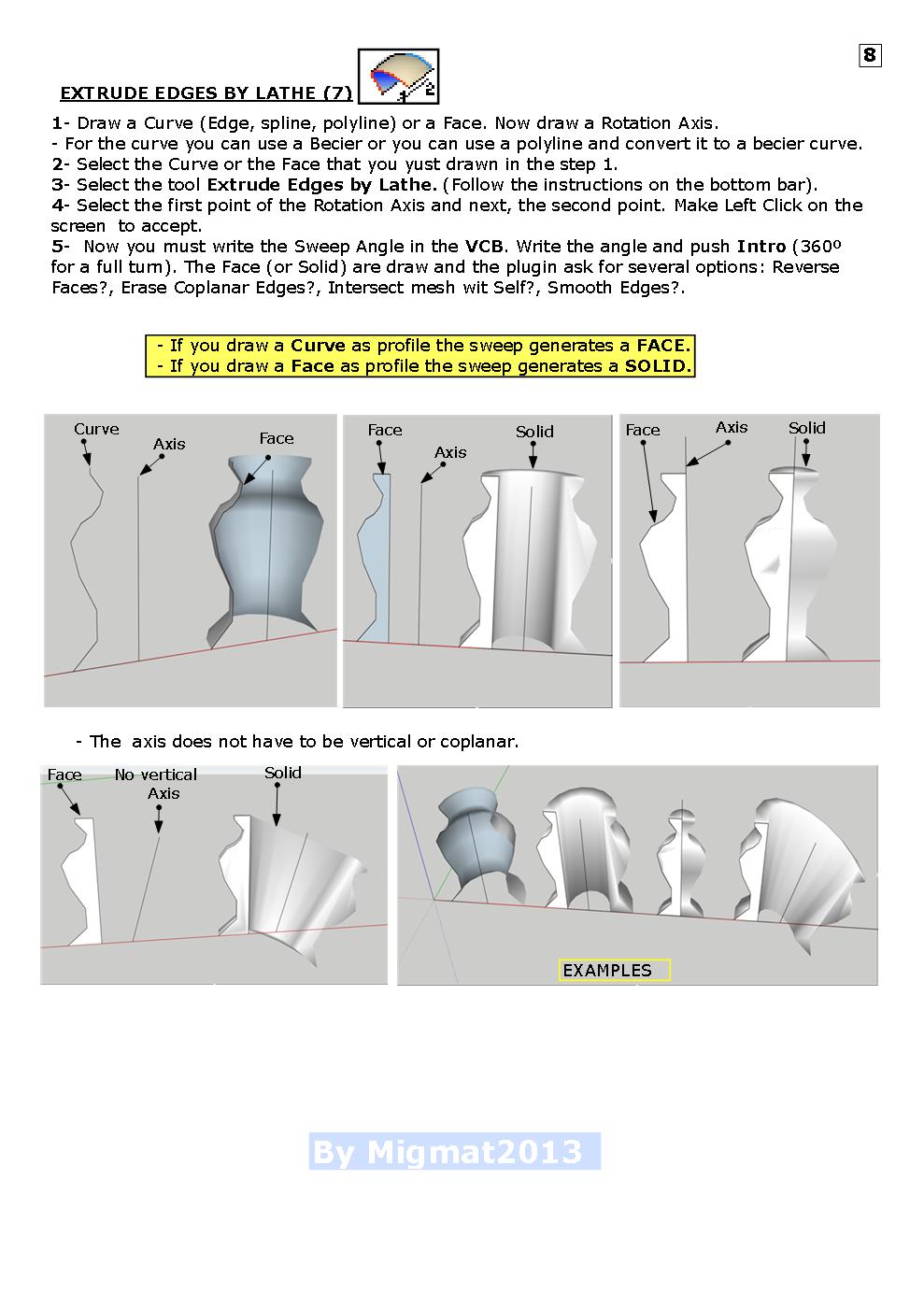
      Page 7 EXTRUDE TOOLS TUTORIAL


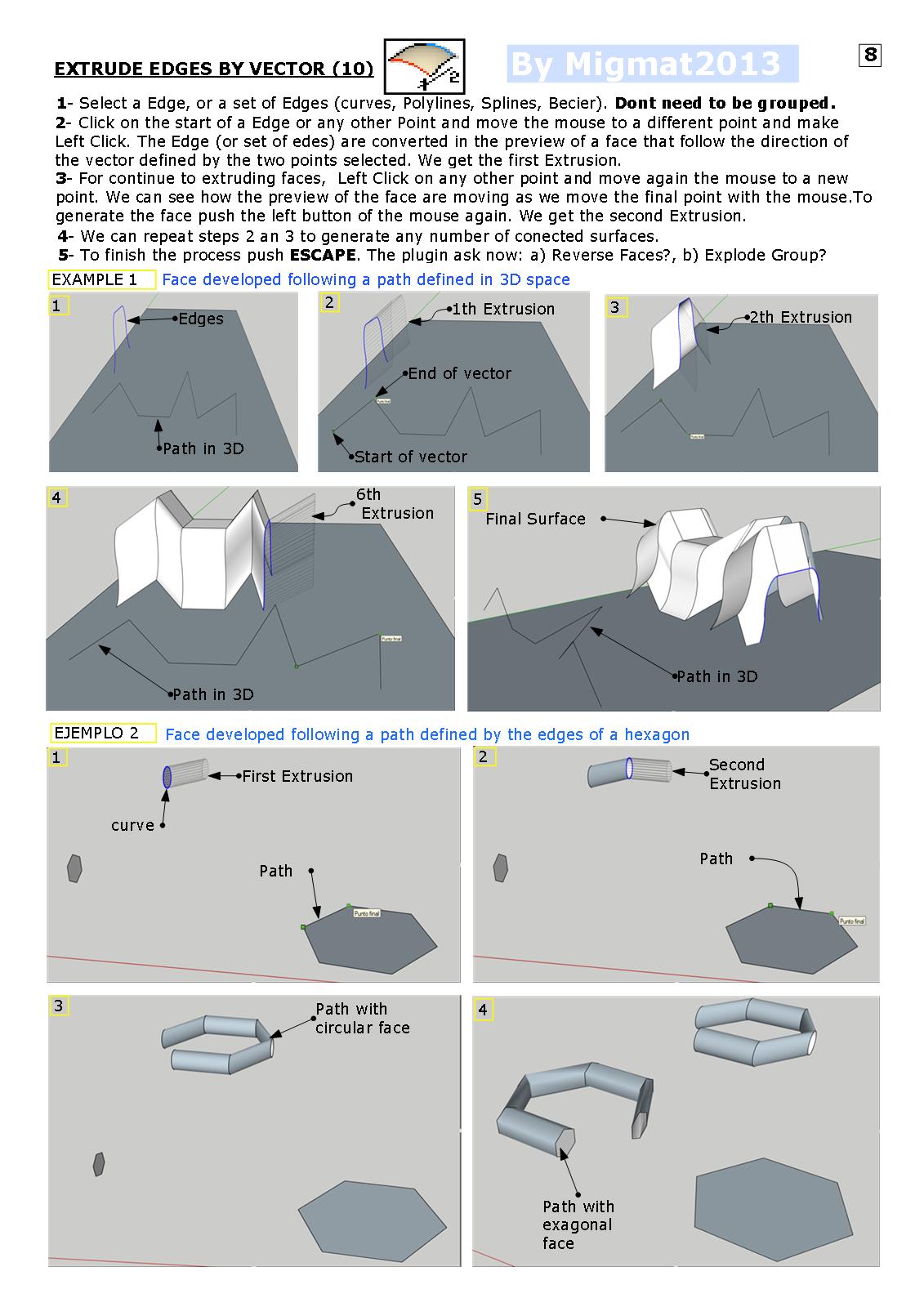
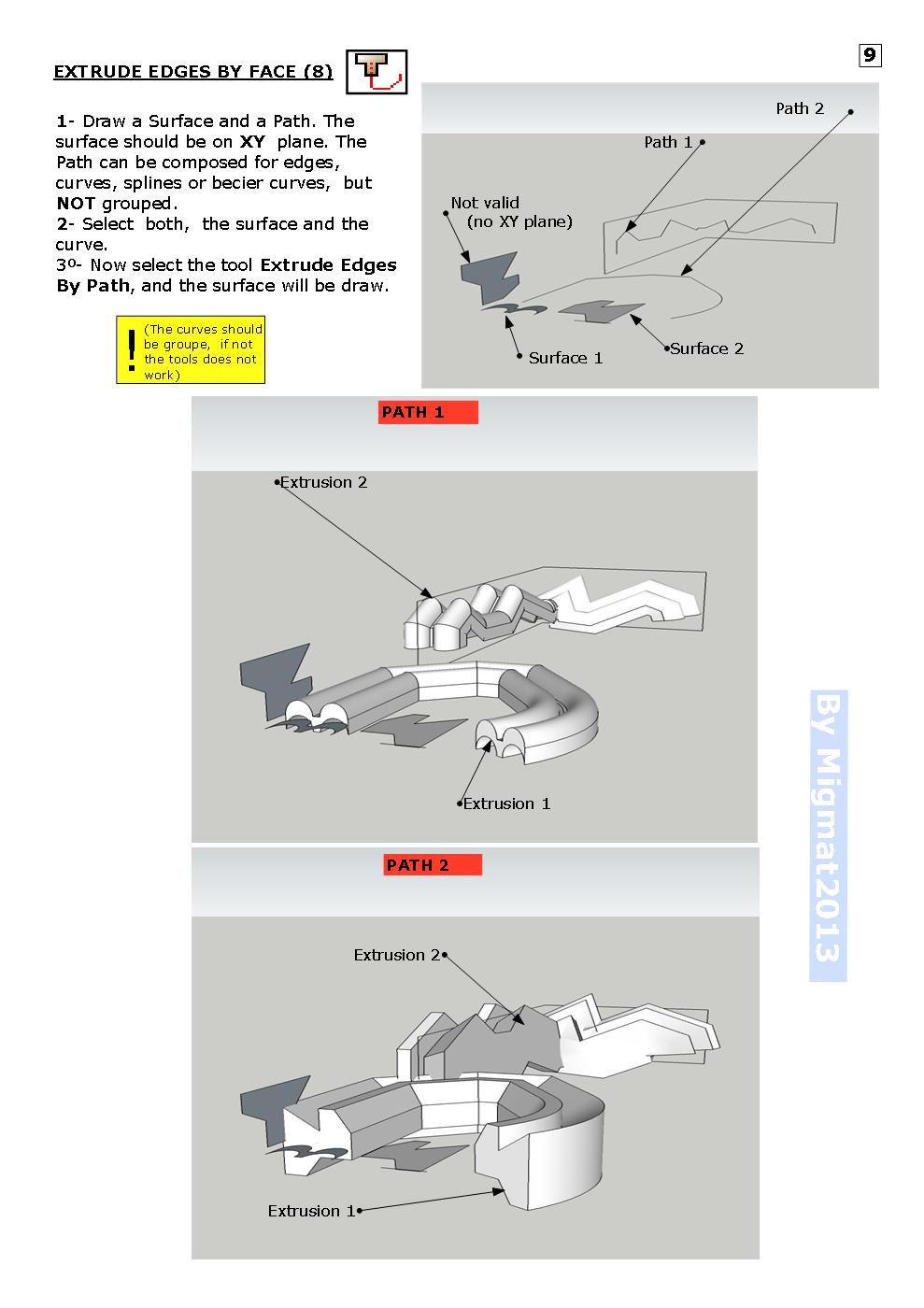
      Page 8 EXTRUDE TOOLS TUTORIAL


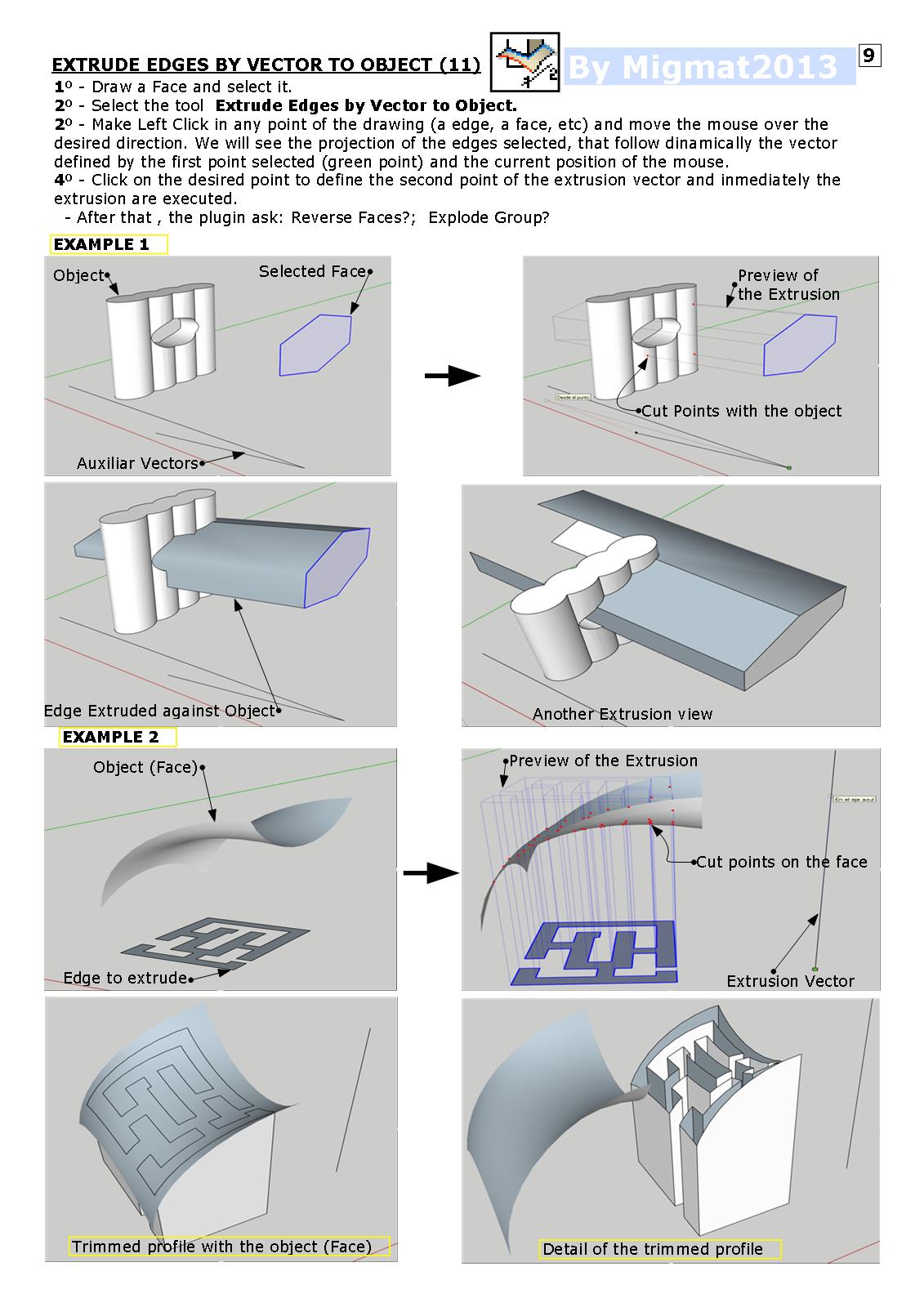
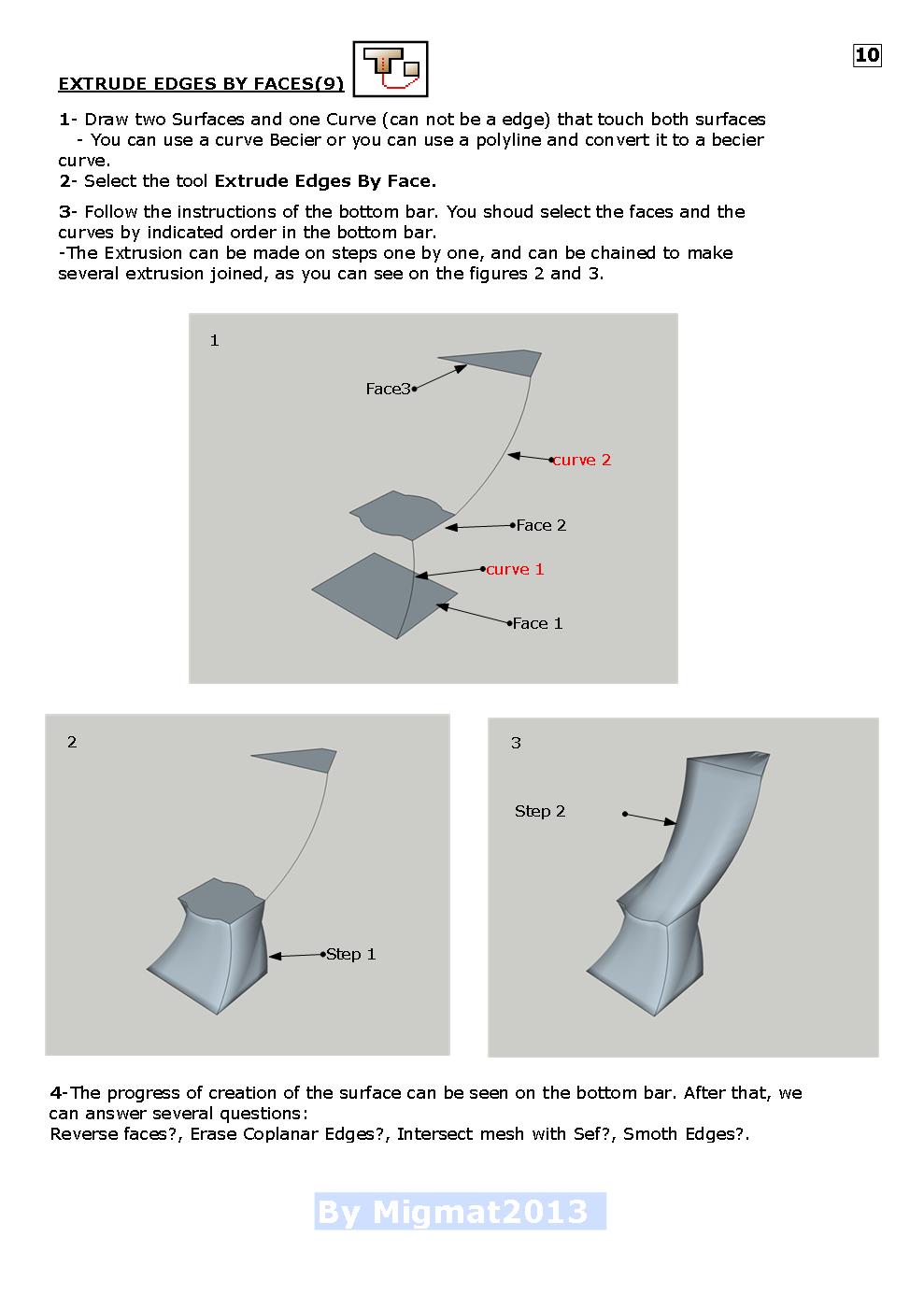
      Page 9 EXTRUDE TOOLS TUTORIAL


      Page 10 EXTRUDE TOOLS TUTORIAL

      1 Reply Last reply
      Reply Quote 0
      • M
        Migmat
        last edited by

        Well TIG, I did it as you say!

        Now I would like to know your comments, because at last you are the creator of the plugin.

        What Erase,Change or modify ?

        1 Reply Last reply
        Reply Quote 0
        • TIGT
          TIG Moderator
          last edited by

          Thanks, it is pretty good and comprehensive. 😄

          One niggle... the toolbar is not the current one ?
          The buttons are now reordered in the likelihood of most usage...

          TIG

          1 Reply Last reply
          Reply Quote 0
          • M
            Migmat
            last edited by

            The tool bar is that I have in my sketchup2013, but I'll try to get the toolbar that you say.

            1 Reply Last reply
            Reply Quote 0
            • TIGT
              TIG Moderator
              last edited by

              @migmat said:

              The tool bar is that I have in my sketchup2013, but I'll try to get the toolbar that you say.

              It might be... BUT the latest version of the toolset available from The SketchUcation Plugin Store has evolved... it has a reordered toolbar and several future-proofing tweaks - I recommend you get it asap...
              The core usage and tools have not changed however so your tut' is 99.9% applicable - just update any toolbar images... 😄

              TIG

              1 Reply Last reply
              Reply Quote 0
              • Dave RD
                Dave R
                last edited by

                Thanks for the tutorial. I like the title, "Extrusions of TIG". It has a nice ring to it.

                Etaoin Shrdlu

                %

                (THERE'S NO PLACE LIKE)

                G28 X0.0 Y0.0 Z0.0

                M30

                %

                1 Reply Last reply
                Reply Quote 0
                • U
                  unearthed
                  last edited by

                  Thanks Migmat for exploring and showing us how to use this very useful tool.

                  Growplan - People ∩ Plants ∩ Place

                  windows 7 64b, 4GB RAM, SU 8.0.16846
                  Gimp, QGIS, Vectorworks 12, Bricscad 11

                  1 Reply Last reply
                  Reply Quote 0
                  • M
                    mwm5053
                    last edited by

                    Thanks Migmat for doing this, makes it easy to understand 👍

                    2011 iMac
                    SU 2015 Pro, 2017 Make
                    V2 Twilight
                    macOS Sierra 10.12.5

                    1 Reply Last reply
                    Reply Quote 0
                    • pilouP
                      pilou
                      last edited by

                      Cool tutorials of a very vertsatile plugin! 😎

                      Frenchy Pilou
                      Is beautiful that please without concept!
                      My Little site :)

                      1 Reply Last reply
                      Reply Quote 0
                      • M
                        Migmat
                        last edited by

                        @tig said:

                        @migmat said:

                        The tool bar is that I have in my sketchup2013, but I'll try to get the toolbar that you say.

                        It might be... BUT the latest version of the toolset available from The SketchUcation Plugin Store has evolved... it has a reordered toolbar and several future-proofing tweaks - I recommend you get it asap...
                        The core usage and tools have not changed however so your tut' is 99.9% applicable - just update any toolbar images... 😄

                        Hello Again;

                        I finish the Extrude Tools V2.2 Tutorial in English and Spanish versions.

                        This time the PDF files is lower tan 4 Mb and can be uploaded to Skechucation.

                        Also I include the JPG versión in next post of the English version.

                        I hope you make useful.


                        EXTRUDE TOOLS V2.2 TUTORIAL V14 ENGLISH


                        EXTRUDE TOOLS V2.2 TUTORIAL V11 SPANISH

                        1 Reply Last reply
                        Reply Quote 0
                        • M
                          Migmat
                          last edited by

                          Here I Wil try to include the versión JPG of the tutorial EXTRUDE TOOLS V2.2, but previously...

                          Even knowin the titanic effort that supose to modify someting in a relatively old code,I would like to suggest to TIG three minor (or giant?) modifications that could make improve the plugin from perfect to universal.

                          Posible modifications:

                          1- In EXTRUDE EDGES BY LOFT, make posible to work with Closed Curves (like Curviloft)

                          2- In EXTRUDE EDGES BY EDGES, make posible to select a Edge as path (not only a Curve)

                          3- In EXTRUDE EDGES BY FACE, make posible to choose a profile in any plane (not limited to XY plane)

                          Anyway, THANKS TIG for your excelent work.

                          Now the JPG version
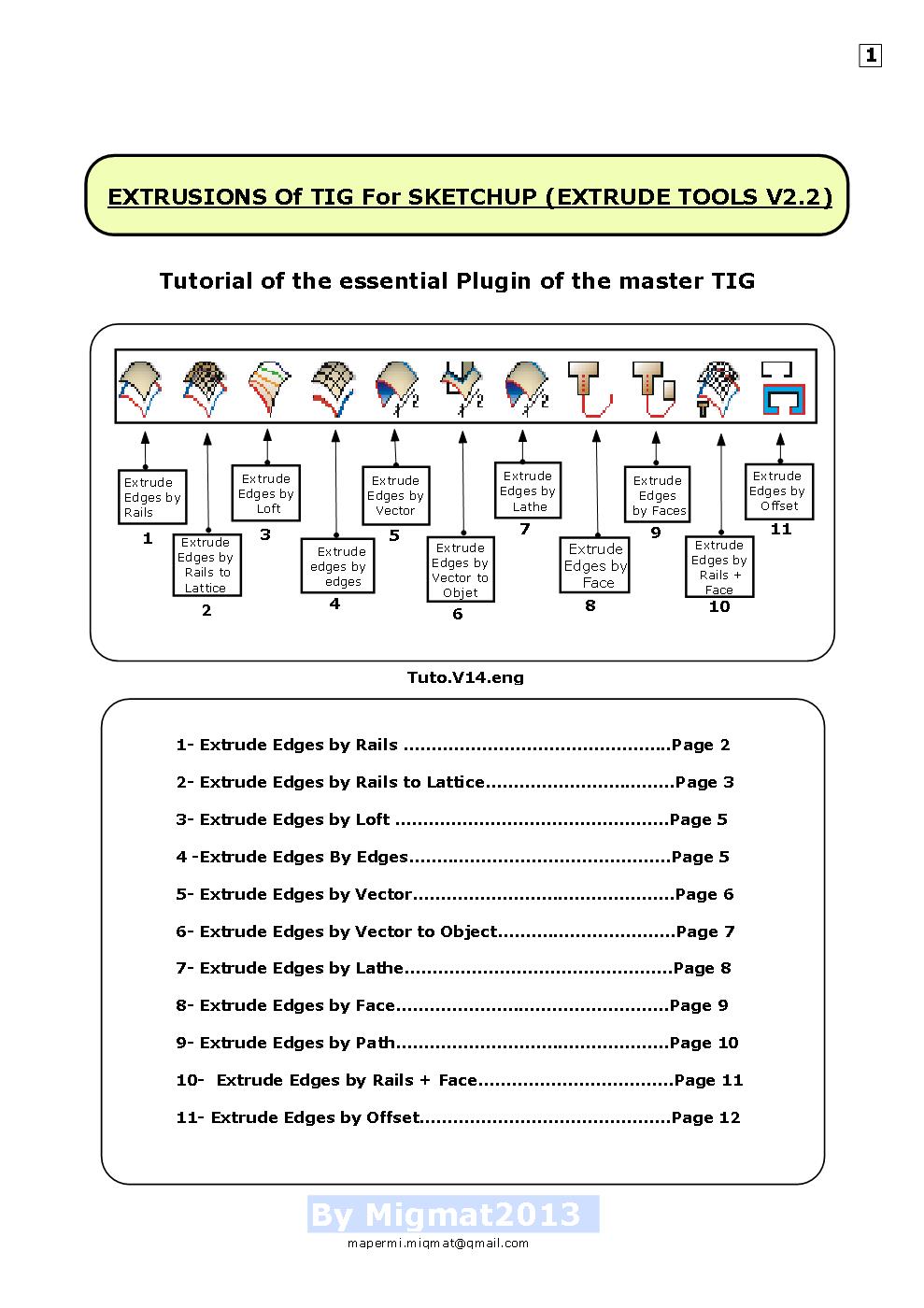

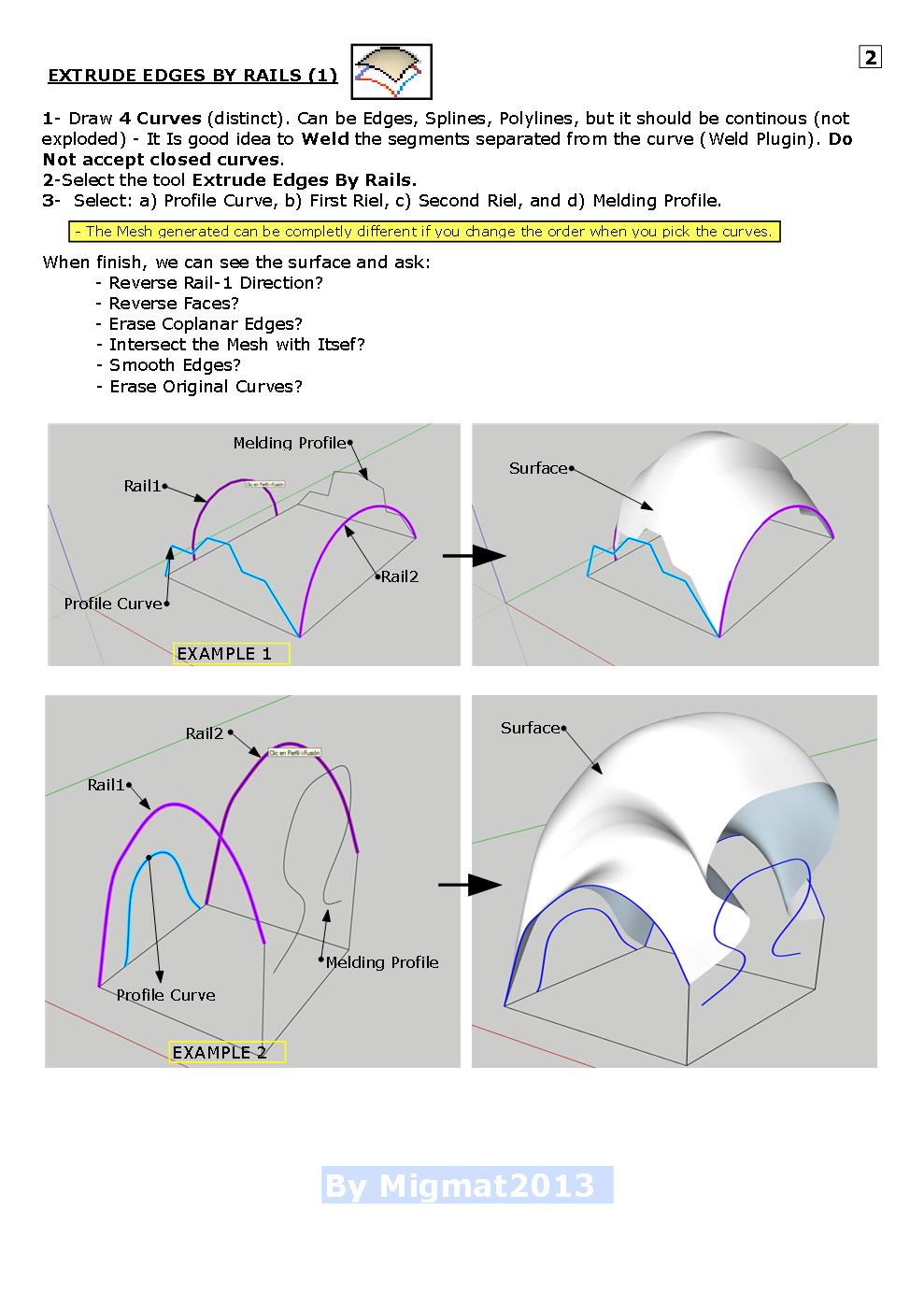
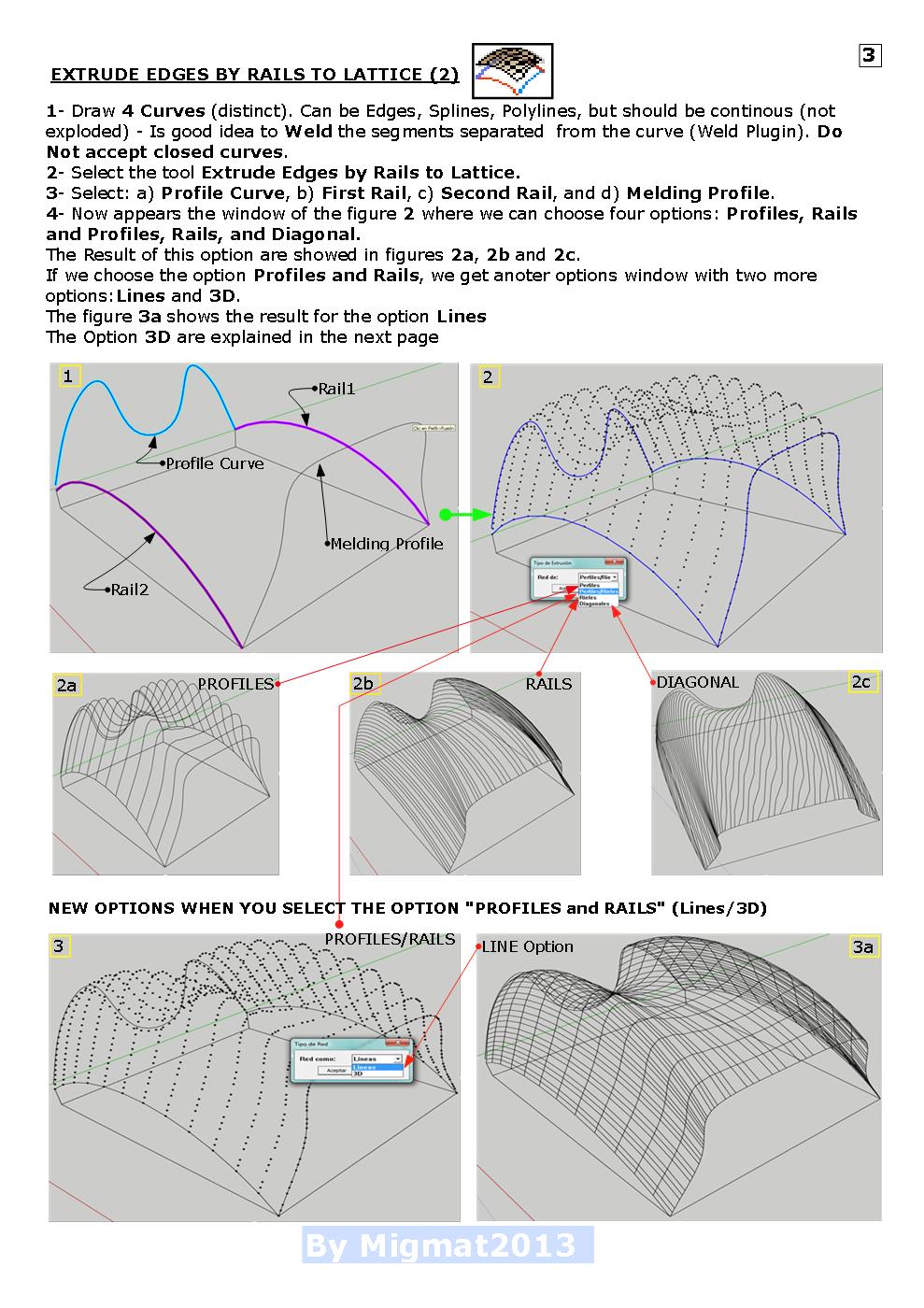
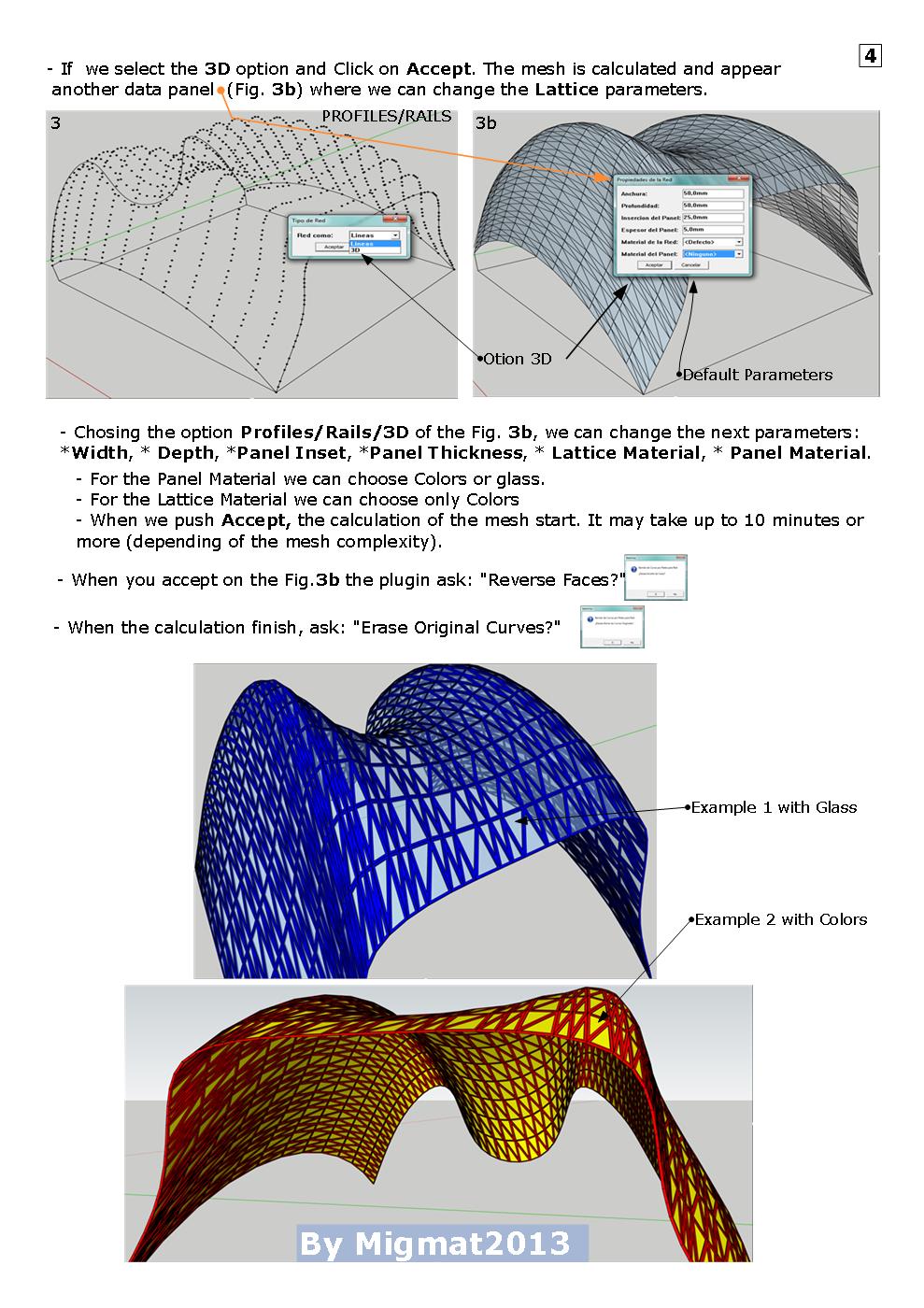
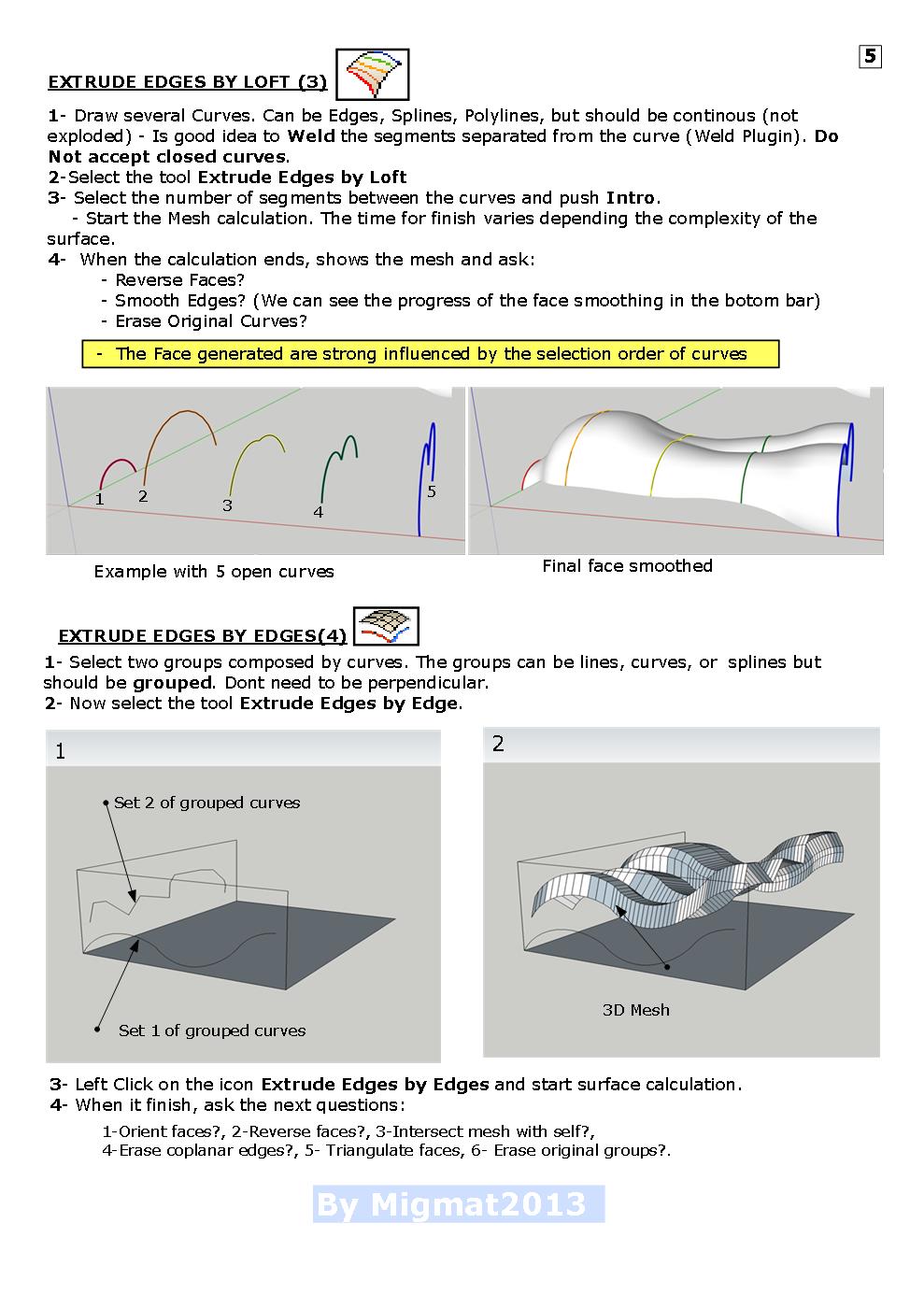
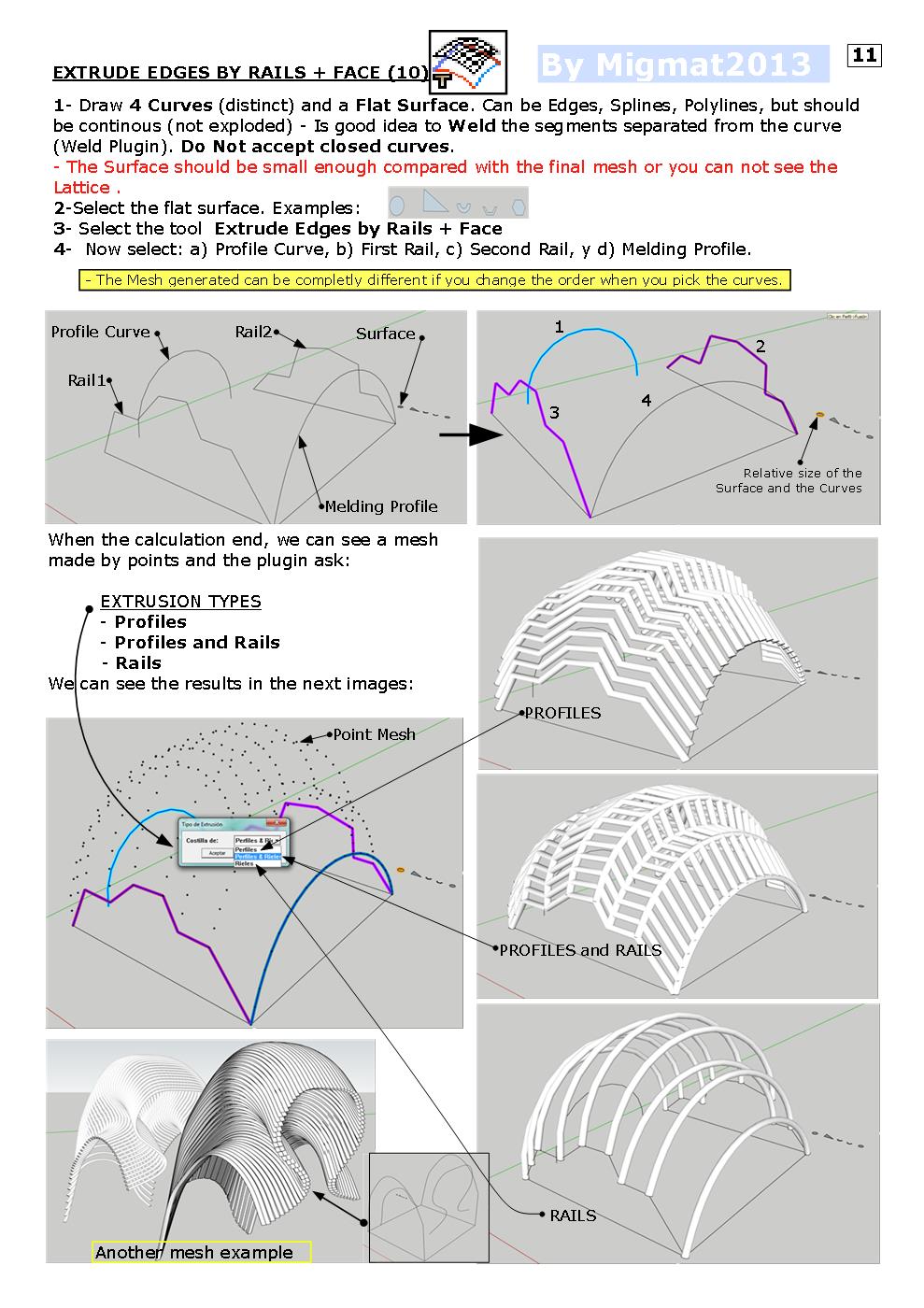
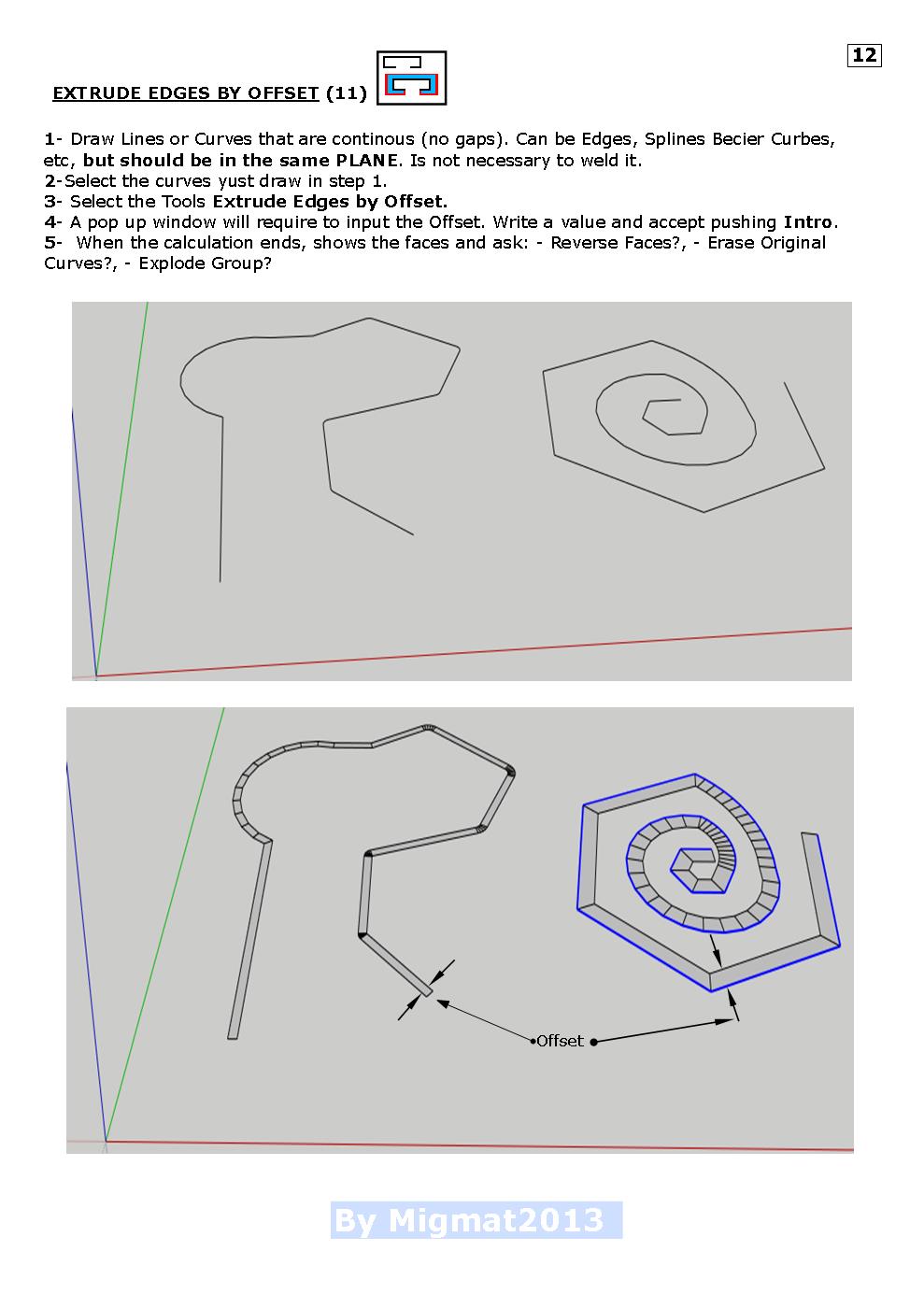
                          EXTRUDE TOOLS V2.2 TUTORIAL V14 ENGLISH


                          Page 2 EXTRUDE TOOLS V2.2 TUTORIAL V14 ENGLISH


                          Page 3 EXTRUDE TOOLS V2.2 TUTORIAL V14 ENGLISH


                          Page 4 EXTRUDE TOOLS V2.2 TUTORIAL V14 ENGLISH


                          Page 5 EXTRUDE TOOLS V2.2 TUTORIAL V14 ENGLISH


                          Page 6 EXTRUDE TOOLS V2.2 TUTORIAL V14 ENGLISH

                          1 Reply Last reply
                          Reply Quote 0
                          • M
                            Migmat
                            last edited by

                            The second part of EXTRUDE TOOLS V2.2 TUTORIAL V14 ENGLISH

                            (Pages 7 to 12)


                            Page 7 EXTRUDE TOOLS V2.2 TUTORIAL V14 ENGLISH


                            Page 8 EXTRUDE TOOLS V2.2 TUTORIAL V14 ENGLISH


                            Page 9 EXTRUDE TOOLS V2.2 TUTORIAL V14 ENGLISH


                            Page 10 EXTRUDE TOOLS V2.2 TUTORIAL V14 ENGLISH


                            Page 11 EXTRUDE TOOLS V2.2 TUTORIAL V14 ENGLISH


                            Page 12 (end) EXTRUDE TOOLS V2.2 TUTORIAL V14 ENGLISH

                            1 Reply Last reply
                            Reply Quote 0
                            • pbacotP
                              pbacot
                              last edited by

                              This is so great! THANK YOU! Peter

                              MacOSX MojaveSketchUp Pro v19 Twilight v2 Thea v3 PowerCADD

                              1 Reply Last reply
                              Reply Quote 0
                              • M
                                Migmat
                                last edited by

                                I am Miguel.
                                Who is Peter?

                                1 Reply Last reply
                                Reply Quote 0
                                • TIGT
                                  TIG Moderator
                                  last edited by

                                  Peterbacot !

                                  TIG

                                  1 Reply Last reply
                                  Reply Quote 0

                                  Hello! It looks like you're interested in this conversation, but you don't have an account yet.

                                  Getting fed up of having to scroll through the same posts each visit? When you register for an account, you'll always come back to exactly where you were before, and choose to be notified of new replies (either via email, or push notification). You'll also be able to save bookmarks and upvote posts to show your appreciation to other community members.

                                  With your input, this post could be even better 💗

                                  Register Login
                                  • 1
                                  • 2
                                  • 2 / 2
                                  • First post
                                    Last post
                                  Buy SketchPlus
                                  Buy SUbD
                                  Buy WrapR
                                  Buy eBook
                                  Buy Modelur
                                  Buy Vertex Tools
                                  Buy SketchCuisine
                                  Buy FormFonts

                                  Advertisement