Axes settings save incorrectly in scenes.
-
Hi,
I've noticed a few times that when I save a scene with the axes off, they often re-appear the next time I go to the scene, even after un selecting axes and updating the scene.
I've just been setting up some scenes for a template file, with 4 scenes. On the 1st 1 of the scenes I want to see the axes, and on the next 3 of these scenes I want the axes not showing.
Despite changing them and updating the scenes multiple times, they come out the wrong way, ie the 1st scene has no axes but the next 3 have them showing. I've checked that the axes are ticked or unticked when I update the scenes, it shows correctly but as soon as I change scenes, they keep reverting.
I've also set up different styles for the scenes, but even though I've set up scenes 3 & 4 as 'shaded with textures', the textures don't show if I draw a face and apply a texture.
I can't work out what's going on, can anyone help? Has anyone else had this problem?
I've attached the file.
Thanks for any help you can offer, Sally
PS SU 8 (not 2013) on a Mac
PPS Mac users - skip to last post for complete "how to" explanation!
-
Two main issues.
You need to set and save the axes in the styles.
Your template is huge, and when I say huge I mean Texas huge. I drew a simple square in it just to see what I was doing and it was 800000m, far too big to see textures.
I'd start again with a cube of a known size in it to make your template, you can always remove the cube before you save it finally.
Anyway, attached is a working version but it may not be positioned exactly as you want and I think I mixed up one of the texture styles.
-
Hi Box,
thanks so much for your help, which has mostly solved the problem (I don't know how I'd managed to get the template soooo large!)
However, when you say
@box said:
You need to set and save the axes in the styles.
I can't see anywhere within styles to set whether the axes show or not.
I wonder if it's the same on Windows and Mac. But it makes sense that I have to set it somehow other than just ticking or unpicking axes within the view drop down, and this would explain why I have had so many problems with this previously.
best regards, Sally
-
Yes it may be different on Mac, it's here on windows.
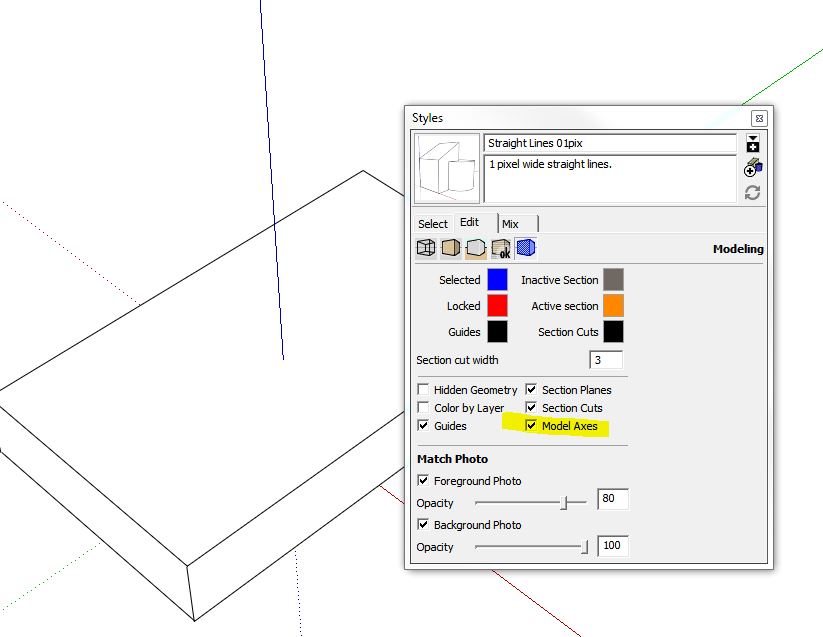
-
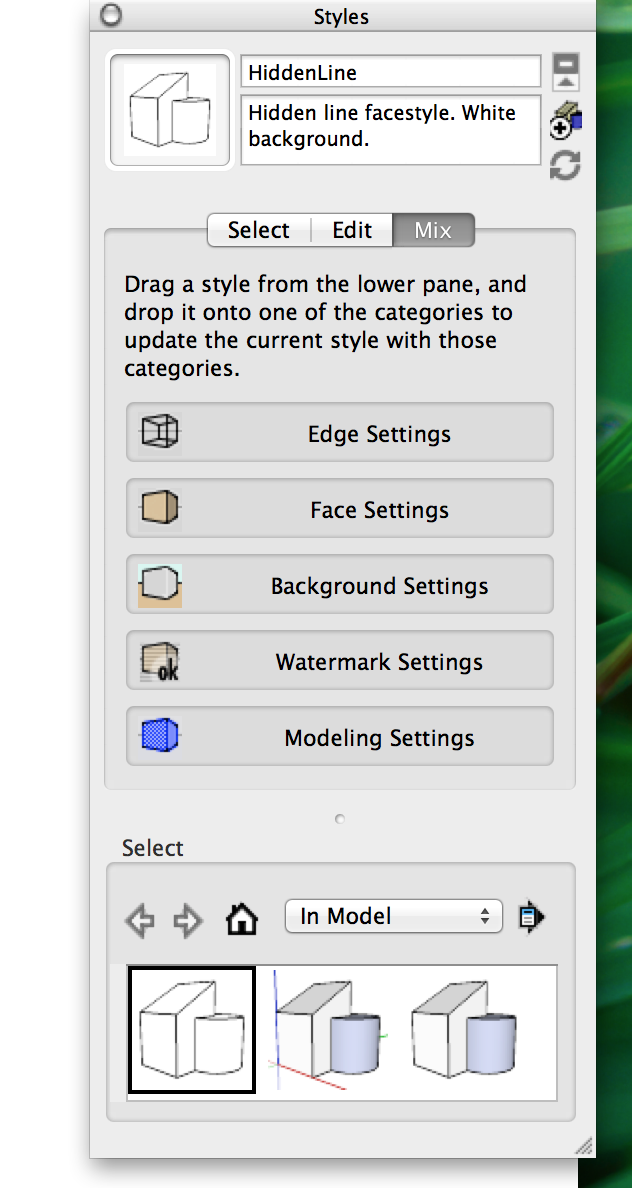
It must be somewhere else, but I can't find it! This is the mix panel in styles on a Mac.....
Are there any Mac users who can help?
Thanks again Box.
-
Try clicking edit tab and then the last one, Modelling settings.
-
I tried that but you can't click on it, just drag style icons onto it.
-
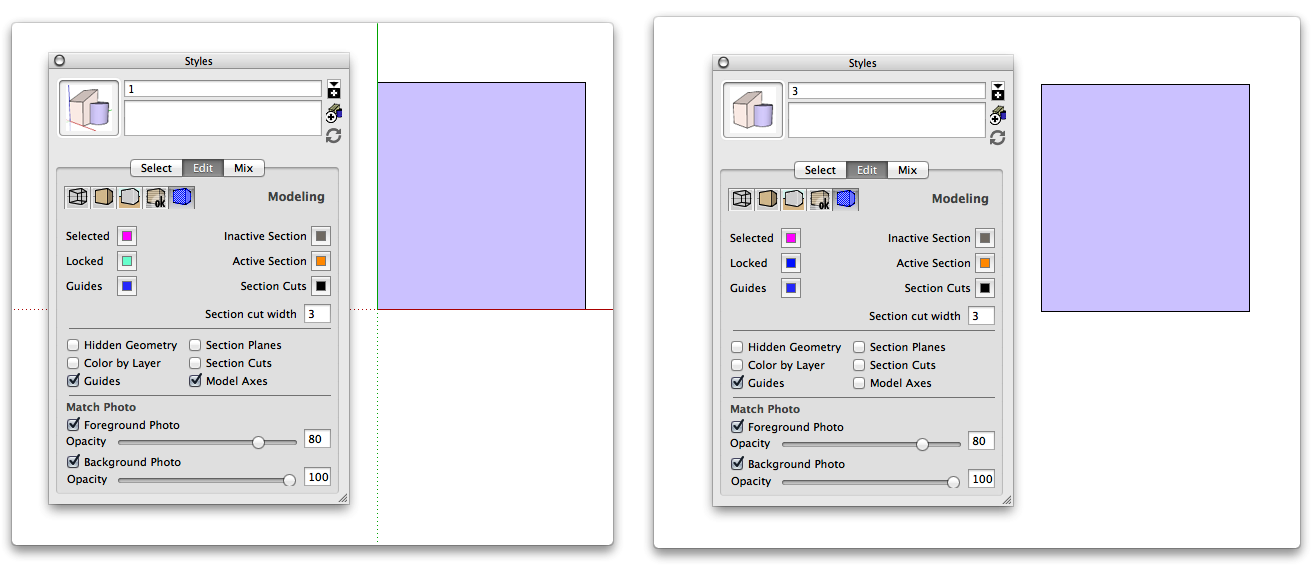
Mac edit
-
First click the edit button next to Mix, then click the little blue icon that now appears.
Ah Wind-borne's got it for you.
-
Brilliant, thanks to you both, problem solved and new things learned. Great!

-
Hi,
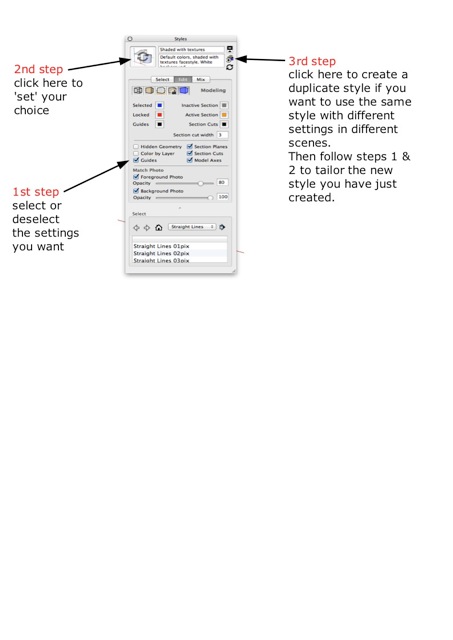
to anyone on a Mac who wants to know more, I kept having problems even after Box and Wind-bourne helped me so I played around a little more and discovered what I was still not doing completely right. I have summarised the steps you need to follow in the attachment below. Hope it helps!
Best, Sally



Hello! It looks like you're interested in this conversation, but you don't have an account yet.
Getting fed up of having to scroll through the same posts each visit? When you register for an account, you'll always come back to exactly where you were before, and choose to be notified of new replies (either via email, or push notification). You'll also be able to save bookmarks and upvote posts to show your appreciation to other community members.
With your input, this post could be even better 💗
Register Login


Advertisement