We need spellcheck for Layout!
-
Has anyone ever wondered why the largest software company in the world which extensively relies on accurate spelling has not included a spellchecker in its own design software Layout? Can't be that hard to implement I imagine!?! There is nothing worse than printing of an entire set of plan documentation only to find a small spello within the title block on every page....
**
We need spell check for Windows Users...please!**I hope that the Trimblers will be able to finally fix it.
Cheers
David
-
Hello,
I use latest notepad++ and it can spell-check your script. It's also good at trimming trailing space and turning tabs to space.
In Google Chrome I use spell cheking extention to correct my errors in posts.
-
I haven't really spelled it out correctly...we need spell check specifically for Layout!
-
I think it would be a good idea in principle... but for all locales ?
If you prepare your standard notes in a wordprocessor [RTF] that's likely to include a spell-checker...
OR on windows I also use AutoHotKeys which corrects common misspelling as you type, in ANY application... -
@tig said:
on windows I also use AutoHotKeys which corrects common misspelling as you type, in ANY application.
WHATCHU TALKIN BOUT WILLIS? Now I gotta go research this.
-
Get AutoHoyKeys from http://www.autohotkey.com/ - download and install.
Put the folder [made form the attached ZIP] into say 'My Documents'... then shortcut the two .ahk files into your StartUp folder, and restart your PC.
Now you'll get WinKey+Delete to empty the RecycleBin without a prompt AND better still AutoCorrect to fix out any common misspelling in any app... You can adjust the text-list to suit your needs...
-
AWESOME...
-
Thanks Tig & Krisidious
Just had a look at Autohotkey. However I decided to go with a nifty little software (644kb) called TinySpell.
This is a great "as-you-type" correction tool which automatically learns from your mistakes adding your preferred corrections to a windows wide dictionary that applies to all programs and browsers. It is very customizable too... see screen shot.
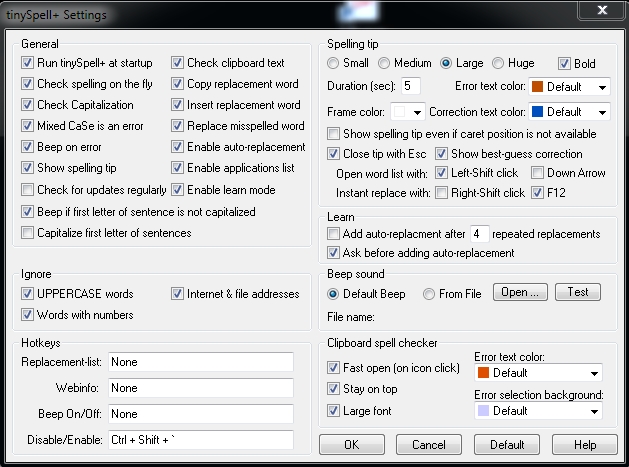
have attached a trial zip, which can be unlocked for U$10, well worth it...it's a keeper!

I still think an inbuilt spell check within Layout is a must.
Thanks again for putting the heads together on this.
-
This is an older subject but still relevant today; Please, an integrated spell check for Layout.

-
@davidmreinbold said:
Thanks Tig & Krisidious
Just had a look at Autohotkey. However I decided to go with a nifty little software (644kb) called TinySpell.
This is a great "as-you-type" correction tool which automatically learns from your mistakes adding your preferred corrections to a windows wide dictionary that applies to all programs and browsers. It is very customizable too... see screen shot.
[attachment=0:ti2qux0b]<!-- ia0 -->ScreenShot Tiny spell.jpg<!-- ia0 -->[/attachment:ti2qux0b]have attached a trial zip, which can be unlocked for U$10, well worth it...it's a keeper!
I still think an inbuilt spell check within Layout is a must.
Thanks again for putting the heads together on this.
How did you make it work in Layout?





Hello! It looks like you're interested in this conversation, but you don't have an account yet.
Getting fed up of having to scroll through the same posts each visit? When you register for an account, you'll always come back to exactly where you were before, and choose to be notified of new replies (either via email, or push notification). You'll also be able to save bookmarks and upvote posts to show your appreciation to other community members.
With your input, this post could be even better 💗
Register Login


Advertisement