Material Colors Disappeared
-
Hi,
I assigned a lot of materials (just colors) to my model. While using orbit, for some reason, all the material colors become invisible. I cant get them back - tried restarting.
The entity info suggests the materials are still assigned to one face. I tried reversing faces to see it was on the inside. but its not.
Is there some way to show/hide material colors?
Thanks
Alex -
Materials don't just 'disappear'.
Not unless you close the SKP without saving some changes...
I assume they are all still in the Model tab of the 'Material Browser'.Use the 'Styles' toolbar to change the View Mode.
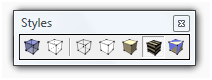 The Shaded Mode will show colors only.
Shaded-with-Textures also shows any textures...
You might have picked one of the other Modes that ignores colors - like Monochrome [far right, which just shows default front/back materials, useful when re-orienting colored faces], or Hidden-Line which is 'black and white'...Alternatively check for any faces that are hidden [View > Hidden Geometry > ON] and also OFF layers...
-
Great - I must have changed the style by accident. Thanks

Hello! It looks like you're interested in this conversation, but you don't have an account yet.
Getting fed up of having to scroll through the same posts each visit? When you register for an account, you'll always come back to exactly where you were before, and choose to be notified of new replies (either via email, or push notification). You'll also be able to save bookmarks and upvote posts to show your appreciation to other community members.
With your input, this post could be even better 💗
Register Login


Advertisement