Yet another SphereTool
-
I think this will give me 'quad faces'
        # quadify edges...
        edges = gents.grep(Sketchup;;Edge)
        edges.each{ |edge|  edge.soft = true; edge.smooth = true; edge.casts_shadows = false; }
but does anyone know how to write the uv sphere-mapping to a newly formed sphere, I have all the faces, and edges in arrays from the making and also the centre, top and bottom
john -
No, you set [ruby]edge.casts_shadows = false[ruby] only on the diagonal edge dividing the two triangles making up the quad.
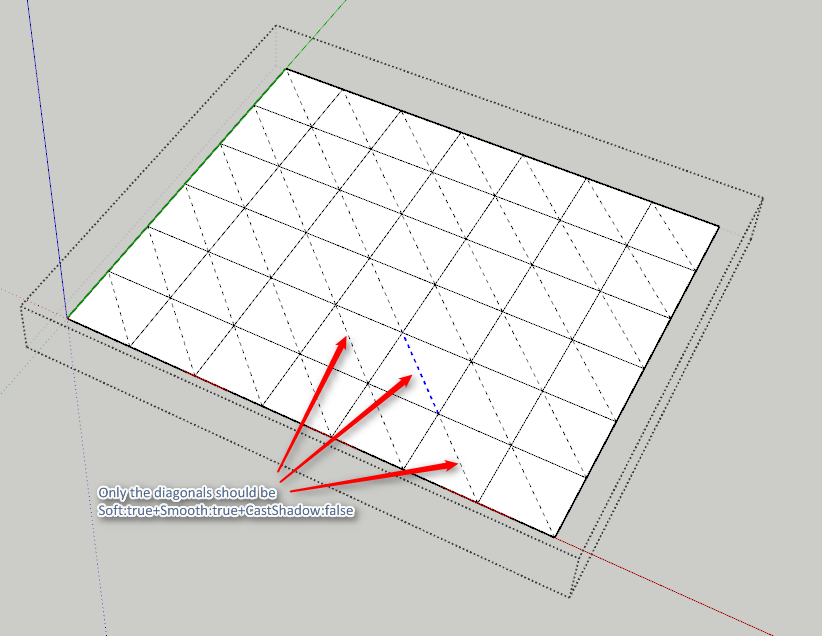
The other edges can be soft,smooth, hidden whatever - but do not set Cast Shadow to false for these.
-
@thomthom said:
No, you set
edge.casts_shadows = falseonly on the diagonal edge dividing the two triangles making up the quad.The other edges can be soft,smooth, hidden whatever - but do not set Cast Shadow to false for these.
I couldn't see how hiding those others helped, which is why I asked, so thanks.
Can I expose the diagonals through code, then soften them?
would I need to collect faces.each face.edge_loop.verticies, add an edge between [1] and [-1] then hide those?
will that do it? -
Does your code currently generate true native quads? (planar)
-
It is just a 'followme' sphere, so I assume yes, I can only show the diagonals by distorting after completion.
john -
Basically, a QuadFace compatible quad is either:
-
a native quad (face with four vertices)
-
two triangles made to act as one unit (separated by an edges that is soft+smooth and cast_shadow: false)
The reason that cast_shadow needs to be false for the diagonal is that in case the whole mesh is made soft+smooth there needs to be a way to detect what is the diagonal - and since cast_shadow is on by default and it appear most people don't use this property I made that the "magic marker" for the diagonal. This allowed for non-planar quads in SketchUp.
-
-
@thomthom said:
Basically, a QuadFace compatible quad is either:
- a native quad (face with four vertices)
So, it should be ok as is?
-
It would work. But maybe Rich has hoped for a triangulated version so things can be manipulated without ending up with the edge that SU's AutoFold feature adds. But then again, QuadFace Tools had a function to add triangulation and there is my recent AutoSmooth plugin that both addresses this.
-
-
Thomthom nailed it. I triangulate everything using the QuadFace tools.
It will make for a better exchange of data from on app to another.
-
@Rich
would this do what you need
just an off axes sphere, with tri's -
There's something funky with that because none of Thomthom Ring Select/Loop Select are finding the edges.
Even trying to convert it doesn't work.
Thom can help here more than me. I do understand the property needed but generation of that property through code is not my bag....
Unless I am missing the obvious

-
@driven said:
@TT... does this look right, I applied to all edges, but could just do the diagonals if that's better.
No - just the diagonal should have cast_shadow set to false. Cast Shadows set to false is what marks an edge as separating the two triangles of a quad. The border edges should not have this set.
Also, I see that lots of your edges are 1 segment Curve entities. Why is that?
-
D'oh....
missed the edges that parallel
-
@thomthom said:
No - just the diagonal should have cast_shadow set to false.
I'll exclude the original edges...
@unknownuser said:
Also, I see that lots of your edges are 1 segment Curve entities. Why is that?
It's a rotated arc so before I split them with the diagonals, you can scale using 'move-tool' on the cardinal points.
for uv is it better if I explode the edge first?
john -
For UVs I won't matter. It was just odd to see a one segment Curve. I noticed it because the Smooth and Sort property was gone in the Entity Info when I selected one of them.


Hello! It looks like you're interested in this conversation, but you don't have an account yet.
Getting fed up of having to scroll through the same posts each visit? When you register for an account, you'll always come back to exactly where you were before, and choose to be notified of new replies (either via email, or push notification). You'll also be able to save bookmarks and upvote posts to show your appreciation to other community members.
With your input, this post could be even better 💗
Register Login


Advertisement