Color face normals / reversed faces
-
hi guys,
i'm working on an imported model of a bonsai tree 3dscan, simplified with meshlab. looks like this: http://imgur.com/ZQahIi think there might be some reversed faces, is there any way to see them more clearly than with face style->monochrome?
-
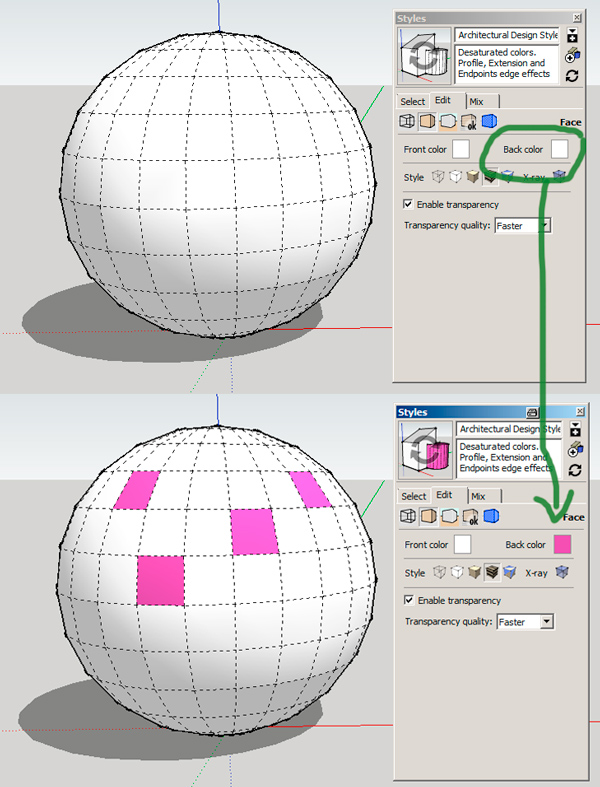
You can change the backface color to something very remarkable (style dialog)...
-
A very nice plugin for changing the orientation is the ReverseOrientFaces as a part of FredoTools ...
-
Cotty's suggestion for changing the back face color is a good.
For me the default back face color is often difficult to discern as different from shaded white front faces so I changed it in my default templates to a green that I would never intentionally use in the model. For me this green is easy to see even if there''s only a few pixels of it showing. That makes it easier to pick out the back faces and holes in the model.
-
thanks for the quick help guys, love this community!



Hello! It looks like you're interested in this conversation, but you don't have an account yet.
Getting fed up of having to scroll through the same posts each visit? When you register for an account, you'll always come back to exactly where you were before, and choose to be notified of new replies (either via email, or push notification). You'll also be able to save bookmarks and upvote posts to show your appreciation to other community members.
With your input, this post could be even better 💗
Register Login


Advertisement